CONTROLS (Continued)
Controlling Phone Calls (continued)
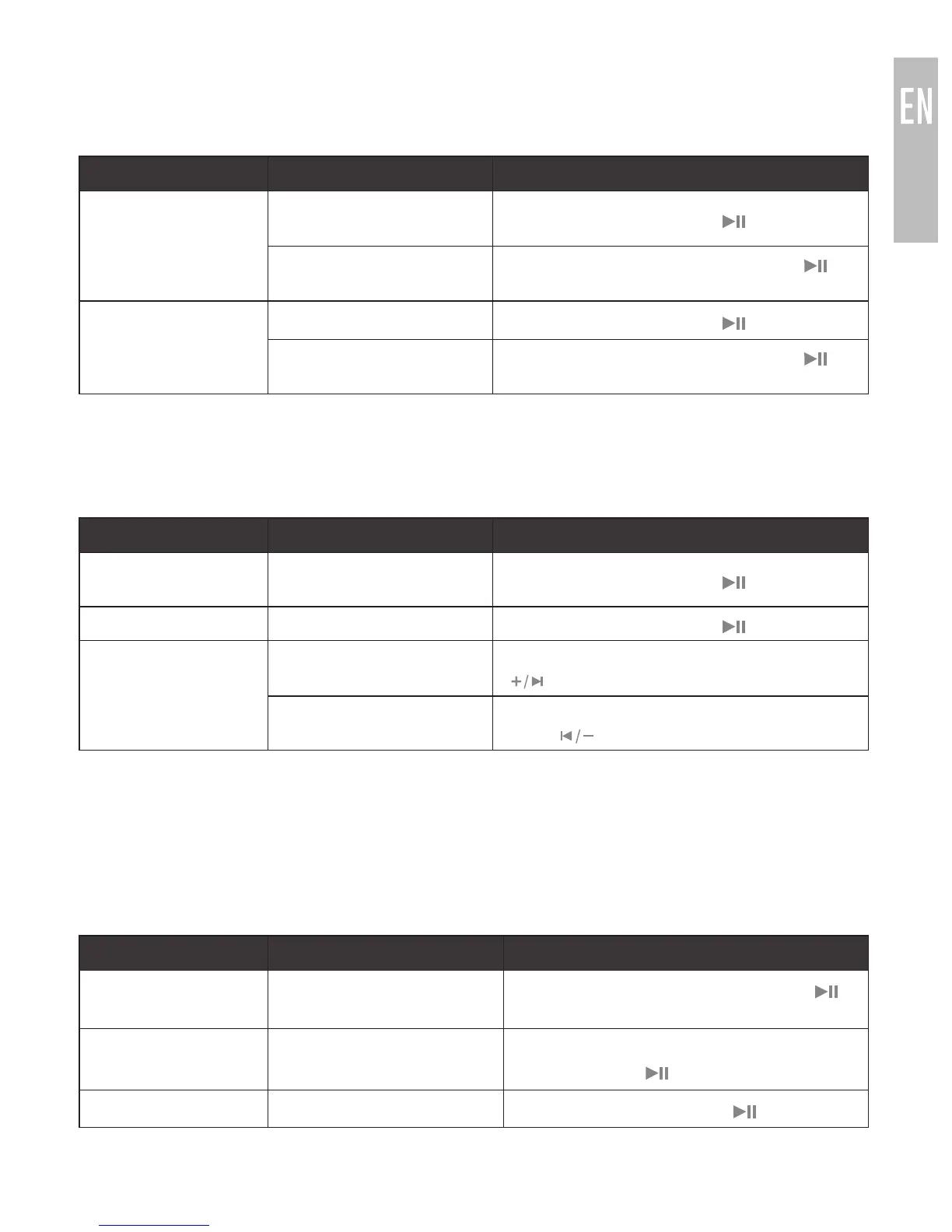
Status Function Operation
Call in progress,
second incoming
call
Place current call on hold
and answer new call
Press the
Multifunction ( ) button
Hang up current call
and answer new call
Press and hold the Multifunction
( )
button for 2 seconds
One call active,
one on hold
Switch active calls Press the
Multifunction ( ) button
End current call and
switch to call on hold
Press and hold the Multifunction
( )
button for 2 seconds
*
If you answer a call from your phone when a headset is connected, most phones will activate the phone
handset, not the headset. Press and hold the Multifunction button for 2 seconds to transfer the call to
the headset
Controlling Media Playback
Status Function Operation
No media playing*
(standby mode)
Play media Press the
Multifunction ( ) button
Media playing Pause media playback Press the
Multifunction ( ) button
Media playing or
paused
Skip to next track**
Long press the Volume up/skip track
( ) button
Restart the track/
previous track**
Long press the Volume down/previous
track ( ) button
*
You may need to focus on the media player application by bringing it up on the screen for initial
playback to start.
**
Not all media players support this functionality.
Note: If you answer or make a call while listening to media, the media will be paused
until the call has ended.
Additional Functionality
Status Function Operation
Media playing or
standby mode
Activate Siri
®
/voice
command/voice dialing*
Press and hold the Multifunction
( )
button for 2 seconds
Media playing or
standby mode
Redial last call*
Double press the
Multifunction ( ) button
Dialing a call Cancel dialing Press the
Multifunction ( ) button
*
Not all devices support this functionality. For more information, refer to the user manual for your device.
6



 To Next Page