34
Timing Test of Instantaneous Overcurrent Element
1. To time the instantaneous element, repeat steps 7 through 14 for
Timing Test,
TIME DELAY OVERCURRENT DEVICES
above.
DC TARGET AND SEAL IN
Many different types of relays use DC target and seal-in coils. This test procedure
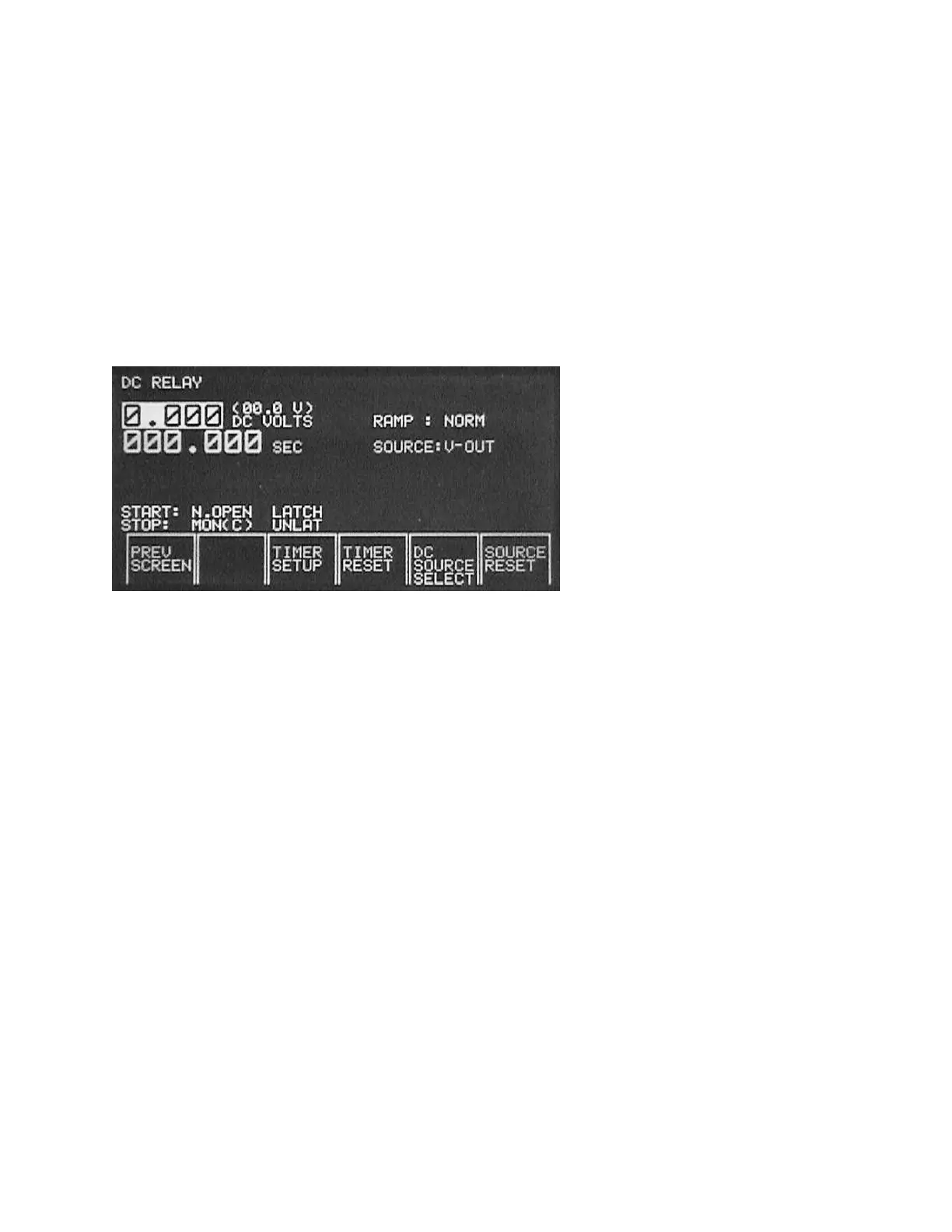
applies to those types of relays. DC targets and seal-in coils are tested using the DC
Relay Test Screen.
1. Connect the target and seal-in coil to the
AUX DC
output terminals.
2. Press the
DC SOURCE SELECT
. This changes the output from
DC VOLTS
to
DC AMPS
.
3. Block the trip contacts closed.
4. Press the
DC AUX
on button. Increase the DC current by slowly rotating the
Control Knob. Note, if the seal-in coil rating is .2 A or lower, you may want to
change the
RAMP
from
NORM
(Normal) to
SLOW
, see
RAMP
description under
OVERCURRENT Relay Test Screen
.
5. When the target drops and the seal-in coil operates, stop increasing the current
and note where the element picked up.
6. Slowly decrease the current. When the seal-in coil drops-out, stop and note the
dropout current level. Return the output to zero and switch off the
DC AUX
.
7. Remove blocking material from the trip contacts if needed.








 To Next Page