49
Timing Test:
There are two timing tests:
Contact Close Timing Test
Drop out Timing Test
Contact Close Timing Test:
1. With the
DC AUX
output
OFF
and properly connected to the relay potential coil,
parallel the
DC AUX
output terminals to the
TIMER
START
gate. Connect Trip
contact to
TIMER STOP
gate.
2. With the relay properly connected to the test set (see connections above) press
the
DC AUX
Button to turn the DC output voltage on.
3. Increase the
DC AUX
output voltage by rotating the Control Knob to the desired
test voltage.
4. Turn the output off by pressing the
DC AUX
Button. Press the
TIMER SETUP
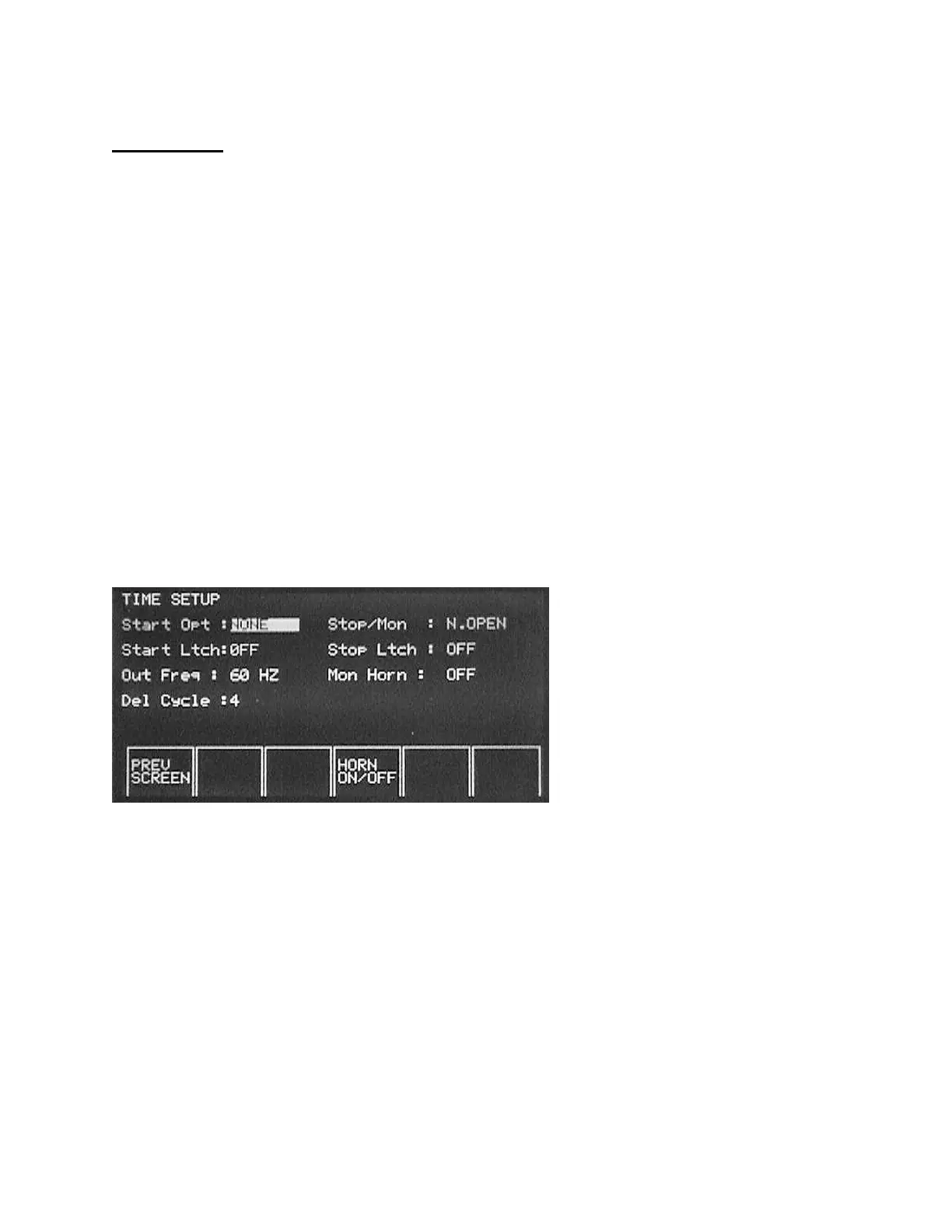
Button. The following screen should appear.
5. Select Start Option to
V. APPLIED
(Voltage Applied).
6. Select Stop Option to
N. OPEN
(assuming Normally Open trip contacts).
7. Select Start and Stop Latch
ON
.
8. Press
PREV SCREEN
.
9. Press the
DC AUX
Button to turn the DC output voltage on. The test voltage is
applied, and the timer is started. When the relay trips, the Timer Stops. Trip
LED turns ON. Record trip time.
Warning: The DC AUX voltage is still on.
Switch DC OFF by pressing the DC AUX Button.








 To Next Page