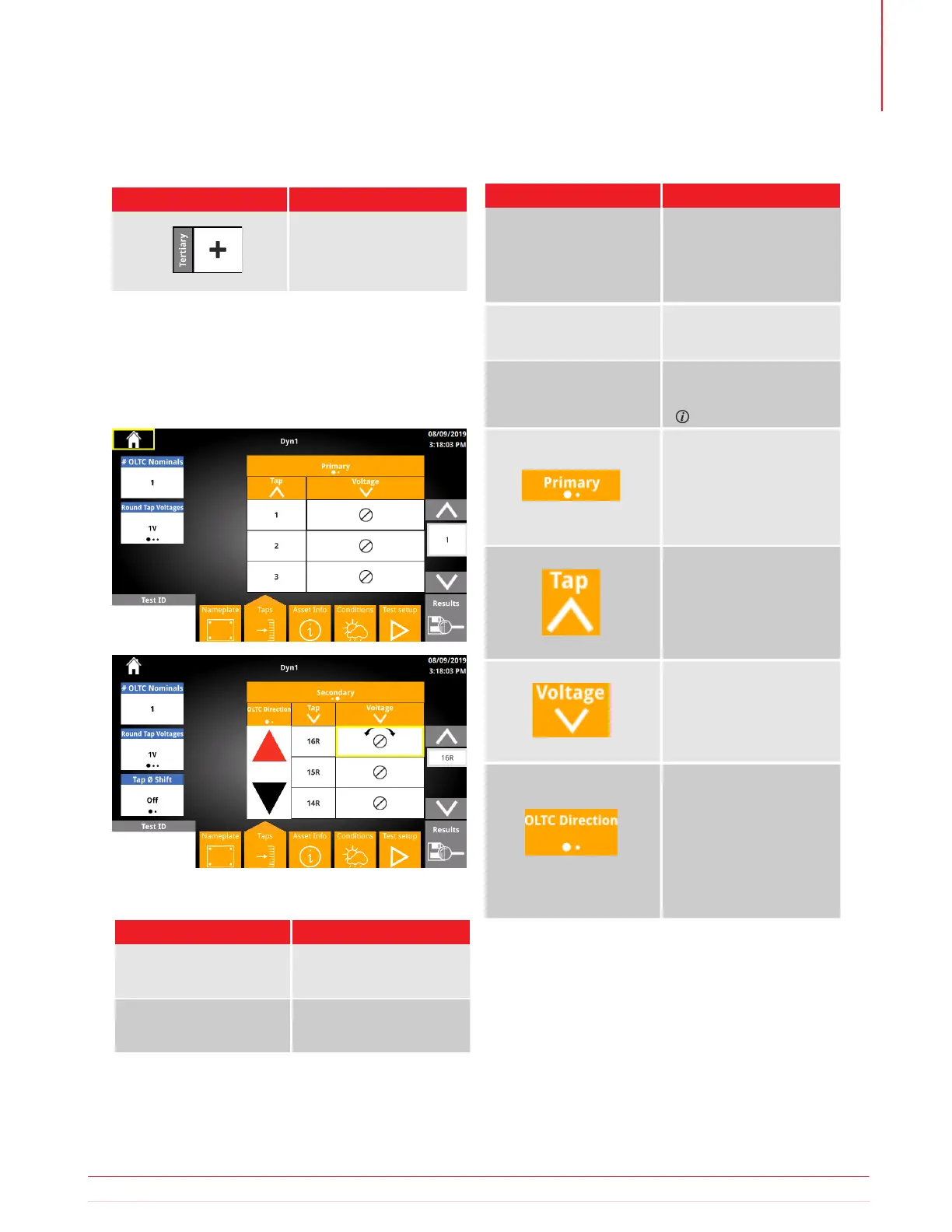
The Nameplate Taps screen is used to confirm and
modify the tap labels and voltages for each winding.
Initial tap labels and voltage values are based on the
selections in the Nameplate screen.
1
Changing Tap Labels or # Taps will overwrite custom tap labels
2
Changing Round Tap Voltages, Nominal Tap V, First Tap V, or last Tap V will
overwrite custom tap voltages
5.19.5 Taps
5.19.4 Nameplate Buttons
5.19.6 Taps Buttons
Button Description
Add Tertiary Winding
Button Description
Enter a custom tap label
1
Enter a custom tap
voltage
2
Tap Voltage
Tap Label
5.19.7 Taps Options
Option Available Settings
1 - 9
# OLTC Nominals
Tap Phase Shift
Primary
Secondary
Tertiary
Tertiary is an option if
configured in Nameplate
On
Off
Optional SW Feature
Ascending
Descending
Swaps first and last
tap labels
Raise Lower
Lower Raise
Allows user to configure
tap changer direction
based on tap changer
cable connection
Ascending
Descending
Swaps first and last
tap voltages
Round Tap Voltages
1V
5V
10V
Information subject to change without notice 37
Operation



 To Next Page