Page 7 of 10
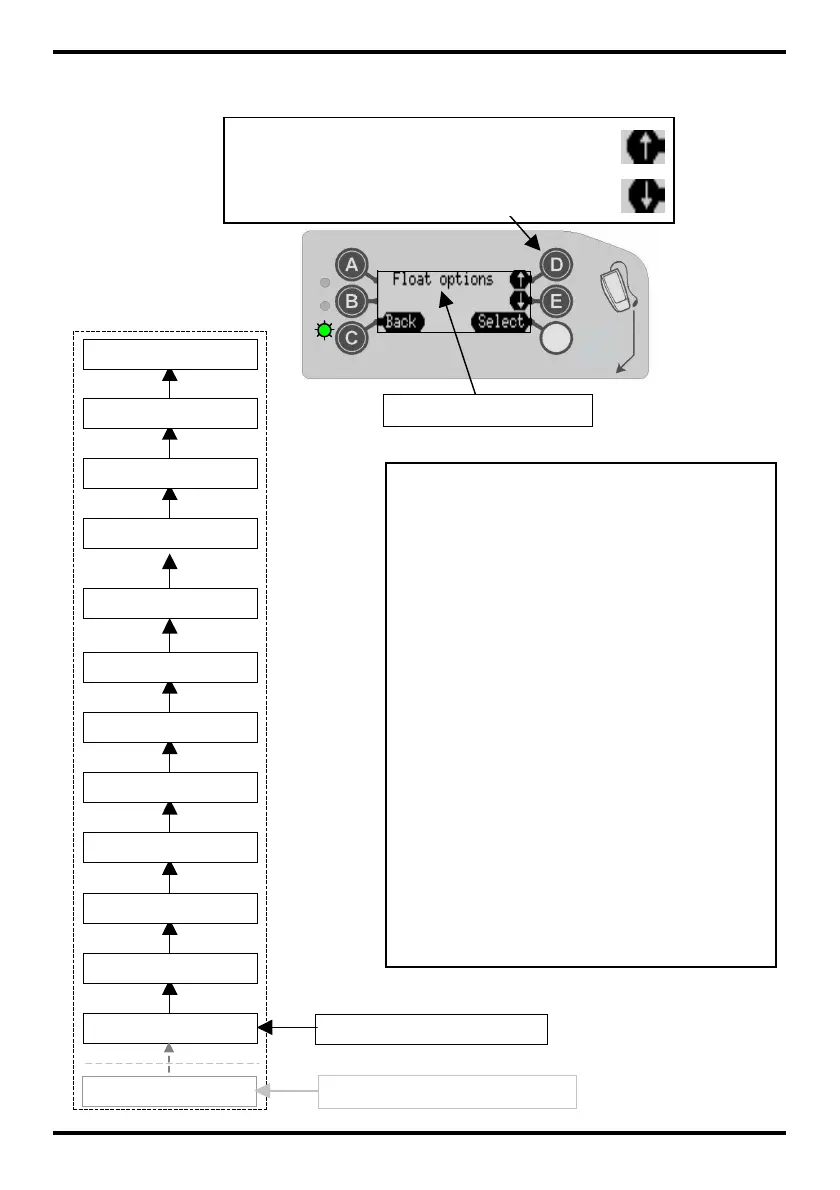
Setup Mode Menus
(not available on CF7400)
Menu Starts from Here
Prices
Language
Float Options
Change Mgmt
Machine Options
Coin Config
Cashless Config
General
Error Log
Test
Audit Config
Bank Note Config
Menu Option Selected
Press button ‘D’ - Scrolls Up the menus
Press button ‘E’ – Scrolls Down the menus
EXAMPLE: - How to set the language
1. Press the ‘Mode’ button once
2. Press button ‘E’ to select ‘Setup’
3. Enter pass code, Press ‘A’‘B’‘C’
4. Press button ‘D’ to scroll up the menu
an until the display shows Language
5. Press ‘Select’ then ‘Edit’
6. Use button ‘D’ or ‘E’ to scroll to the
required language
7. Select ‘OK’
8. Select ‘Back’ and ‘Back’ again to
save your setting and exit
Messages
Only if Messages available



 To Next Page