10 Settings
44
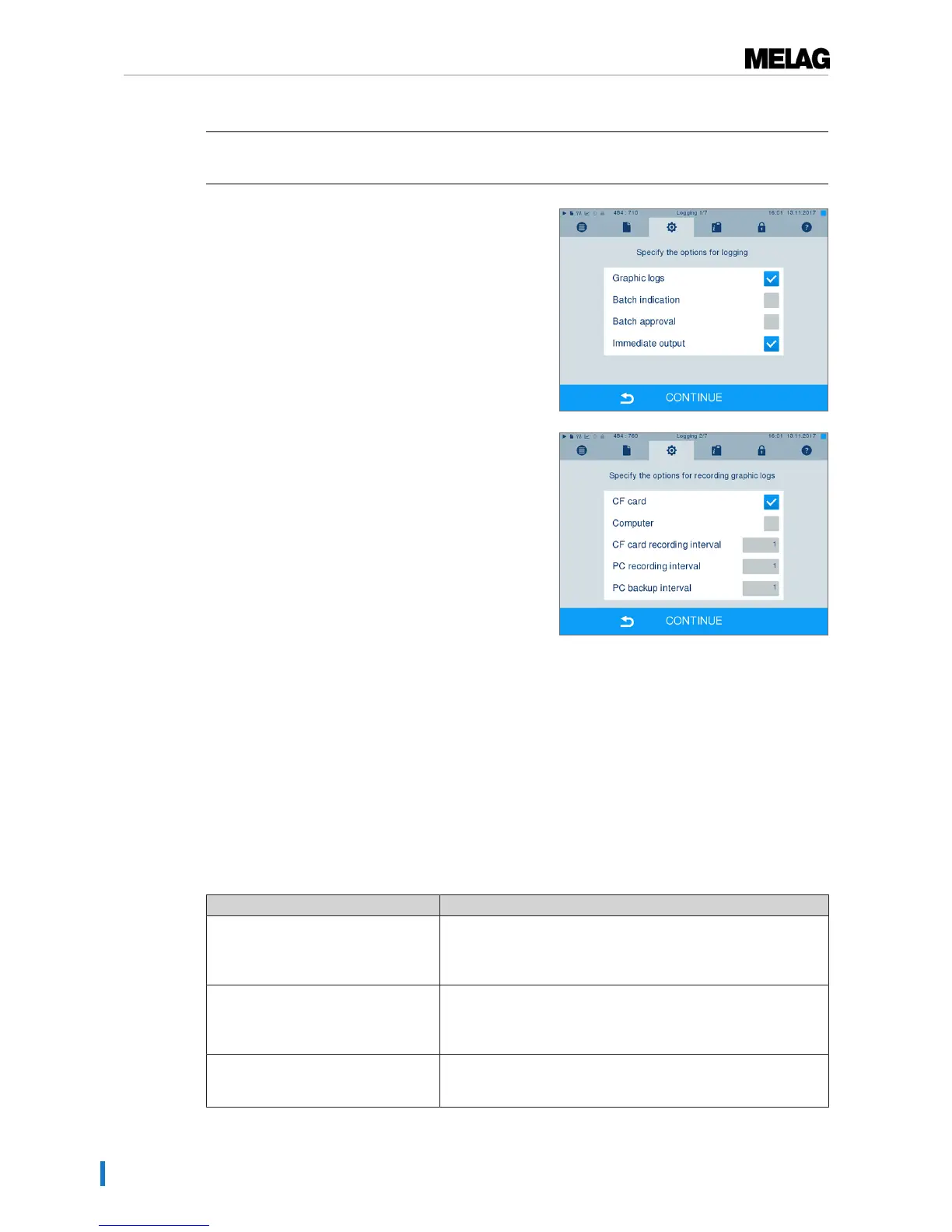
If you wish to output a graphic log (optional) in addition to a text log, proceed as follows:
ü
Navigate toSettings →Logging.
ü
Immediate output is activated.
1. Set a checkmark next to the Graphic logs option and
check whether the checkmark is also set next to the
Immediate output option.
2. Press CONTINUE and select the CF card and/or
computer as an output medium.
3. If necessary, change the intervals and press
CONTINUE.
4. Working in this window, check whether at least one
of the two output media have been selected for text
logs.
5. Check whether the activated output medium is
connected (computer) or has been inserted
(MELAflash CF card).
6. Press repeatedly on CONTINUE until you come to
the summary window.
7. Press SAVE to save the setting.
Explanation of the possible settings for graphic recording:
Interval Explanation
CF card (CFC) recording interval in sec. – indicates the time intervals in which the program curve
is recorded on the CF card. The smaller the time interval, the
more exact the curve. In the example, the time interval is set at 1
second.
PC recording interval in sec. – indicates the time intervals in which the program curve
is recorded, if the computer is selected as output medium. The
smaller the time interval, the more exact the curve. In the
example, the time interval is set at 1 second.
PC backup interval in sec. – indicates the time interval in which the graphic data from
the steam sterilizer is saved on the computer. In example 1, the
backup interval is set to 1 seconds.












 To Next Page