9
Today you can download from the internet directly to your remote control the codes of the latest devices or those
which will be brought out in future, codes which would not otherwise be available using traditional programming
methods. To do this you need to purchase the special MELICONI Audiocable, which allows you to download
the information you need onto any PC using an internet connection. Then go to the www.meliconi.com/guide
website and follow the on-screen instructions.
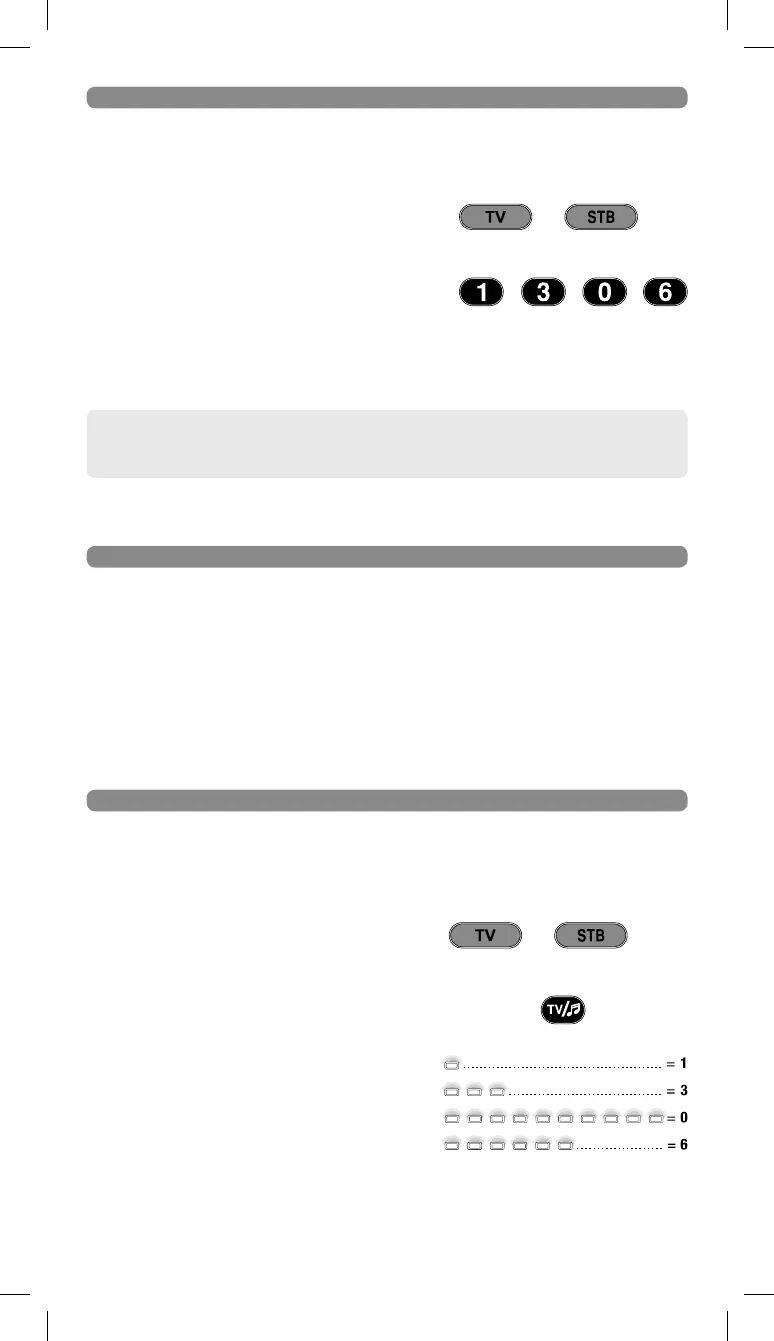
If you set up the remote control using the MANUAL SEARCH
procedure, obtain and make a note of the code in use as follows:
1. Press and hold down for 6 seconds the device selection
button corresponding to the device you wish to enter the
code for.
2. Release the button. The indicator light will fl ash. Press
the TV / RADIO button for an instant.
3. After a pause of several seconds, the indicator light
produces four sets of fl ashes, spaced out, corresponding
to the code to be obtained. Count the number of fl ashes.
Each set of fl ashes corresponds to one fi gure in the code.
Ten fl ashes correspond to the fi gure 0.
4. Make a note of the code obtained on the label on the
inside of the battery cover. You may need it in future.
Code obtained = 1306
6 SEC.
or
ENTERING THE CODE DIRECTLY
(only to be performed if you know the specifi c code to be set)
If they do not appear, repeat the procedure. If the result is still negative, it means the code indicated
is not included in the remote control. So you need to load it via INTERNET.
(see following section)
1. Press and hold down for 6 seconds the device selection
button corresponding to the device you wish to enter the
code for.
2. Release the button. The indicator light will fl ash.
Immediately enter the specifi c code previously found.
(e.g. 1306)
3. Three long fl ashes indicate a correct setting.
6 SEC.
or












 To Next Page