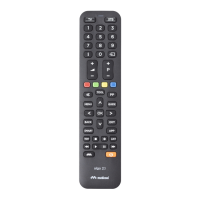
The Meliconi Easytel 2+ is a universal remote control designed to operate both a TV and a DECODER (satellite or digital terrestrial). It features a permanent memory, ensuring that settings are retained even when batteries are removed. The remote control transmits infrared signals, replicating those of original devices, but does not support radio frequency functions like voice commands or pointers.
Safety Warnings:
The remote control and its batteries should not be exposed to excessive heat, such as direct sunlight or fire. It is not a toy and should be kept out of reach of children and domestic animals.
Technical Specifications:
The remote control requires two new 1.5V AAA/LR03 alkaline batteries, which are not included. Rechargeable batteries should not be used.
Usage Features:
Battery Insertion and Test:
To insert batteries, open the battery compartment and insert two 1.5V AAA/LR03 alkaline batteries, ensuring correct polarity as indicated in the diagram. To test the batteries, press and hold the "5" button. If the LED remains continuously lit until the button is released, the batteries are sufficiently charged. If the LED is off or blinks, the batteries are low and require replacement. Exhausted batteries should be removed promptly to prevent leakage and damage to the remote control.
Selection of Operating Mode:
The Easytel 2+ can control two devices. During setup and normal use, you must select the desired operation mode (TV or STB). To do this, press the dedicated button quickly and repeatedly until the LED corresponding to the desired device lights up (red for TV, green for STB).
Activation of Remote Control:
Before use, a specific code must be set for each device you wish to control. This can be done in three ways:
- Smartphone/Tablet/Web: Use the provided QR code or visit www.cme.it to find the specific code for your device. Once found, enter it directly into the remote control as described in the "Entering the Code Directly" section.
- Manual Search:
- Ensure the device to be controlled is ON (not in standby).
- On the Meliconi remote, select the operating mode, then press and hold the dedicated button until the LED lights up; release.
- Point the remote at the device, then press and hold the ON/OFF button. Wait for the device to switch off or for a shutdown menu to appear (this may take up to 5 minutes).
- Immediately release the ON/OFF button when the device turns off.
- Three final flashes of the LED indicate successful completion.
- Verification: Check if the remote controls the main functions of your device. If not, repeat the procedure. If no results are obtained after the code list is exhausted, try the Smartphone/Tablet/Web method or contact assistance.
- Entering the Code Directly (if known):
- On the Meliconi remote, select the operating mode, then press and hold the dedicated button until the LED lights up; release.
- Immediately enter the previously identified specific code.
- Three final flashes indicate successful completion. If the remote does not flash three times, the setting was unsuccessful; repeat the procedure. If still unsuccessful, the code may not be included in the remote control, and you should contact assistance.
The functions of the Meliconi remote control buttons are only available if the original device was equipped with them. Some original remote control functions may not be directly present on the Meliconi keypad. To enable these, visit www.cme.it and use the "ACTIVATION OF REMOTE CONTROL" tool. If the desired functions are matched with an orange number, follow these steps:
- Select the operating mode, then press and hold the dedicated button until the LED lights up; release.
- Enter the code 0707.
- While the LED is on, enter the identified number corresponding to the function you want to assign.
- While the LED flashes (within 30 seconds), press the desired button on the Meliconi remote to match the function.
- Repeat steps 3-4 for each function.
- To end, hold down the dedicated button and wait for three LED flashes, indicating completion. (Note: The assigned button will lose its original function, which can be restored by setting the activation code again).
Display Code in Use:
To retrieve the current code for future reference:
- Select the operating mode, then press and hold the dedicated button until the LED lights up; release.
- Enter the code 0010.
- After a pause, the LED will produce four sets of flashes, spaced out. Count the flashes in each set to determine the digits of the code (ten flashes represent '0').
- Note down the obtained code (e.g., 1701).
To delete a function assigned to a single button:
- Select the operating mode, then press and hold the dedicated button until the LED lights up; release.
- Enter the code 0707.
- While the LED is on, enter the code 1600.
- While the LED flashes (within 30 seconds), press the button on the Meliconi remote from which you want to delete the function.
- Repeat steps 3-4 for each function.
- To end, hold down the dedicated button and wait for three LED flashes, indicating completion. (Original functions can be recalled by setting the activation code again).
Combined Keypad:
To avoid frequently switching between TV and DECODER modes when controlling two devices, you can combine functions. Automatically, the volume (V+, V-) and channel (P+, P-) keys will control the TV, while the remaining keys control the DECODER.
- Press and hold the dedicated button until the LED lights up; release.
- Enter the code 0069.
- Three final flashes indicate successful completion.
To use a function related to the other mode (e.g., DECODER's ON/OFF function), press and hold the dedicated button and then press the desired key (e.g., ON/OFF).
To revert to separate operating modes, use the code 0096.
Child Mode:
Activating Child Mode restricts the remote to only main functions: NUMBERS, V+, V-, P+, P-, and EXIT. All other functions are blocked.
- Press and hold the dedicated button until the LED lights up; release.
- Enter the code 0123.
- Three final flashes indicate successful completion.
To restore all original functions, re-enter code 0123.
Reset the Remote Control:
To completely reset the remote control to its initial conditions (all user settings will be lost):
- Press and hold the dedicated button until the LED lights up; release.
- Enter the code 0279.
- Three final flashes indicate successful completion.
Troubleshooting (F.A.Q.):
- Remote not working (new): The code may be incorrect. Verify settings or consult www.cme.it for the correct code, or contact assistance.
- Remote stops working: Disconnect the device from power, remove and reinsert new batteries (after pressing ON/OFF twice), and ensure no obstacles. If the remote was unintentionally set to a different device type, select the correct operating mode. If issues persist, try a full reset and re-activation.
- Some functions unavailable: The remote typically only offers functions present on its keyboard and the original remote. If main functions are missing, the code might be incorrect; find a more suitable one. If functions are not directly on the keypad, enable them via the "Buttons and Functions" procedure.
- Checking infrared signals: The human eye cannot see infrared. Use a camera (e.g., mobile phone camera). Aim the infrared LED (front of remote, not the red LED above) at the camera and press and hold the "5" button. Short white/light blue flashes on the camera screen indicate the remote is working and emitting infrared.
Assistance:
For technical assistance, visit www.cme.it or email telecomandi@meliconi.com. It is essential to provide the BRAND and MODEL of your appliance and the name of your Meliconi remote control.
Warranty:
The product comes with a 2-year warranty. Keep your sales receipt as proof of purchase. The warranty is voided if the product is tampered with or used improperly.
The crossed-out wheelie bin symbol indicates that the product must be collected separately from other waste at the end of its life. Dispose of it at appropriate collection centers for electrical and electronic waste, or return it to the retailer when purchasing a new equivalent device. This promotes recycling and prevents negative environmental and health impacts.
Batteries must not be disassembled, thrown into fire, or released into the environment. Improper disposal can harm the environment and health. The symbol on battery packaging indicates they should be disposed of according to local regulations; inquire about battery collection in your country.

 Need help?
 General









 To Next Page