Thank you for choosing Meliconi.
This universal remote control is used for all the functions of 2 TV and VCR
remote controls of the makes listed at the back of the pack.
Keep your Instructions Booklet and Code Booklet for future reference.
TV VCR
Fastext Func.
– Record
Red Rewind
Green Stop
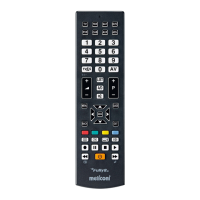
USING THE BUTTONS AND FUNCTIONS
TV and VCR ON/OFF button.
TV selection button
for using the TV.
This button lights up
whenever you use
a TV command.
Teletext buttons:
to access Teletext
to close Teletext and
return to normal viewing
Teletext page hold
function
additional Teletext
function.
Confirm button.
To select the next (P+)
or previous (P-) channel
or program. These buttons
can also be used to move
up and down in the MENU.
Mute button.
TV VCR
Fastext Func.
White/Violet
Additional Func.
Blue Fast forward
Yellow Pause
– Play
VCR selection button for
using the VCR.
This button lights up
whenever you use a VCR
command.
Used to access additional
commands and to program
the remote control.
User customisation
buttons for memorising
and accessing
additional commands.
Number keys.
To access the MENU
for your TV or VCR.
Move within the MENU using
the +/- and P +/- keys or
SHIFT with +/- P +/-
depending on the model of
your original remote control.
Control the volume
using +/ -. These buttons can
also be used to move to the
right and left in the MENU.
To select an external terminal.
The functions described above are only operative
if your appliance also has them.
GB
Use

 Need help?
 General










 To Next Page