You can
customise
your remote
control to use
any 4
additional
TV or VCR
functions,
using the
function keys F1- F2 - F3 - F4.
In the symbol table corresponding to your
remote control code, locate the additional
function you require and note down the
number which appears below it.
Note that only number functions can be saved
using F1- F2 - F3 - F4.
NOTE:
You cannot use the additional commands unless these were already available on your
original remote control.
PROGRAMMABLE BUTTONS
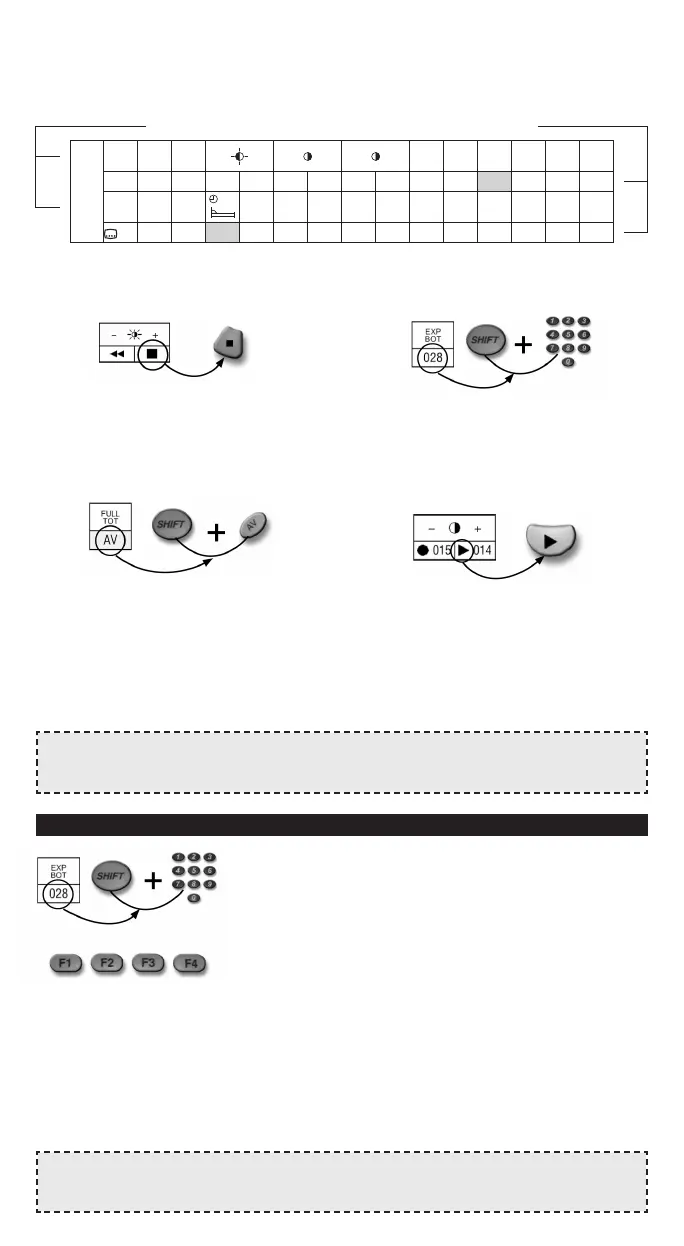
The function programming procedure is as
follows:
TV function example: EXP BOT
Press and hold down SHIFT and type in the
number written beneath function 028.
Press one of the function keys (e.g. F1)
and hold it down together with SHIFT.
After a few seconds, the TV or VCR selection
button for the appliance you have chosen will
emit a series of 3 flashes to indicate that the
function has been saved correctly.
Release SHIFT and F1.
From now on, whenever you press F1,
the additional command just saved is
transmitted to the appliance and stops when
F1 is released.
3. FOR THE LESSER-USED FUNCTIONS, refer to the code book appendix.
Find the symbol table corresponding to the code you saved to program the remote control.
Locate the additional function you require and note down the symbol or number which
appears below it. EXAMPLE: XXX CODE TABLE
NOTE:
If the TV or VCR selection button does not flash, repeat the saving procedure described
above.
C – TV function example: EXP BOT
A number appears beneath the function (028).
Press and hold down SHIFT.
Type in the number, holding down the last
digit (8).
The function is transmitted to the TV and stops
when you release the two buttons (SHIFT+ 8).
D – TV function example: contrast +
A symbol and a number are displayed beneath
the function.
You can apply the command using either the
symbol or the number.
Locate this symbol on your remote control
and press the button to transmit the function
to the appliance.
If you want to use the number, refer to
example C above.
There are 4 ways to enable the additional
commands:
A – TV function example: brightness (+)
A symbol appears beneath the function.
Locate this symbol on your remote control
and press the button to transmit the function
to the appliance. The commands stops when
you release the button.
B – TV function example: FULL TOT
A symbol against a grey background
appears beneath the function.
Locate this symbol on your remote control.
Press SHIFT and the button at the same time.
The corresponding function is transmitted
to the appliance and stops when you release
the buttons.
REV RIV
TUPO CANCEL
–+–+–+
TP OFF TP ON FULL EXP EXP ALTO
TIME ORA MEM F MEM TOT TOP BOT I-II
XXX *
MENU MENU
●
015 014 014
●
015 AV 027 028 027
MIX 10 11
030 058 059
Original remote control / GumBody
additional functions symbols or numbers
▼
▼
▼
▼
▼
▼
■❙❙
▼
▼
..
▼ ▼
▼ ▼
◗
◗










 To Next Page