OPERATION (CONTINUED)
17
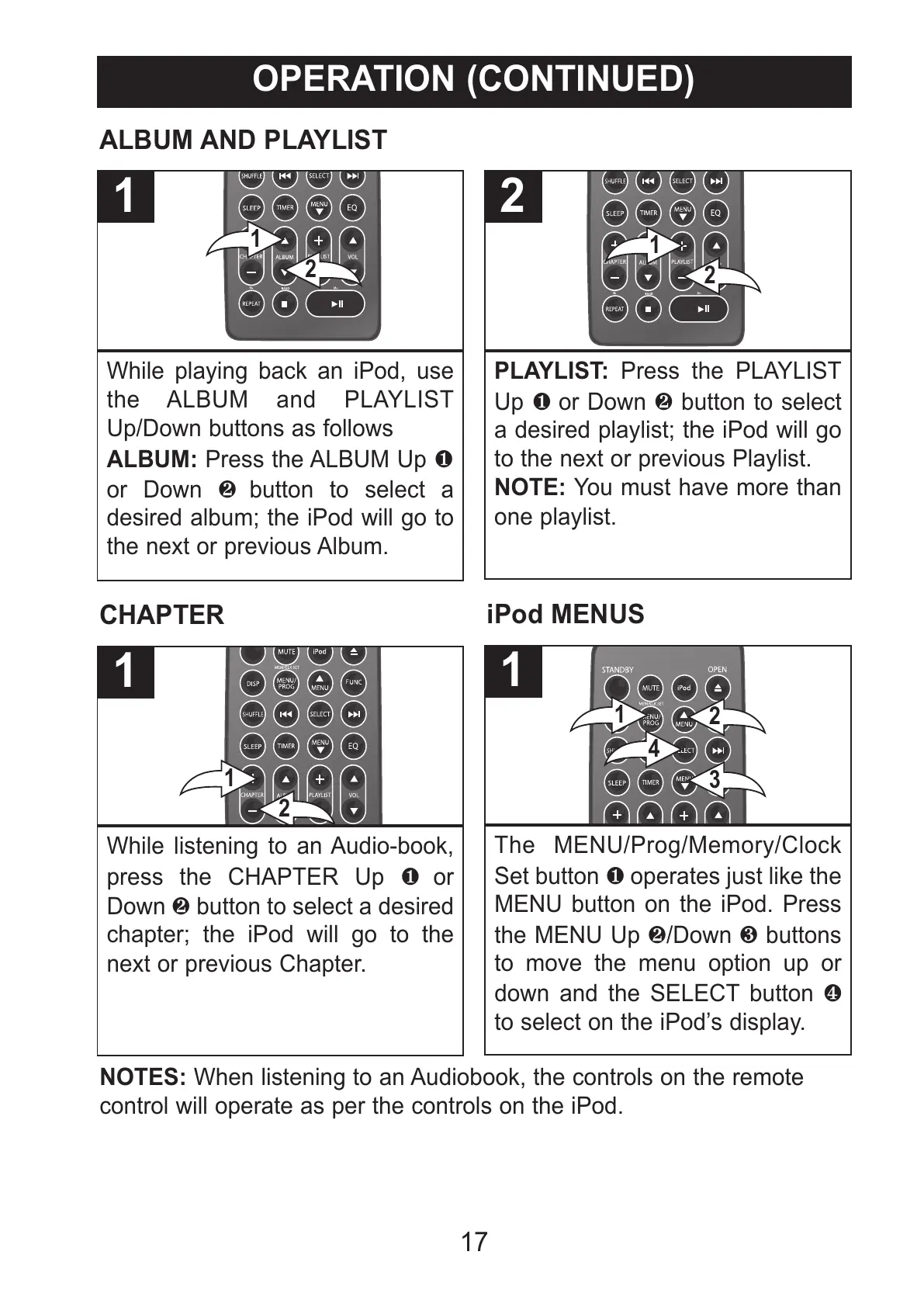
While playing back an iPod, use
the ALBUM and PLAYLIST
Up/Down buttons as follows
ALBUM: Press the ALBUM Up 1
or Down 2 button to select a
desired album; the iPod will go to
the next or previous Album.
1
PLAYLIST: Press the PLAYLIST
Up 1 or Down 2 button to select
a desired playlist; the iPod will go
to the next or previous Playlist.
NOTE: You must have more than
one playlist.
2
ALBUM AND PLAYLIST
While listening to an Audio-book,
press the CHAPTER Up 1 or
Down 2 button to select a desired
chapter; the iPod will go to the
next or previous Chapter.
1
CHAPTER
The MENU/Prog/Memory/Clock
Set button 1 operates just like the
MENU button on the iPod. Press
the MENU Up 2/Down 3 buttons
to move the menu option up or
down and the SELECT button 4
to select on the iPod’s display.
1
iPod MENUS
NOTES: When listening to an Audiobook, the controls on the remote
control will operate as per the controls on the iPod.
All manuals and user guides at all-guides.com



 To Next Page