17
TROUBLESHOOTING GUIDE
If you experience a problem with this unit, check the chart below before calling for service.
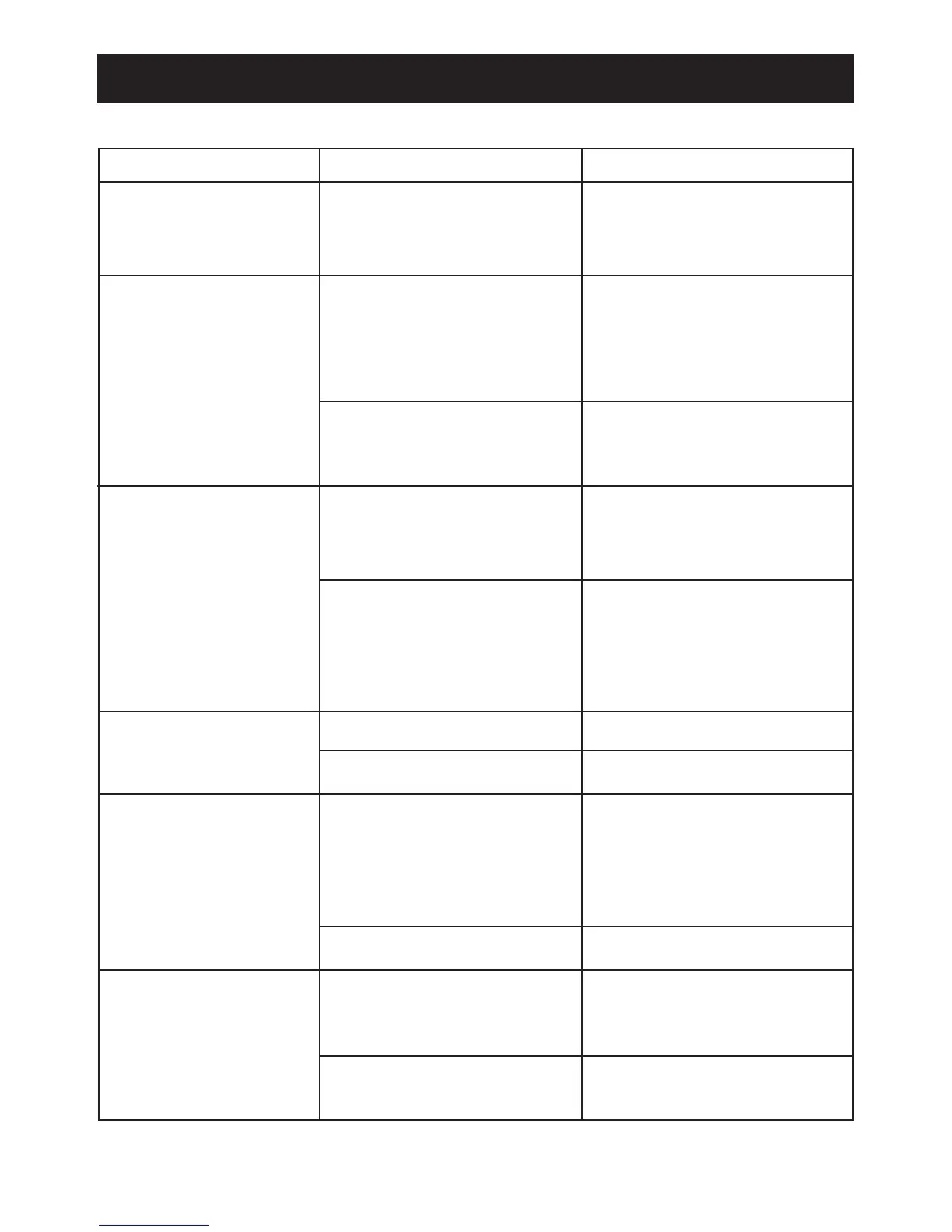
SYMPTOM CAUSE SOLUTION
No sound. Volume is Increase volume.
set to minimum.
FM, no sound. Power is not on or Press the POWER button,
FM mode is not then the MODE button to
selected. select FM.
Volume is Increase volume.
set to minimum.
FM, poor sound. Station is not tuned Retune the FM
properly. broadcast station.
FM: Wire Extend FM wire
antenna is not antenna.
extended.
iPod mode, no sound. Incorrectly connected. Check the connection.
Not in iPod mode.
Press the MODE button.
Time reset to “12:00”. Batteries connected Check the batteries.
improperly, not con-
nected or dead.
Clock not set. Set the clock.
Alarm does not Alarm is not activated Set and activate alarm as
turn on. or set properly. described on page 13.
Clock is not set. Set the clock.


 To Next Page