22
SETTING THE MENUS (CONTINUED)
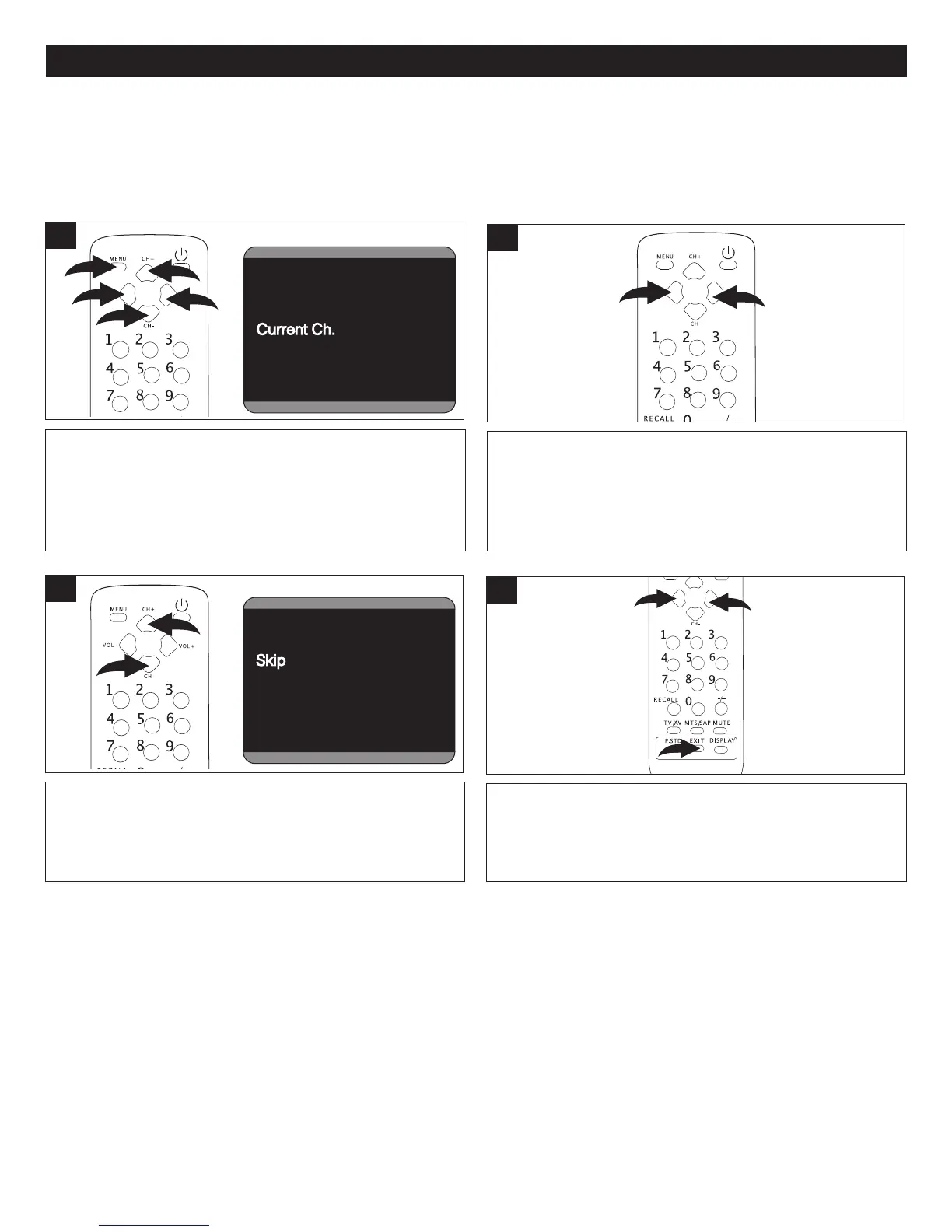
After setting channels into memory, you can add or delete channels as follows:
Press the VOLUME Up 1 or Down 2 button to select a
desired channel to add or delete.
2
While in the TV mode, press the MENU button 1 once; the
Video menu will appear. Press the VOLUME Up
2 or Down
3 button to select the Channel Setting. Press the
CHANNEL Up
4 or Down 5 button until CURRENT CH. is
selected.
C
hannel System Auto
Antenna CATV
Skip
OffOff
Current Ch. 13
Fine
Auto Program
C
Channel System Auto
Antenna CATV
Skip Off
Current Ch.
1313
Fine
Auto Program
Channel
Channel System Auto
Antenna CATV
Skip Off
Current Ch. 13
FineFine
Auto Program
Channel
Channel System Auto
Antenna CATV
Skip Off
Current Ch. 13
Fine
Auto ProgramAuto Program
Channel
1
Press the VOLUME Up 1 or Down 2 button to turn Skip
feature ON (to skip the channel) or OFF (to memorize the
channel). When done, press the EXIT button
3 to exit the
menus.
4
Press the CHANNEL Up 1 or Down 2 button until SKIP is
selected.
Channel System AutoAuto
Antenna CATV
Skip Off
Current Ch. 13
Fine
A
uto Program
Channel
Channel System Auto
Antenna
CATVCATV
Skip Off
Current Ch. 13
Fine
Auto Program
Channel
Channel System Auto
Antenna CATV
Skip
OffOff
Current Ch. 13
Fine
Auto Program
Channel
Channel System Auto
Antenna CATV
Skip Off
Current Ch.
1313
Fine
Auto Program
Channel
Channel System Auto
Antenna CATV
Skip Off
Current Ch. 13
FineFine
Auto Program
Channel
C
3
ADDING AND DELETING CHANNELS



 To Next Page