3
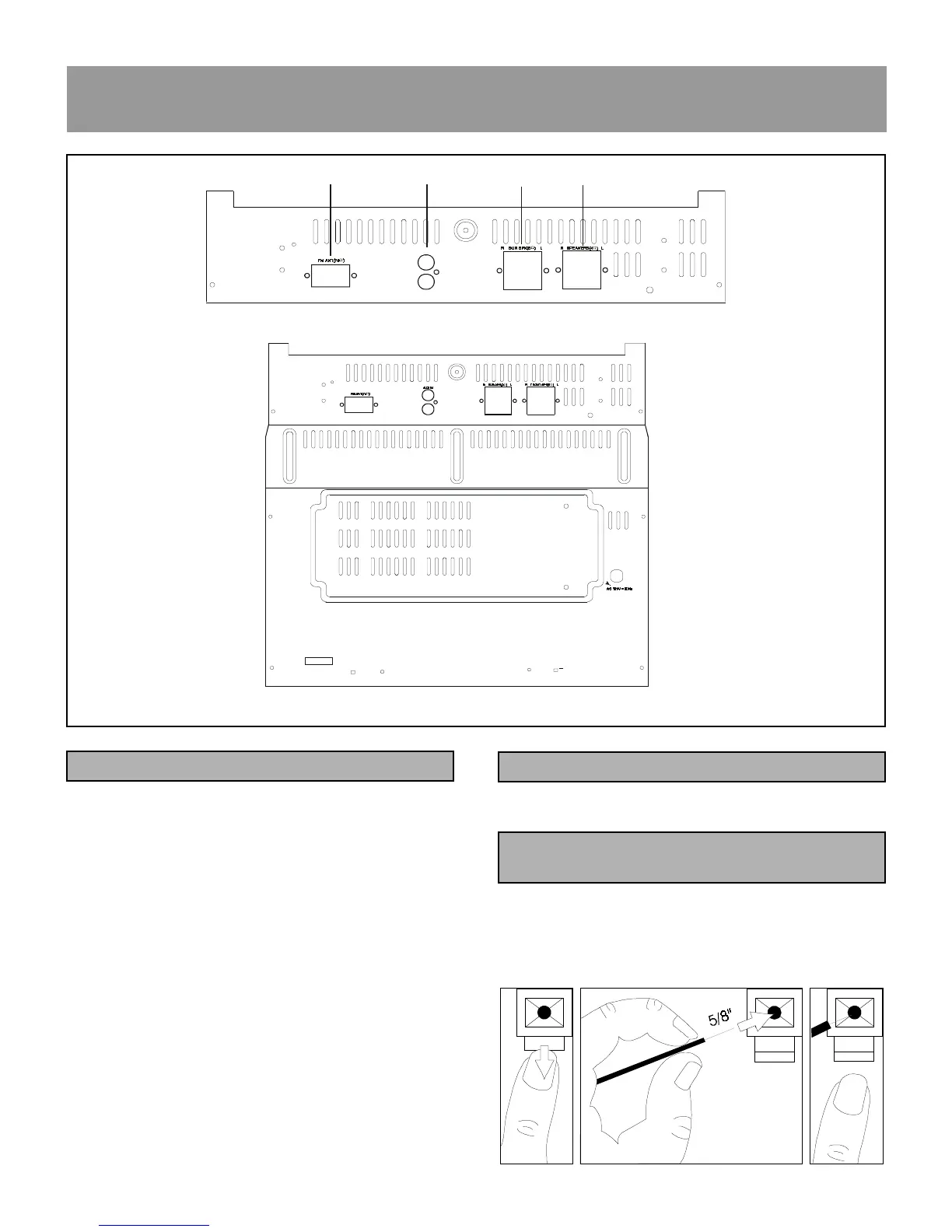
Plug the FM antenna to the FM terminal of the main unit.
ANTENNA OR SPEAKER WIRE CONNECTION TO
TERMINALS
INSTALLATION
REAR PANEL CONNECTIONS
1.FM ANTENNA (FM 75 OHM)
For connecting the 75 ohm antenna supplied.
2. AUX IN (L/R)
For connecting optional video equipment.
3. SURROUND SPEAKER (8 OHM)
Connect supplied left and right front surround speaker
here.
4. FRONT SPEAKERS (4 OHM)
Connect supplied left and right front speakers here.
5. AC POWER CORD
Plug into a standard 120V/60Hz household wall outlet.
CONNECTING THE FM ANTENNA
NOTE: Push and hold speaker terminal tab down to insert
wire. Release tab to lock wire in terminal. Make sure
the insulation is completely removed from the ends of
the antenna and speaker wires at all connection points.
+
_
+
_
AUX IN
R
L
!
"
++
__
R
L
+
_
+
_
++
__











 To Next Page