4
INSTALLATION
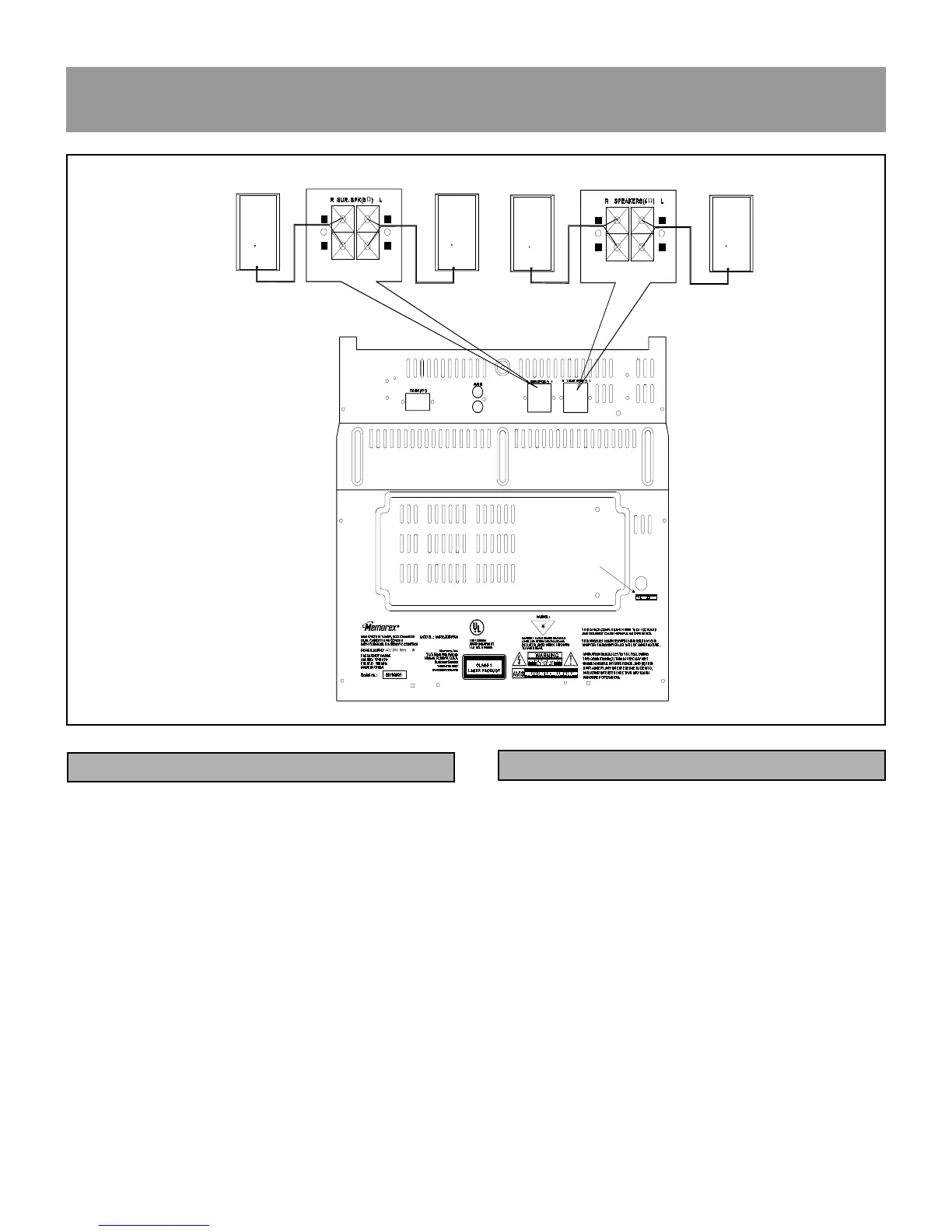
CONNECTING THE SPEAKERS
Connecting the Front Speakers
Connect the right front speaker to the front speaker ″ R ″
terminal on the back of the main unit, and the left front
speaker to the front speaker ″ L ″ terminal.
Make sure the (+) and (-) cables are connected to the cor-
rect front speaker terminals [(+) to (+) and (-) to (-)].
L
L
L
L
+
-
+
-
+
-
+
-
41/06
41/06
LEFT
LEFT
R
L
+
_
+
_
2
++
++
%
Connecting the Surround Speakers
Connect the right front speaker to the surround speaker ″ R
″ terminal on the back of the main unit, and the left front
speaker to the surround speaker ″ L ″ terminal.
Make sure the (+) and (-) cables are connected to the cor-
rect surround speaker terminals [(+) to (+) and (-) to (-)].
CONNECTING THE SURROUND SPEAKERS













 To Next Page