4. Note that you do not have to be connected to the Internet to
reach this address, as you are simply connecting to a web
service running locally on the router.
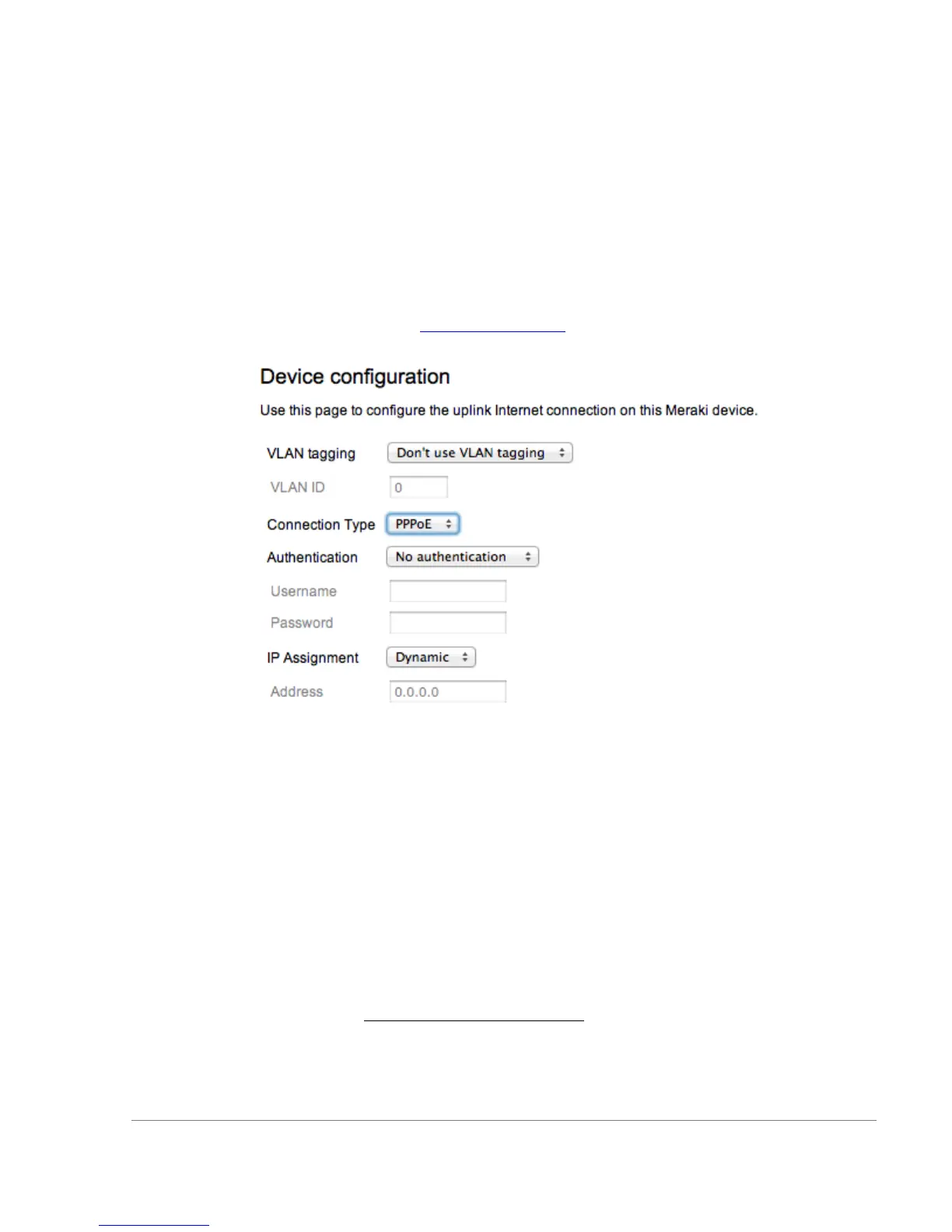
5. In the event your ISP requires you to handle PPPoE
termination, this can be configured on the same local setup
page. Please specify the connection type as “PPPoE” and
provide the required username and password (if applicable) to
properly terminate the connection.
6. If your WAN uplink is on a trunk port, you will need to specify
the correct VLAN. To do so, please visit
http://setup.meraki.com and specify the correct VLAN tag ID to
allow your device to properly connect.
2.4 Network Settings
All Meraki MX60 devices must have an IP address. The following
section describes how to configure your local area network prior to
deploying a Meraki MX60. Please check with your ISP to make sure you
have the adequate Ethernet handoff device (e.g., T1, MPLS, ADSL or
Cable modem), as the MX60 only supports RJ45 Ethernet connectivity.
2.4.1 Router Mode: Gateway to the Internet
In router mode, the MX60 will provide network address translation
(NAT) services. Therefore it requires two IP addresses, one that is
recognized by the WAN interface and another that is recognized by the
LAN interface.
Internet (WAN) IP address settings:
By default the router will obtain the configuration for its Internet port via
DHCP. If this is compatible with your upstream Internet connection, no
local configuration of the Internet port is required.


 To Next Page