Smoke and Heat Exhaust Control Unit mcr 9705 – User Instruction Manual
Strona 6 z 24
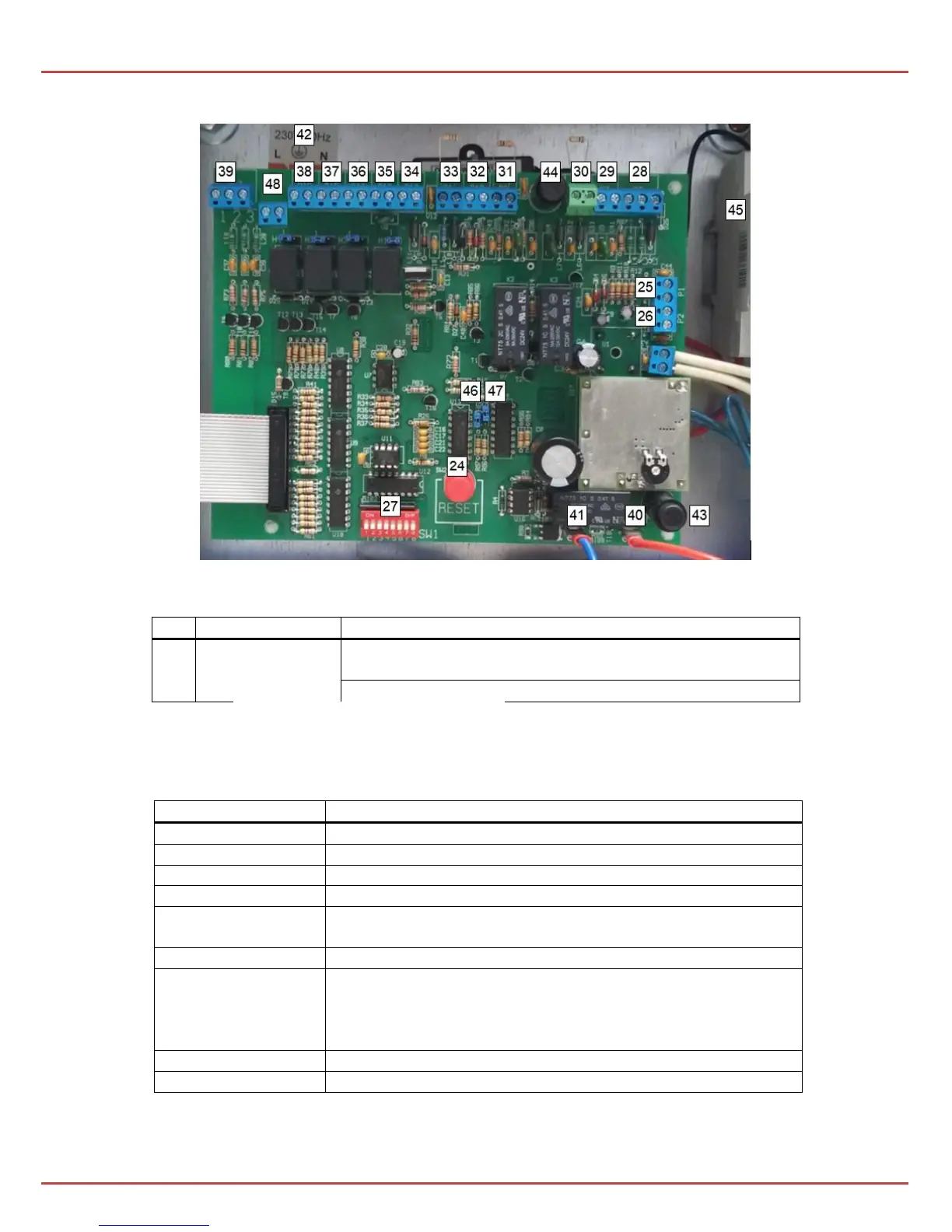
Pic. 3 Interior view of the control unit.
At the bottom of the control unit module there is a multi-function button:
in the alarm state - deleting the alarm and closing the
vent
in the state of supervision - closing the vent
Press the button for at least 1 second!
To the left of the RESET button there is an eight-position switch SW1 (27), designed
to set the functions of the control unit:
Disconnection of the actuator line
Disconnection of the sensor line
Disconnection of the ROP pushbutton line
Disconnection of the in/out relay contacts
Full opening of the vents during non-emergency ventilation in
in "ventilation" and "hatch" mode
Activation of the mode – “door’s control”
Enabling the electric locking drive/ activating alarm boxes
------------------------------------------------------------------------
Activation of automation mode in mcr PROSMOKE CE/CE1
curtain (for control panels with the "curtain" option)
Disabling the autoreset function
Note: the default setting for SW1-1 to SW1-7 – is OFF position,
SW1-8 – is ON position.


 To Next Page