PRODUCTS WITH EMISSIONS CONTROL
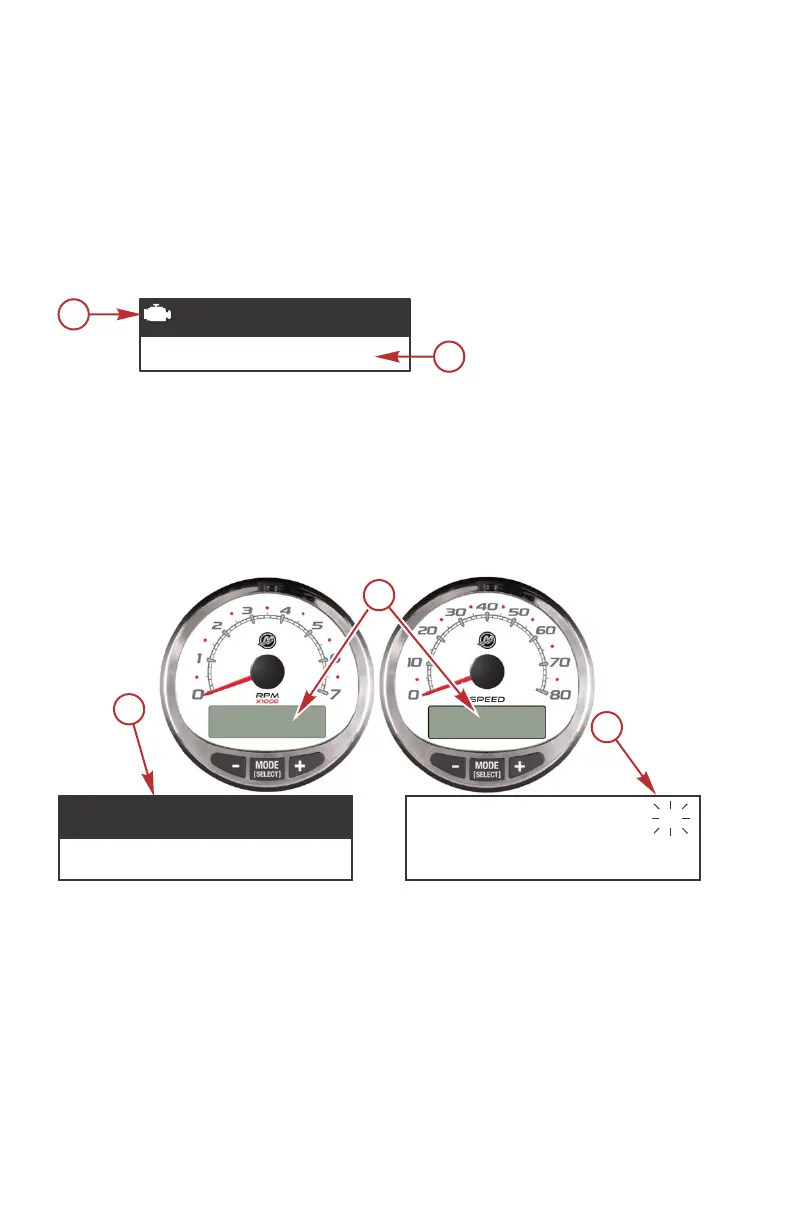
After the ignition is turned on, the tachometer will display the name of the
gauge and the version of the software for approximately two seconds. In the
upper left‑hand corner of the display, a small engine icon will also be visible.
The engine icon indicates the power package has emissions control onboard
diagnostics, also known as OBD. The icon will only be seen during the key up
process unless a system fault is detected. When a fault is detected, the OBD
icon will be displayed in the upper left‑hand corner on all system screens.
a - OBD icon
b - Software version
Alarm Warnings with Descriptive Text
Descriptive text alarm warning screens are displayed with 2007 and newer
engines.
a - Display screen
b - Engine Guardian System
c - Alarm signal
When a problem is detected, the name of the offending alarm appears on the
display.
MERCURY
13469
S Cmart raft v X.X
a
b
a
3200
RPM
AL
b
c
REDUCE
THROTTLE
46348
PRODUCT OVERVIEW
2 eng


 To Next Page
 Loading...