TREBLE CONTROL
The TREBLE control determines the amount of high frequencies present in the signal, relative to the rest
of the spectrum. High frequencies (>2.5kHz) are responsible for the “bright”, “airy”, “shimmery” character of the tone. This is also an
active control with boost and cut, the amount of boost proportional to the clockwise rotation to the right of “flat” (12:00 straight up)
position and the amount of cut proportional to the counter-clockwise rotation to the left of “flat” (12:00 straight up) position. This is a
shelving style filter.
MASTER VOLUME CONTROL
The MASTER sets the level of signal being sent to the power amp, and determines the overall
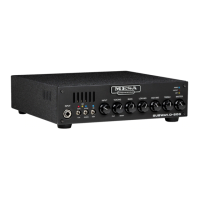
playing volume of the SUBWAY D-800+. Using the MASTER VOLUME along with the INPUT GAIN, allows the optimal control over
gain and front end drive as well as playing volume. For example, if you are using high input gain to achieve an overdriven tone, it will
likely be necessary to adjust the master volume down to obtain a reasonable playing volume and to avoid excessive overdriving of
the power amp. Likewise, if you are looking for a very clean tone, you may wish to start with a lower INPUT GAIN control setting and
use a higher MASTER VOLUME control setting to obtain the desired playing volume.
POWER LED
This blue LED indicates that the amplifier is connected to a power source and is switched on, operating correctly.
If this LED is not on, double-check the power source, and be sure the power cable is firmly inserted into the IEC power inlet socket.
PROTECT LED
This red LED indicates that the amplifier has entered protect mode and is either protecting itself from an exter-
nal fault (such as a shorted speaker cable or defective speaker), or that there is an internal fault within the amp itself. Verify that it’s
not a fault external to the amplifier by disconnecting all cables (except the power cable) from the amplifier. If the protect LED is no
longer lit, the problem is most likely a bad speaker cable or defective speaker. Testing with a set of headphones can help to narrow
down the problem, as the headphone signal is derived post-power amp using a frequency compensation, cabinet emulation network.
LIMIT LED
This amber LED indicates that the power amp is nearing maximum power and is entering the soft clip/limit output
tube emulation mode. Soft clip/limit output tube emulation mode mimics many of the desirable characteristics of tube amp output
stage overdrive while eliminating the common solid state clipping artifacts. There is approximately 6dB of range on this circuit, driving
beyond this, of course, will cause gradual output stage clipping. It’s acceptable for this amplifier to operate in output stage overdrive
mode (if that’s the tone you are after) with the LED flashing roughly 25% of the time on.
REAR PANEL (CONTROLS & FEATURES)
POWER SWITCH
This switch is used to turn your amp on and off by disconnecting the amplifier from the power source. This
amplifier complies with the new EU Eco-design directive by providing a switched “0.00 watt power consumption off-mode”. The D-800+
is additionally protected against high inrush current conditions at power up that can damage the inrush current limiting circuitry. If power
ON is re-applied to the amplifier within 15-20 seconds of a previous power-up event, the AC Mains Short Power Cycle Protection is
provided. Allowing the unit to cool for 20-30 seconds will allow the protective inrush current limiting components to cool enough to
allow the unit to power up again.
OFF ON
PAGE 5



 To Next Page