30
DETAILED INSTRUCTIONS
PERFORMING
AN ABI
MEASUREMENT
5.3.2
On the MESI mTABLET
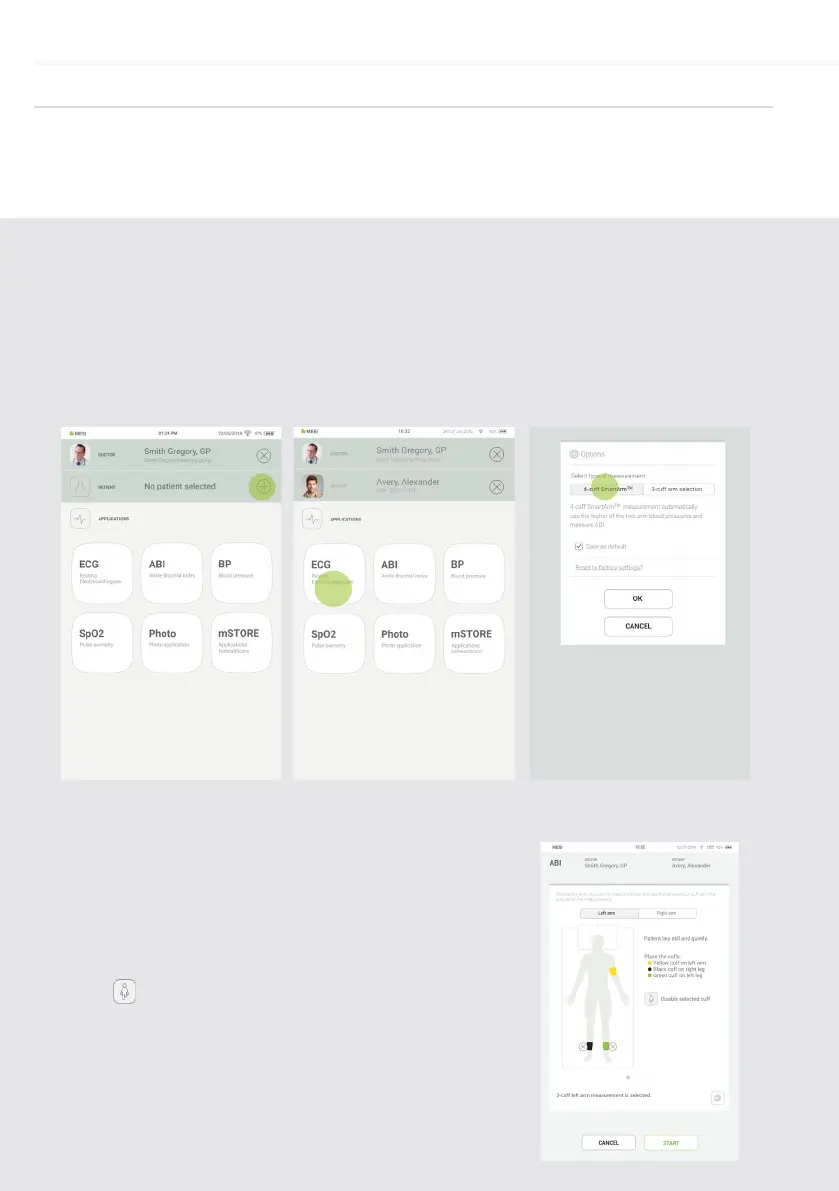
UNIT select an existing
patient or add a new one.
For additional information
see chapter 5.2 PATIENT
SELECTION.
Step 1
After selecting a patient,
select the ABI application in
application menu.
Step 2
Select the type of
measurement – 4 cus or
3 cus (when selecting 3
cus you need to select
the appropriate arm for
calculating ABI – left/right).
Press OK.
Step 3
Amputation option – if a patient has an amputated limb
or is not compliant for ABI measurement due to severe
and/or painful wounds, the ABI can be measured only
on patient’s existing limbs. Before the measurement
the user can disable the selected cu, by clicking
on the button and selecting the limb that is not
compliant for measurement.
Step 4


 To Next Page