5
TEROS 10
Table 1 Installation (continued)
Connecting
(continued)
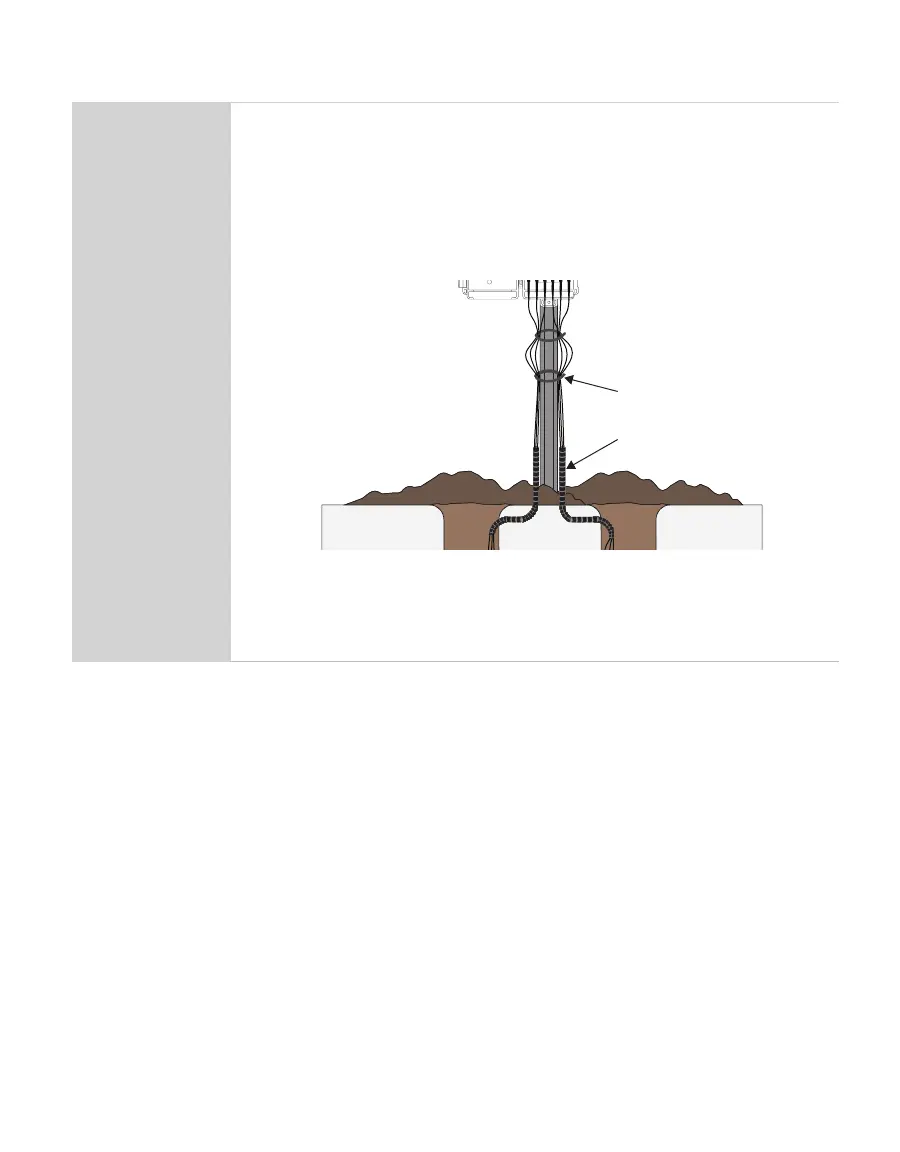
Install cables in conduit or plastic cladding when near the ground to avoid
rodent damage.
Relieve strain on the connections and prevent loose cabling from being
inadvertently snagged by gathering and securing the cables between the
TEROS10 and the data acquisition device to the mounting mast in one or more
places.
Tie excess vertical cable to the data logger mast to ensure cable weight does
not cause sensor to unplug.
conduit
zip tie
mast
ERROR
OK
TEST
(–)
(+)
(–)
(+)
(–)
(+)
(+)
(–)
(+)
(–)
P1 P2 P3 P4 P5 P6
Securing excess cable
Return soil to the hole, packing the soil back to its native bulk density.
WARNING: Do not hit the ferrite core as this could potentially pull the sensor out of the soil.
Table 2 contains brief descriptions for typical installation methods. Each has its own
advantages and disadvantages. For more information about which installation method is
best for specific applications, please see the TEROS Sensors Best Practices Installation
Guide or contact Customer Support.


 To Next Page