1. Locatethefactorywiringharnessin
thedash.Metrarecommendsusingthe
propermatingadapterfromMetra
orAXXESS.Re-connectthenegative
batteryterminalandtesttheunitfor
properoperation.
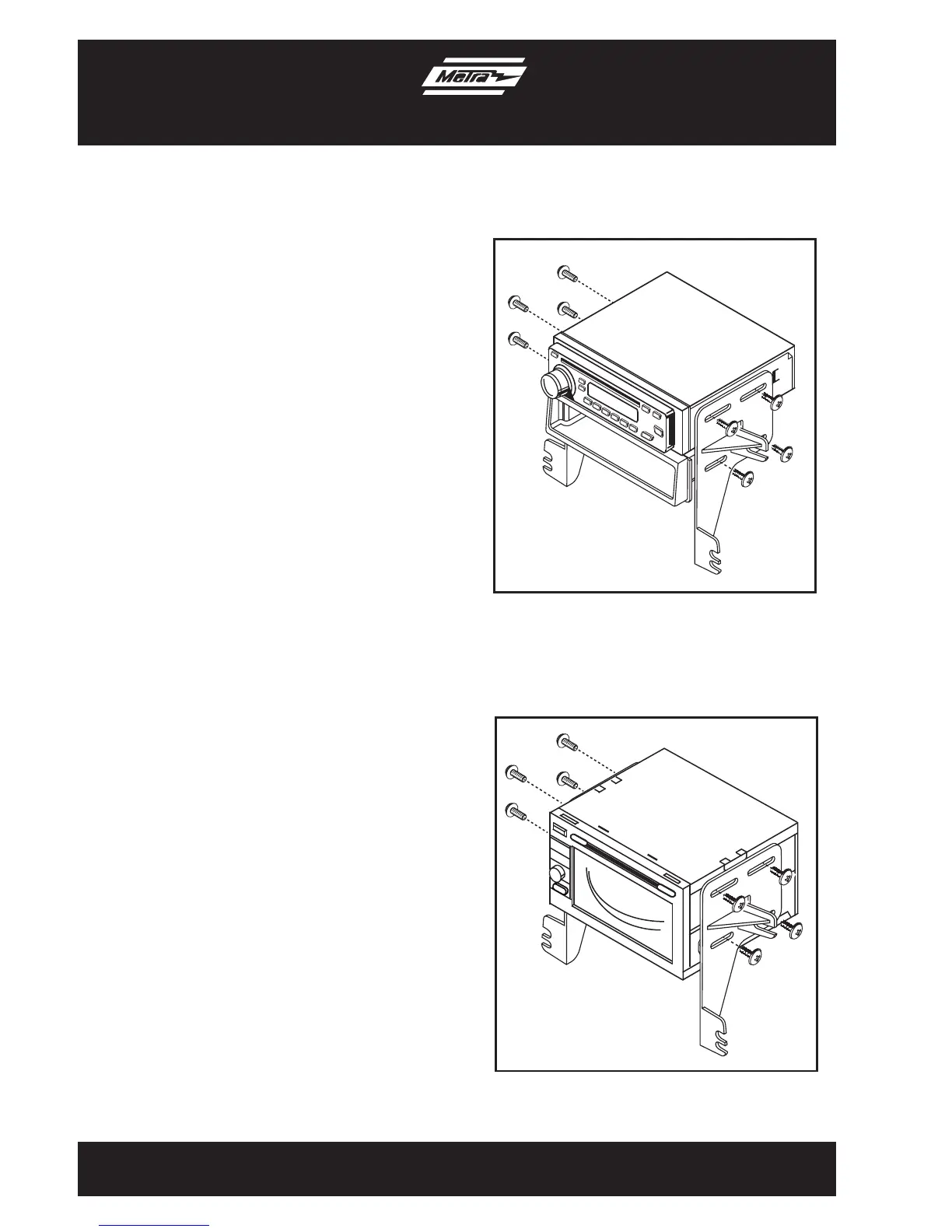
2. AttachtheDDINbracketstothe
aftermarketradiousingthescrews
supplied with the radio, then secure
theassemblytothepocketusingthe
(4)supplied#8Trussheadscrews.
(FigureA)
3. Mounttheassemblyintothesubdash.
4. Reassembledashinreverseorder
ofdisassembly.
1. Locatethefactorywiringharnessinthe
dash.Metrarecommendsusingthe
propermatingadapterfromMetraor
AXXESS.Re-connectthenegative
batteryterminalandtesttheunitfor
properoperation.
2. AttachtheDoubleDINbracketstothe
aftermarketradiousingthescrews
supplied with the radio, then mount the
unitinthesubdash.(FigureB)
3. Reassembledashinreverseorder
ofdisassembly.
ISO DIN head unit provisions
Double DIN head unit provisions
99-7343
(Figure A)
(Figure B)
7



 To Next Page