
 Need help?
Do you have a question about the Metz AF-1 and is the answer not in the manual?
Instructions for attaching and detaching the flash unit to a camera's accessory shoe.
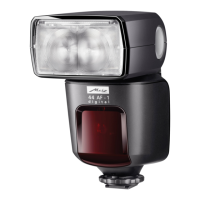
Details on suitable battery types for operating the Metz MECABLITZ 48 AF-1 digital flash unit.
Procedure for powering the flash unit on and off using the main switch.
Explanation of the automatic power-off function to save battery life.
How the flash readiness symbol indicates the unit is ready to fire.
Explanation of the 'OK' indicator for correct exposure in TTL flash mode.
Describes how different flash modes are shown on the unit's display.
Details on how the flash range is displayed based on camera data.
Overview of TTL flash modes and their automatic exposure capabilities.
Instructions for using the manual flash mode and setting light output levels.
Explanation of using flash with shutter speeds faster than the sync speed.
How the flash unit's reflector automatically adjusts zoom for lens focal length.
Procedures for setting slave group, remote channel, and testing the mode.
How to set up and perform a series of flash shots with exposure correction.
Configuration options for the flash unit's automatic power-off function.
How to activate and use the modelling light for previewing lighting.
Adjusting the reflector position for wider light coverage at specific focal lengths.
Setting the display for flash range indication in metres or feet.
How to enable second curtain sync for capturing motion trails.
Adjusting the reflector display to match the FourThirds system format.
Techniques for using bounce flash to soften light and reduce shadows.
Using the integrated reflector card for highlights in portraits.
Tips for flash photography in close-up and macro situations, avoiding parallax.
How the camera automatically sets shutter speed to match flash sync speed.
Standard flash triggering at the beginning of the exposure.
Flash fires at the end of the exposure for motion blur effects.
Adjusting shutter speed for ambient light, emphasizing backgrounds.
Information on updating the flash unit's firmware via USB.
Procedure to restore the flash unit to its factory default settings.
Routine maintenance to condition the flash capacitor after long periods of inactivity.
 General
| Power Source | 4 x AA batteries |
|---|---|
| Zoom Head | Yes, automatic and manual |
| Zoom Range | 24-105mm |
| Wireless Functionality | Yes |
| TTL | Yes |
| Compatibility | Canon, Nikon, Sony, Olympus/Panasonic, Pentax |


 To Next Page