148
k
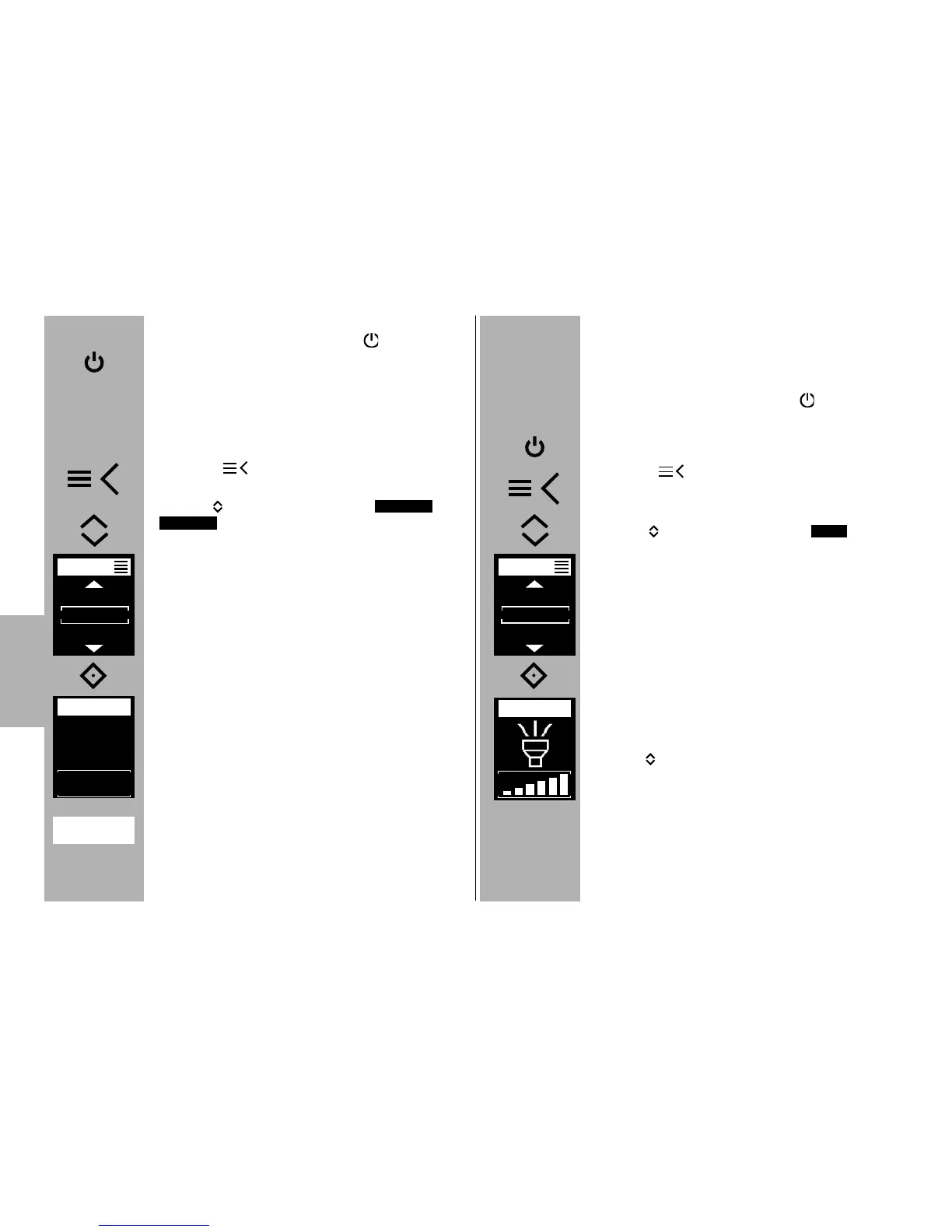
Setting the mode of operation
• Switch on the flash unit with the
button.
The start screen appears. Thereafter, the flash
unit always switches on with the mode of operati-
on that was used last .
• Tap the shutter release to transfer data between
the flash unit and the camera.
• Press the button and the drop-down
menu will appear.
• Use the buttons to select the or
operating mode..
• Press the
° button and confirm the selected
operating mode.
The setting will take effect immediately.
Second curtain synchronisation (REAR) is automati-
cally deactivated when the flash unit is set to high-
speed synchronisation HSS!
TTL HSS
M HSS
7.5 LED Video Light
With the LED and video light modes, you can exami-
ne recordings of moving pictures at close range.
Setting the mode of operation
• Switch on the flash unit with the
button. The start screen appears. Thereafter, the
flash unit always switches on with the mode of
operation that was used last.
• Press the button and the drop-down
menu will appear.
• Use the buttons to select the opera-
ting mode.
• Press the
° button and confirm the selected
operating mode.
• Use the buttons to select the desired bright-
ness.
The setting will take effect immediately.
LED
MODE
TTL
TTL HSS
M
MODE
MHSS
LED
MASTER
E
LED
EV
+1 1/3
6.9m
TTL
HSS
+



 To Next Page