
 Need help?
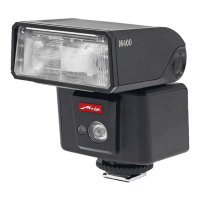
Do you have a question about the Metz mecablitz M400 and is the answer not in the manual?
Details on suitable batteries and their handling.
Instructions for attaching and removing the flash unit.
Procedure for powering the flash unit on and off.
Accessing and navigating the main operating mode menu.
Accessing and configuring various flash unit settings.
Displaying current flash unit settings and parameters.
Explanation of the automatic power-off function.
How the flash unit indicates it is ready for use.
Indication of whether the exposure was correct after a shot.
Shows the currently selected flash mode on the display.
Displays the calculated maximum flash range.
Range indication in manual flash mode.
How to interpret when the display range is exceeded.
Simple, automatic flash mode for general photography.
TTL and ADI metering for precise flash exposure control.
Manually controlling flash output power.
Using flash with faster shutter speeds than normal sync.
Using the flash as a continuous LED video light.
Saving and loading custom flash settings.
Adjusting the reflector's zoom for coverage.
Automatic adjustment of zoom position to lens focal length.
Manual adjustment of zoom position to lens focal length.
Using the integrated wide-angle diffuser.
Using the MBM-04 diffuser accessory.
Setting up the flash unit as a remote master.
Configuring the wireless communication channel.
Selecting the flash mode for the master unit.
Setting the master to Remote TTL mode.
Setting the master to Remote Manual mode.
Activating and deactivating ratio control for lighting.
Setting exposure shares for master and slave groups.
Using the flash unit as a remote slave.
Configuring the flash unit for remote slave operation.
Setting the communication channel for slave units.
Assigning slave units to groups (RMT, RMT2).
Adjusting partial light output for slave units.
Setting exposure compensation for slave units.
Simple slave mode triggered by a light pulse.
Configuring the flash unit for SERVO mode.
Adjusting pre-flash settings for SERVO mode.
Setting partial light output for SERVO mode.
Adjusting slave unit to camera flash technology.
Step-by-step guide for the learn function.
Automatic adjustment of reflector zoom to focal length.
Manual adjustment of reflector zoom to focal length.
Controlling the AF auxiliary light function.
Softening light and reducing shadows using bounced flash.
Using a reflector card for catchlights in portraits.
Automatic adjustment of shutter speed to flash sync speed.
First curtain sync, standard for most flash shots.
Using slower shutter speeds to capture background detail.
Flash triggers at the end of the exposure time for motion trails.
Adjusting the screen brightness.
Selecting display units for range (meters or feet).
Information on updating the flash unit's firmware.
Procedure for maintaining the flash capacitor after long disuse.
Resetting the flash unit to its original factory settings.
 General
| Type | Slave flash |
|---|---|
| Material | Metal, Plastic |
| Flash modes | Auto, Fill-in, High-speed synchronization, Manual |
| Swivel head | Yes |
| Display type | LED |
| Product color | Black |
| Zoom reflector | Motor |
| Color temperature | 5600 K |
| Focal length range | 24 - 105 mm |
| Approximate recycling time | - s |
| Camera brands compatibility | Pentax |
| Brand specific flash systems | TTL |
| Guide number (ISO 100, set at 35mm zoom) | 40 m |
| Battery type | AA |
| Power supply type | Battery |
| Number of batteries supported | 4 |
 Weight and Dimensions
| Depth | 87 mm |
|---|---|
| Width | 65 mm |
| Height | 92 mm |
| Weight | 220 g |


 To Next Page
