EasyManua.ls Logo

MFJ MFJ-213 - Li-Ion Battery Charge (4.Chr); Bluetooth Link; Frequency Selection; Variable Tuning

Default Icon
24 pages
Print Icon
To Next Page IconTo Next Page
To Previous Page IconTo Previous Page
Loading...
MFJ-213
HF/VHF/UHF
Antenna
Analyzer
Instruction
Manual
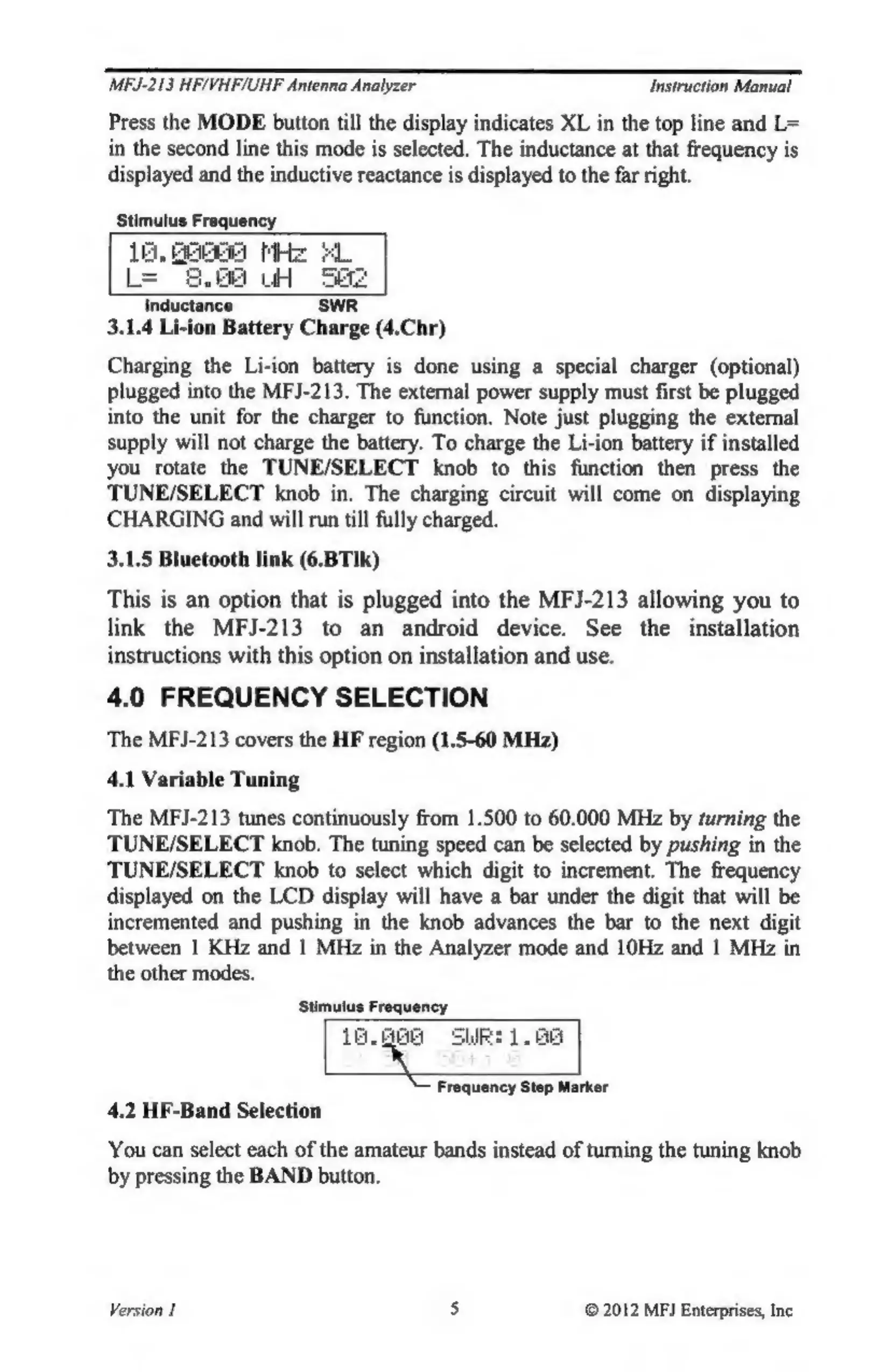
Press
the
MODE
button
till
the
display
indicates
XL
in
the
top
line
and
L=
in
the
second
line
this
mode
is
selected.
The
inductance
at
that
frequency
is
displayed
and
the
inductive
reactance
is
displayed
to
the
far
right.
Stimulus
Frequency
18,
oi
MHz
L=
WH
Inductance
SWR
3.1.4
Li-ion
Battery
Charge
(4.Chr)
Charging
the
Li-ion
battery
is
done
using
a
special
charger
(optional)
plugged
into
the
MFJ-213.
The
external
power
supply
must
first
be
plugged
into
the
unit
for
the
charger
to
function.
Note
just
plugging
the
external
supply
will
not
charge
the
battery.
To
charge
the
Li-ion
battery
if
installed
you
rotate
the
TUNE/SELECT
knob
to
this
function
then
press
the
TUNE/SELECT
knob
in.
The
charging
circuit
will
come
on
displaying
CHARGING
and
will
run
till
fully
charged.
3.1.5
Bluetooth
link
(6.BTIk)
This
is
an
option
that
is
plugged
into
the
MFJ-213
allowing
you
to
link
the
MFJ-213
to
an
android
device.
See
the
installation
instructions
with
this
option
on
installation
and
use.
4.0
FREQUENCY
SELECTION
The
MFJ-213
covers
the
HF
region
(1.5-60
MHz)
4.1
Variable
Tuning
The
MFJ-213
tunes
continuously
from
1.500
to
60.000
MHz
by
turning
the
TUNE/SELECT
knob.
The
tuning
speed
can
be
selected
by
pushing
in
the
TUNE/SELECT
knob
to
select
which
digit
to
increment.
The
frequency
displayed
on
the
LCD
display
will
have
a
bar
under
the
digit
that
will
be
incremented
and
pushing
in
the
knob
advances
the
bar
to
the
next
digit
between
1
KHz
and
|
MHz
in
the
Analyzer
mode
and
10Hz
and
1
MHz
in
the
other
modes.
Stimulus
Frequency
a
You
can
select
each
of
the
amateur
bands
instead
of
turning
the
tuning
knob
by
pressing
the
BAND
button.
-
88
Frequency
Step
Marker
4.2
HF-Band
Selection
Version
1
5
©
2012
MFI
Enterprises,
Inc

Related product manuals