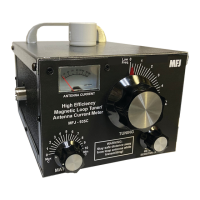
MFJ-935C High-Efficiency Magnetic Loop Tuner Instruction & Technical Manual
Step 3 Setup the MFJ-935C High-Efficiency Magnetic Loop Tuner/Antenna Current Meter™ as
illustrated in Figure 6.
Step 4 Set the controls to the following positions:
• TUNING control to Position 0.
• MATCHING control to Position 10.
• METER SENSITIVITY control to the fully counterclockwise position.
Step 5 Tune the transceiver to the desired frequency then adjust the controls for maximum noise
and S-Meter reading. The tuner will produce a peak in both when the proper positions for the
controls are achieved. The recommended process consists of the following steps:
• Slowly rotate the TUNING control clockwise while listening for a peak until you reach
Position 5.
• If no peak is found, re-position the TUNING control to Position 0.
• Rotate the MATCHING control counter-clockwise one step to Position 9.
• Slowly rotate the TUNING control clockwise while listening for a peak until you reach
Position 5.
• If no peak is found, re-position the TUNING control to Position 0.
• Rotate the MATCHING control counter-clockwise one more step to Position 8.
• Slowly rotate the TUNING control clockwise while listening for a peak until you reach
Position 5.
• Repeat this sequence until the MATCHING control reaches Position 0.
• If no peak is found, the loop length is incorrect for the frequency of interest. At this point
refer to Tables 3a and 3b for the most efficient loop lengths.
• Once a peak is found, alternately adjust the TUNING and MATCHING controls until the
peak is maximized.
Step 6 Apply 10 to 20 Watts of power to the MFJ–935C and adjust the TUNING control for
maximum RF current and the MATCHING control for minimum SWR on your external
SWR/Wattmeter. Readjust the TUNING control for maximum RF current. Repeat this sequence
until you see no further improvement in minimum SWR and maximum RF current. Be sure to
adjust the RF current meter to center scale using the METER SENSITIVITY control as you make
the other adjustments.
Step 7 Once you are satisfied that the adjustments and settings are correct, you can increase the
power to 150 Watts if desired. Be sure that MPE distance standards as defined in Supplement B of
the FCC OET Bulletin 65, version 97-01 are met. Should any arcing be detected, stop
transmitting and check connections and proximity to objects that may be suspect. If arcing seems
to be inside of the MFJ–935C, lower the output power and re-check for arcing.
As a courtesy to our fellow hams, for safety, and to stay within FCC regulations you should use
the minimum power needed for communications. Power levels of 20 to 50 Watts often provide very
reliable communications. The difference between 50 and 100 Watts is less than half of an S-Unit
and is generally not noticeable on the receiving end.
-12-


 To Next Page