115114
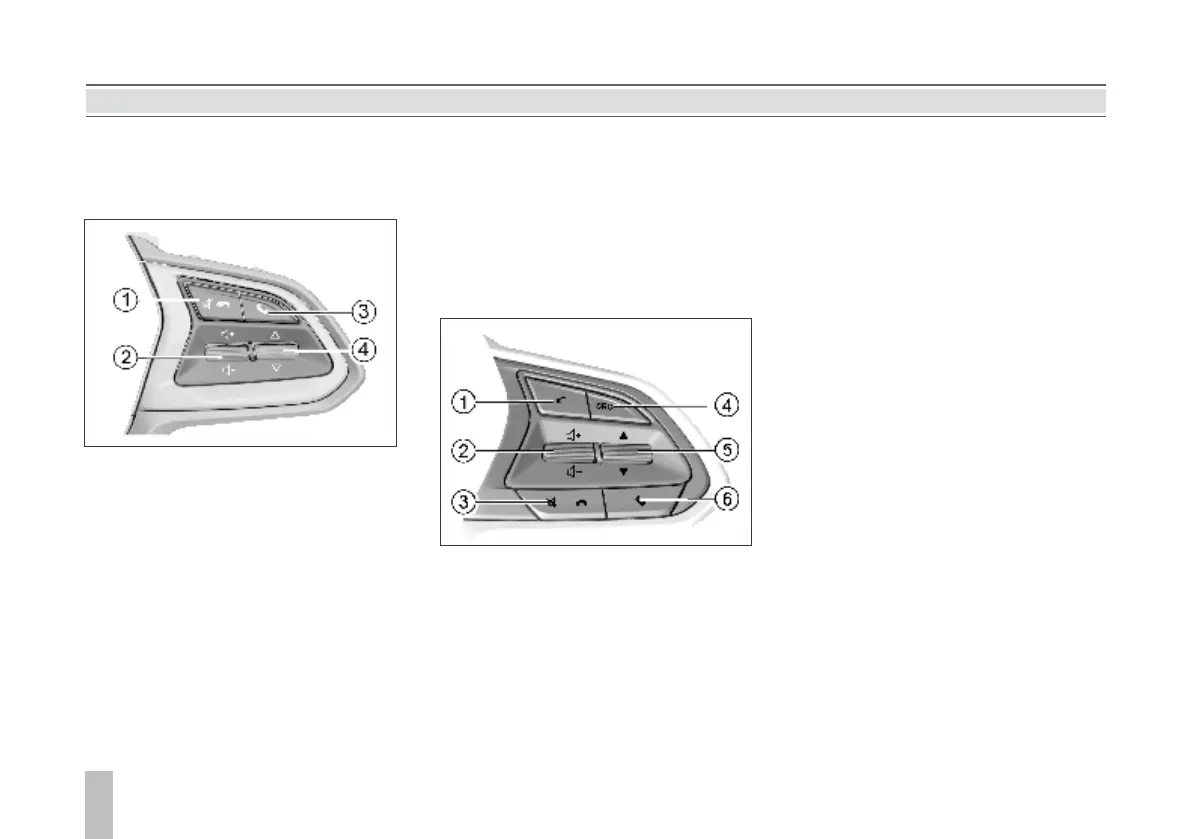
Audio Control Buttons on
Steering Wheel*
Type I
Type II
1. Mute or Call Hangup Button
It is used to sound off or hang up a Bluetooth
telephone call.
2. Volume Adjustment Thumbwheel
Pull the thumbwheel up and down to adjust
the sound volume.
3. Bluetooth Setup or Call Answer
Button
Press the button to enter the Bluetooth
interface or answer the Bluetooth telephone
call.
1. Reserved Button
It is reserved with no role to play for the time
being.
2. Volume Adjustment Thumbwheel
Pull the thumbwheel up / down to increase /
decrease the volume.
3. Mute or Call Hangup Button
It is used to sound off or hang up a Bluetooth
telephone call.
4. Song Selection / Station Switch
Thumbwheel
Pull the thumbwheel up and down to select the
station or song.
4. Audio Source Selection Button
Press the button to switch among audio
sources such as radio / USB / Bluetooth music.
5. Song Selection / Station Switch
Thumbwheel
Pull the thumbwheel up / down to select the
next / previous station or song.
6. Call Answer Button
Press the button to answer Bluetooth phone
calls or enter the Bluetooth interface.
AUDIO ENTERTAINMENT SYSTEM AUDIO ENTERTAINMENT SYSTEM
Driver Information and Entertainment
As the model configuration or the supporting manufacturers are different, the audio entertainment system function, the display interface and the
operation method may be different, such as video and entertainment, navigation, reverse camera, Bluetooth and telephone calls. For details about
functional introduction and description of the audio entertainment system, please refer to the Vehicle Audio System Instructions placed in the glove box.
Inspection before Repair
If you feel a bit of misgiving about certain audio function, before driving the vehicle to the Service Center for repair, please first read the directions given in
the product instructions carefully and then check and operate according to the following table. This can help you remove the fault.
The host does not work and no information is shown on the screen. Take out the host from the instrument panel, and then check the host fuse and
connector to the vehicle.
The host works but no sound can be heard or the sound volume is very low. Increase the sound volume and check the front/rear and left/right balance setup of the horn.
The device body is a little hot. The device heats normally as it works.
The radio cannot search for the desired station. Inspect whether the antenna is fully stretched and connected correctly.
Inspect whether the antenna amplifier in the vehicle has been damaged.
Signal of the desired station is too weak and please tune manually.
Certain audio files cannot be played via USB connection. Please confirm whether the device supports such audio files. Refer to the vehicle audio
system instructions.
The sound volume fluctuates as MP3 songs are played. As MP3 songs are of wide sources and no uniform standard applies. The reason can be
that the volumes of MP3 songs are different as they are compressed. Please turn the
volume knob to adjust in case of this.
The singer/track/song name cannot be displayed. The device does not support text display of the audio file.
The music pauses intermittently as it is played. The reason can be that the format of the music file is different as it is compressed.
Songs stored in the memory device cannot be read. Please confirm that the storage partition form of the memorizer is FAT16 or FAT32 as
it is checked in the computer; if not, please make new setup on the computer to
change the format into a standard applicable to the device requirement.
MP3 songs cannot be read via an all-in-one USB adapter. This device only supports song reading via an adapter with only one USB port.
Noise can be heard. The noise can be produced by the device used to record the original audio file or it
may be the noise existed at the time of recording. Please use other players to play the
file and then confirm whether the problem lies in this device.
If the fault still cannot be removed, please go to the MG Authorised Service Center for inspection. Never disassemble the host to repair it on yourself.



 To Next Page