Copyright © 2009-2013 Micca, LTD. All rights reserved.
3 Connections and Buttons
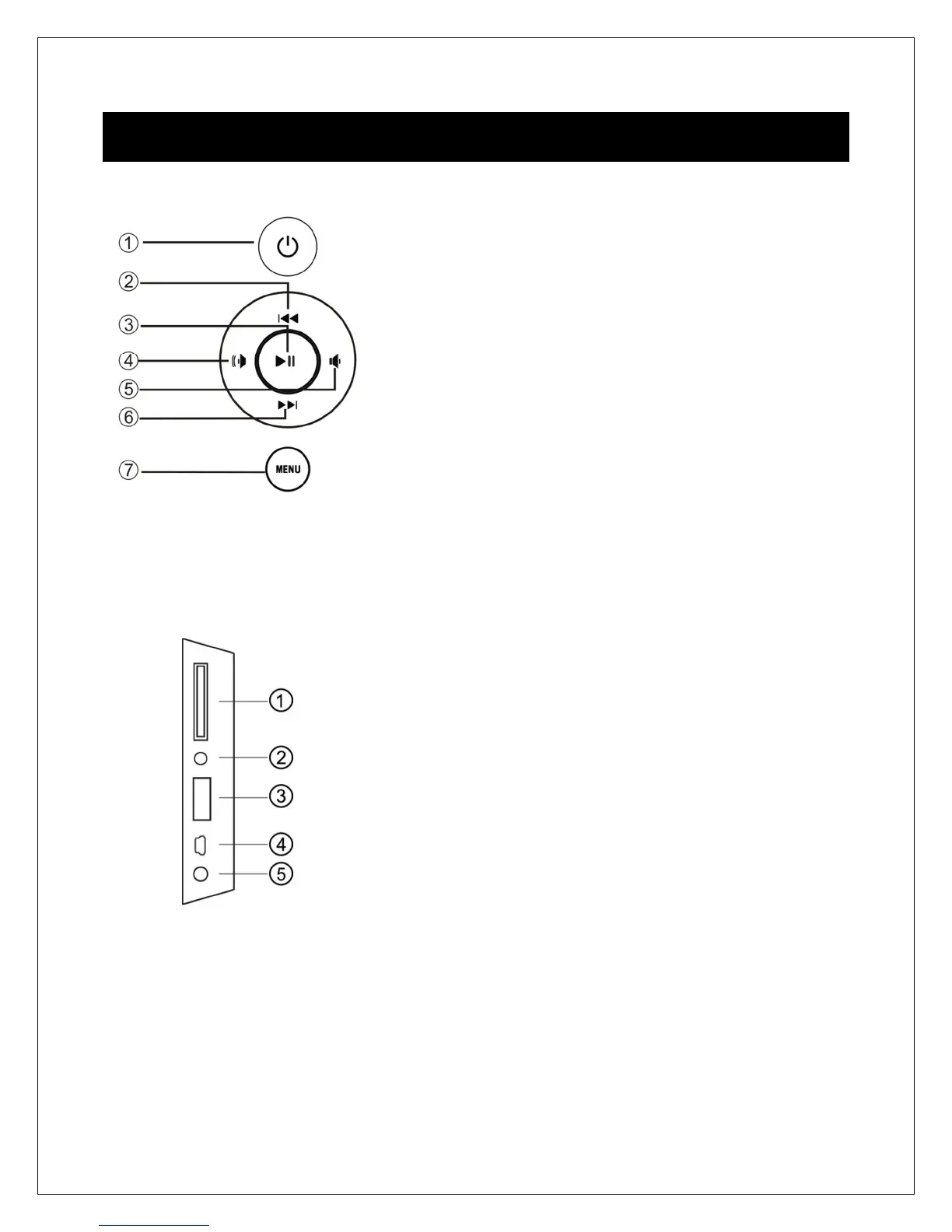
3.1 Buttons
1. Power
2. Up/Previous
3. Play/Pause or Enter
4. Right/Volume+
5. Left /Volume-
6. Down/Next
7. Menu (Long Press) or Return (Short Press)
Note: The left and right buttons are named in accordance of their function when the
user is looking at the front of the photo frame. Thus, pressing the “Left” button will move
the cursor to the left and the “Right” button will move the cursor to the right.
3.2 Connections
1. SD/SDHC Card Reader
2. Headphone Output
3. USB 2.0 Port
4. Mini USB Port (Optional)
5. DC Power Input
Note: Only use the AC adapter that is provided with the digital photo frame. Using a
different AC adapter may damage the unit. The Mini USB port is optional and may not
be present.



 To Next Page