Copyright © 2009-2013 Micca, LTD. All rights reserved.
3.3 Remote Control
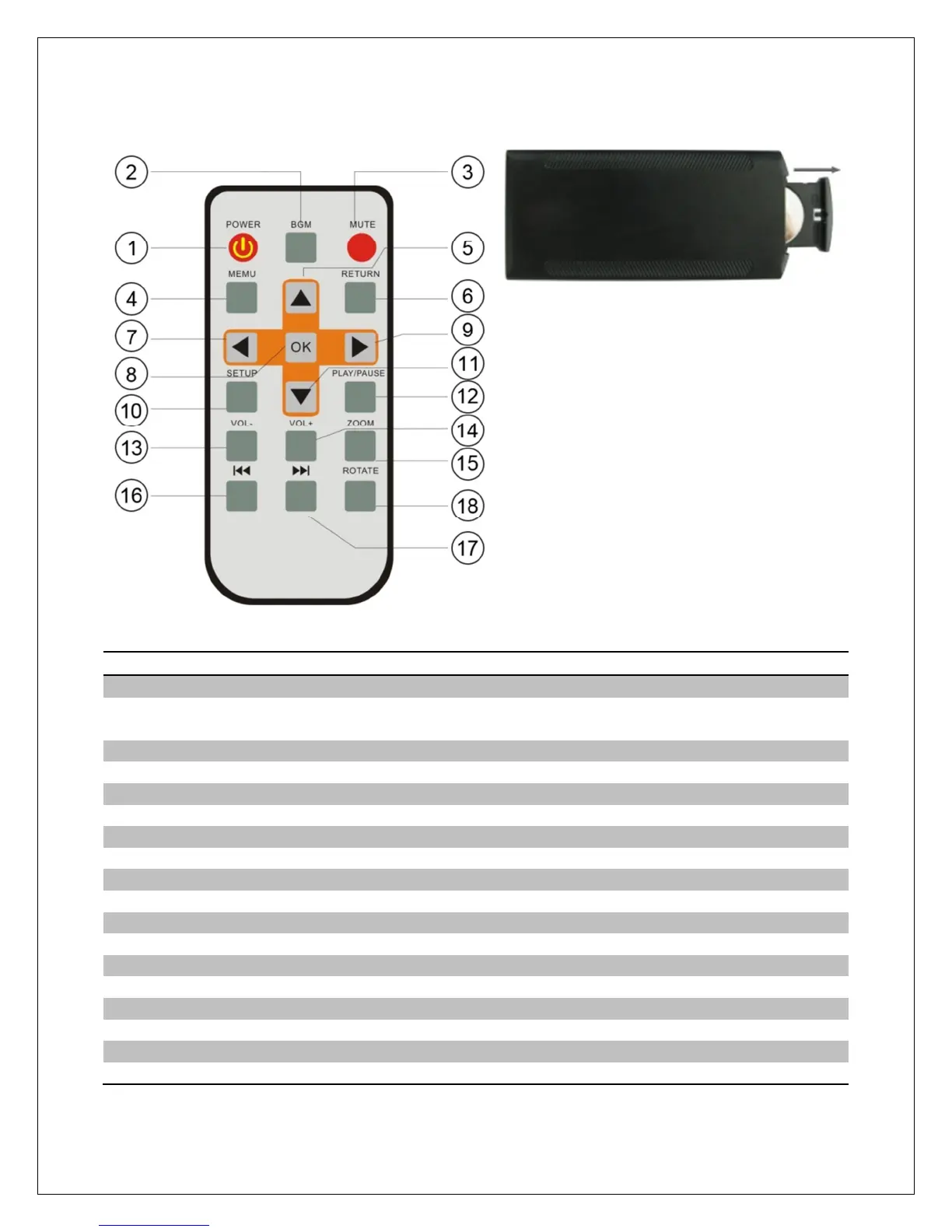
To replace the battery in the remote,
place the remote control face down,
press down on the ridged area of the
battery cover and pull towards you to
remove the tray. Place one CR2025
lithium button-cell battery on the tray
with the positive “+” side facing you.
Reinsert the tray.
Power Turn the photo frame on or off
BMG Start a slideshow with background music (background music
must be enabled in the settings menu)
Mute Mute or unmute the sound output
Menu Return to the main menu
Up Move cursor up, or go to previous photo during slideshow
Return Go back to the previous step or screen
Left Move cursor left, or fast-forward during music or video playback
OK Play or pause photo slideshow, music, or video
Right Move cursor right, or rewind during music or video playback
Setup Go to the setup menu
Down Move cursor down, or go to next photo during slideshow
Play/Pause Play or pause photo slideshow, music, or video playback
Volume- Decrease the volume during music or video playback
Volume+ Increase the volume during music or video playback
Zoom Zoom in when viewing a photo (slideshow must be paused)
Previous Go to previous file during music or video playback
Next Go to next file during music or video playback
Rotate Rotate a photo 90 degrees (slideshow must be paused)



 To Next Page