28 ACDC200LCD
TROUBLE SHOOTING CHART
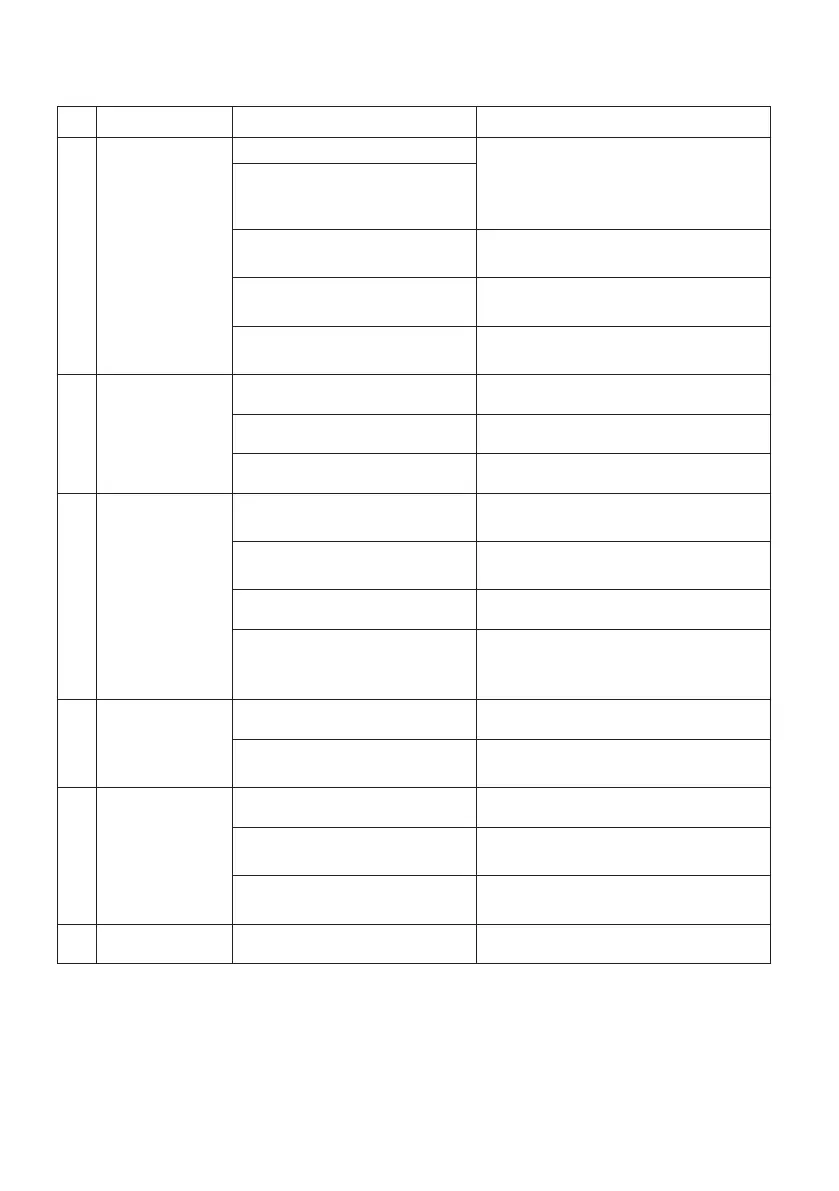
No Breakdown Analysis Solutions
1
Yellow
Indicator is on
Voltage is too high (≥15%) Switch o power source; Check
the main supply; Restart welder
when power recovers to normal
state.
Voltage is too low (≤15%)
Bad power ventilation lead
to over-heat protection
Improve the ventilation
condition.
Circumstance temperature
is too high.
It will automatically recover when
the temperature has lowered.
Using over the rated
duty-cycle.
It will automatically recover when
the temperature has lowered.
2
Cooling Fan
not working
or turning
very slowly
Switch broken Replace the switch
Fan broken Replace or repair the fan
Wire broken or falling o Check the connection
3
Arc is not
stable and
splash is large
Too large contact tip makes
the current unsteady
Change the proper contact
tip or roller
Too thin power cable makes
the power asceticism
Change the power cable
Too low input voltage Enhance the input voltage
Wire feeding resistance is
too large
Clean or replace the liner and the
torch cable had better in the line
direction.
4 Not arcing
Earth cable break Connect earth cable
Work piece has grease or
rust on it.
Clean grease or rust
5
No shielded
gas
Torch is not connected well Connect the torch again
Gas pipe is pressed or
blocked up
Check gas system
Gas system
rubber pipe break
Connect gas system
and bind rmly
6 Other Please contact Total Tools


 To Next Page