26
Troubleshooting
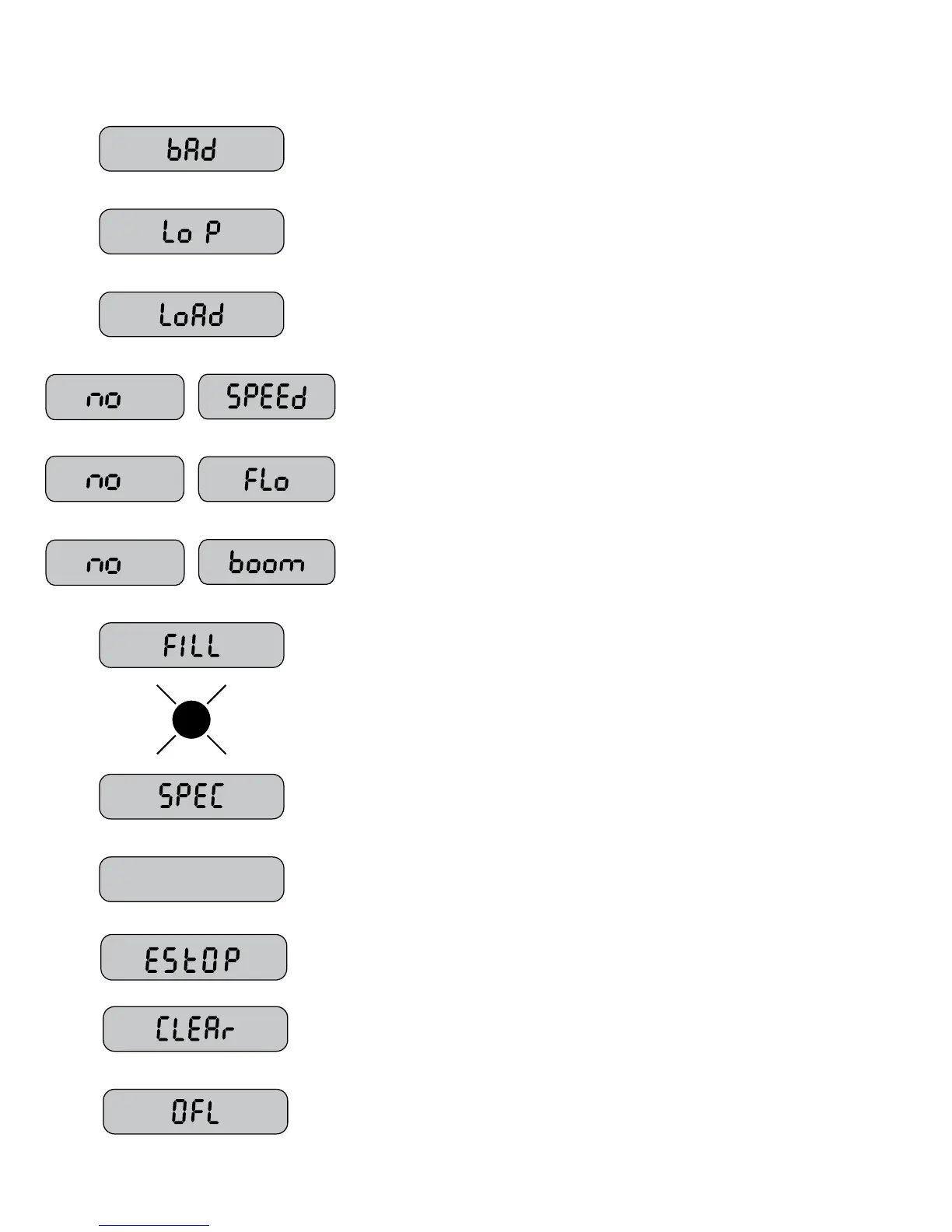
Messages / Warnings
V
CAL
If this message appears, check and verify all calibration values before using
the console. It indicates that there may have been a problem with storing
calibration values. Cycling power will not clear the bad CAL message, it can
only cleared by entering and exiting calibration mode.
Low Power. Check all power and ground connections. After OFF button is
pressed and console powers down, this message is briey displayed.
Has loaded Default Cal factors (appears when default calibration factors are
loaded by holding CAL and “-” buttons while turning the console on).
Will ash in right-hand display with rotary switch in ANY position if there is
no Speed signal regardless of all other conditions. Check speed sensor and
connections per Troubleshooting section.
Will ash in right-hand display with rotary switch in ANY position if there should
be ow (In Run, some booms on, speed greater than 0) but no ow is detected.
Check owmeter and ow harness connections per Troubleshooting section.
Will ash in left hand display if rotary switch is in Width position, system is in
Cal mode and no booms are turned on. Make sure system is in run and a boom
switch is turned on, also check Run/Hold switch or sensor and connections.
Rotary switch in any position, FILL will ash if tank level is equal to or less than
tank set point. Fill tank and reset TANK counter by setting the rotary switch at
the TANK position and pressing the “+” button for one second. Check to make
sure TANK set point is properly calibrated.
Warn LED ashes when the Rate error is over 10% or Volume/Minute is below
the Minimum, or Tank is less than Tank Set Point. It is on steady when in CAL
mode or SPECIAL CAL mode or Test Speed.
Special Calibration mode is active. Appears when entering Special Calibration
mode (hold AUTO/MAN and CAL buttons while turning console on).
The “V” icon shows that a 12v control valve (not 8v) is currently selected. On
startup, the “V” is also displayed next to the software version #. (Console hours
displayed rst.)
The message alerts the user that the currently selected counter will be cleared
if held for 2 seconds. Also serves as a reminder to use “+” button to select
counters.
Counters (DISTANCE or AREA or VOLUME) have reached their maximum.
RESET (see page 31) to clear counters and resume counting.
System had an Emergency Stop. Check owmeter. Verify there is liquid ow
the tank is not empty.


 To Next Page