SMARTRELEASE
™
INSTRUCTIONS FOR USE IM-SMARTRELEASE REV E
INSTRUCTIONS FOR USE
TROUBLESHOOTING GUIDE
In order to quickly identify the source of the fogging problem and formulate the appropriate solution:
1. Assemble and pre-warm the system by turning on the camera, light source and monitor, white balance and adjust the focus
before the surgeon makes the skin incision to start the procedure (see Note 1 at bottom).
2. Observe for any sign of fogging.
3. Follow the troubleshooting steps below if problems occur.
Fogging—before
insertion into carpal
tunnel
Moisture inside camera coupler and
endoscope lens interface. A single
drop of moisture can cause fogging
at this juncture.
Disassemble and thoroughly dry endoscope lens
and camera coupler interface with alcohol or
anti-fog agent and sterile cotton swab
(See Note 1).
Pre-warm system by connecting light source and camera before
surgeon makes the skin incision (See Note 2).
Use anti-fog agent to dry before assembly.
Thoroughly dry endoscope lens and camera coupler interface
with cotton swab before assembly.
Moisture trapped within endoscope
between endoscope lens optics and
endoscope eyepiece.
Return to MicroAire Repair Center for repair.
Protect scope in its autoclave case (for Eyepiece Endoscope)
during processing or when not in use.
(See Note 3).
Fogging—after insertion
into carpal tunnel
Condensation due to temperature
difference between endoscope,
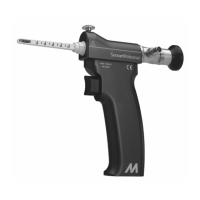
SmartRelease® Handpiece and
patient’s tissue.
Attempt to warm scope to patient’s tissue
temperature:
1. Keep device inside tunnel until scope warms to
body temperature, approximately 45 seconds.
2. Dip or wipe scope tip in sterile anti-fog agent
and wipe dry.
Pre-warm system by connecting light source and camera before
surgeon makes the skin incision (see Note 2). For the Eyepiece
Endoscope: If there is sufficient time between processing and the
skin incision, allow endoscope to air dry in its autoclave case
between procedures.
Moisture inside camera coupler and
endoscope lens interface. A single
drop of moisture can cause fogging
at this juncture.
Disassemble and thoroughly dry endoscope lens
and camera coupler interface with alcohol or
anti-fog agent and sterile cotton swab
(See Note 1).
For back-to-back cases without sufficient time between
processing and the skin incision, place the SmartRelease®
Handpiece and instruments into pan of sterile room temperature
water/saline immediately following autoclaving (see Note 4).
Excess fluid inside carpal tunnel.
Soak up fluid with sterile cotton swab.
Avoid injecting anesthetics into the carpal tunnel. Be sure
endoscope is completely dry after processing.
Moisture trapped within endoscope
between scope lens optics and scope
eyepiece.
Return to MicroAire Repair Center for repair.
Protect endoscope in its autoclave case
(for Eyepiece Endoscope) during processing or when not in use
(See Note 3).
Return to MicroAire Repair Center for repair.
Protect scope in its autoclave case (for Eyepiece Endoscope)
during processing or when not in use
(See Note 3).
OTHER TROUBLESHOOTING TIPS
Lock screw over-tightened.
Release blade lock screw, using scope to view
blade to ensure blade retraction.
If blade remains extended, separate the Blade
Assembly from SmartRelease® Handpiece, leaving
the Blade Assembly in carpal tunnel.
If blade is still extended, do not remove from
tunnel; convert to open procedure.
Tighten blade lock screw until finger tight. Do not over-tighten.
May result in blade not retracting.
Excessive Contact and/or friction
between the Endoscope and Blade
Assembly
Disconnect the endoscope from the handpiece
and release the trigger. Once the blade retracts,
discard the Blade Assembly and replace with a
new blade to continue the procedure.
Follow the surgical protocol by checking the fully assembled
device for correct operation, including blade elevation and
retraction prior to inserting the device into a patient
Debris lodged around trigger or
handpiece needing maintenance.
1. Clean device
2. If trigger continues to stick contact MicroAire.
Send handpiece back to MicroAire for maintenance and update.
NOTE:
1. Beware of contamination caused by disassembling the camera and the endoscope in the sterile field.
2. Assembly and pre-warming of the system prior to surgery helps prevent fogging due to temperature difference between the endoscope, SmartRelease®
Handpiece, and patient’s tissue. In addition, this step serves to check the equipment’s functionality and the clarity of the visualization system before the surgeon
makes the transverse incision to start the procedure.
3. Proper handling of delicate instruments extends the life expectancy of the endoscope. Always store the endoscope in its autoclave case for processing and
between uses.
4. Do not place the endoscope into cool sterile water or saline immediately following autoclave completion. The extreme temperature differences could cause
damage to the scope. The scope will quickly cool down on its own following autoclaving.


 To Next Page
 Loading...