YCables
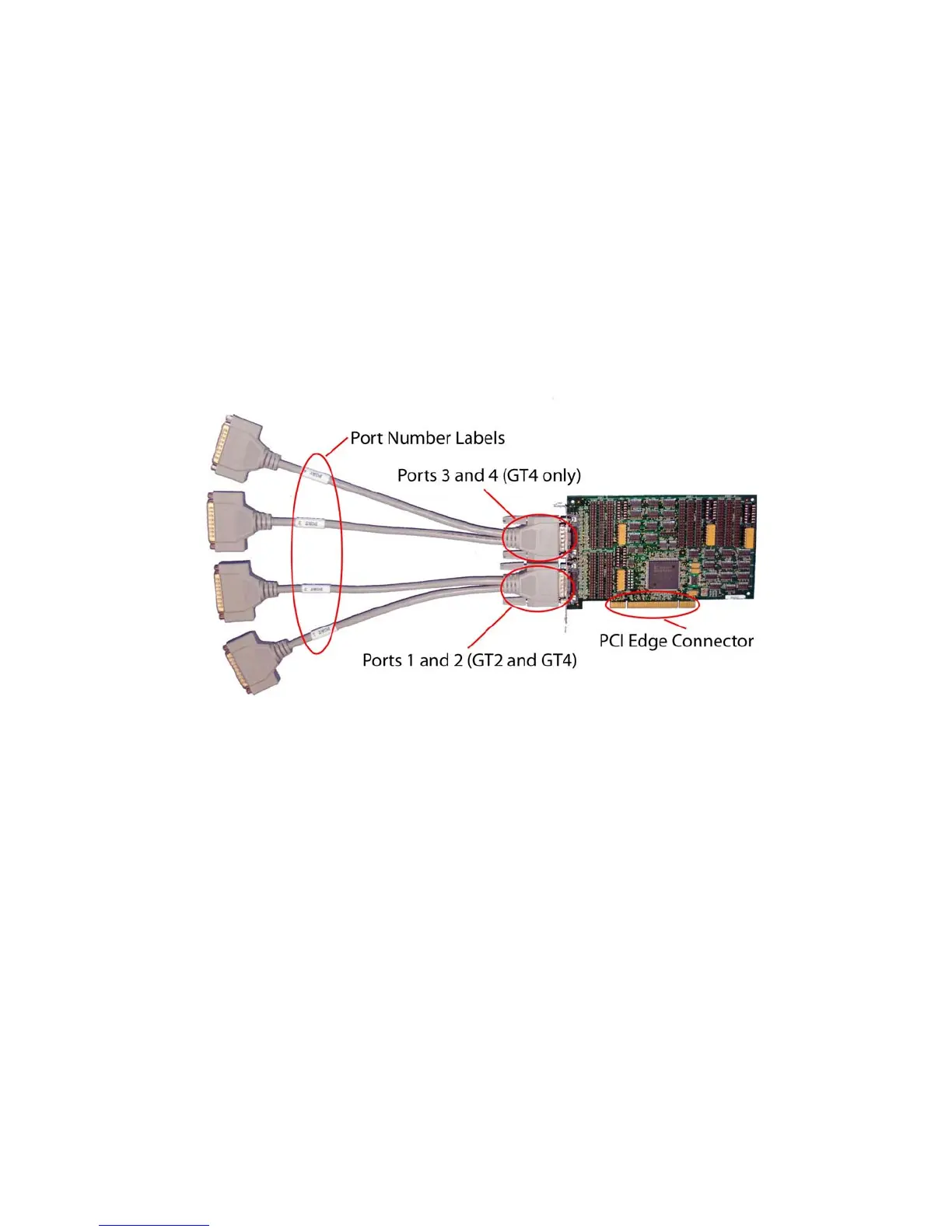
Thecardhastwo60‐pinconnectors,eachcarryingtwoports.Y‐cablesareincludedwiththecardto
converteach60‐pinconnectorintotwostandardDB‐25maleconnectors.TheGT2cardusesone60‐pin
connectorandincludesasingleY‐cableforatotalof2ports.TheGT4cardusesboth60‐pinconnectors
andincludestwoY‐cablesforatotalof4ports.EachbranchofaY‐cableislabeledwithaportnumber.
TheY‐cablelabeled1 and2shouldbeinstalledonthe60‐pinconnectorclosesttothePCIedge
connector(goldfingers).TheY‐cablelabeled3and4shouldbeinstalledonthe60‐pinconnector
farthestfromthePCIedgeconnector.
includedwiththecardto
converteach60‐pinconnectorintotwostandardDB‐25maleconnectors.TheGT2cardusesone60‐pin
connectorandincludesasingleY‐cableforatotalof2ports.TheGT4cardusesboth60‐pinconnectors
andincludestwoY‐cablesforatotalof4ports.EachbranchofaY‐cableislabeledwithaportnumber.
TheY‐cablelabeled1 and2shouldbeinstalledonthe60‐pinconnectorclosesttothePCIedge
connector(goldfingers).TheY‐cablelabeled3and4shouldbeinstalledonthe60‐pinconnector
farthestfromthePCIedgeconnector.
Note:TheserialcontrollerontheGT2hasonlytwoports.AddingaY‐cabletothesecond60‐pin
connectorofaGT2cardwillnotaddports3and4.
Note:TheserialcontrollerontheGT2hasonlytwoports.AddingaY‐cabletothesecond60‐pin
connectorofaGT2cardwillnotaddports3and4.
Figure1 Y‐CablesandPortNumbering



 To Next Page