Page 9
10、Functions in common use
1). How to answer the call and transfer the call to other indoor monitors
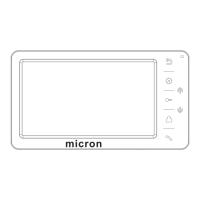
When call from door station or other indoor monitor, the indoor monitor(s) will
chime, short press to answer the call. If no one answers, the monitor(s)
shall be back to standby status after chime time end.
When the monitor is chiming, or when talk with visitor, short press can
unlock the door.
When talking with one door station, if some one calls at the other door station,
the screen will show relevant indication, short press can switch to talk
with the other visitor.
When at talking status, short press can transfer the call to other indoor
monitors.
When at talking status, short press will switch the screen to other
video channel and keep monitoring status; while back to the previous video
channel, the device will be back to talk status.
When at talking status, long press , the microphone will be disabled,
long press again can enable the microphone, screen will show
relevant indication when doing the above operations. The above operation is
only valid in the present calling, the microphone shall be enabled automatically
after the call ends.
2). How to use monitoring function
At standby status, short press to monitor Door 1, short press again can
switch to another video channel. When monitoring door station channel, short press
can talk to door station.
When talk with door station, short press can unlock the door. If enable
MONITOR UNLOCK function in advanced setting, user can short press to
unlock the door when monitoring door station.
If at CCTV status, the longest monitoring time is 4 hours.


 To Next Page