Formatting cards (PC)
There may be instances where you may wish to format a card in the USB CameraMate rather
than in a digital camera. There may also be times when you may be required or prompted to
format your card. As such please read the information in this section for information on format-
ting either CompactFlash or SmartMedia cards.
WARNING: Formatting a CompactFlash or SmartMedia card will completely erase all data cur-
rently stored on the card. If there are important images or files you wish to safeguard for later
use, make a backup copy on your hard drive, CDR drive, or other type of removable media.
Formatting CompactFlash or SmartMedia cards:
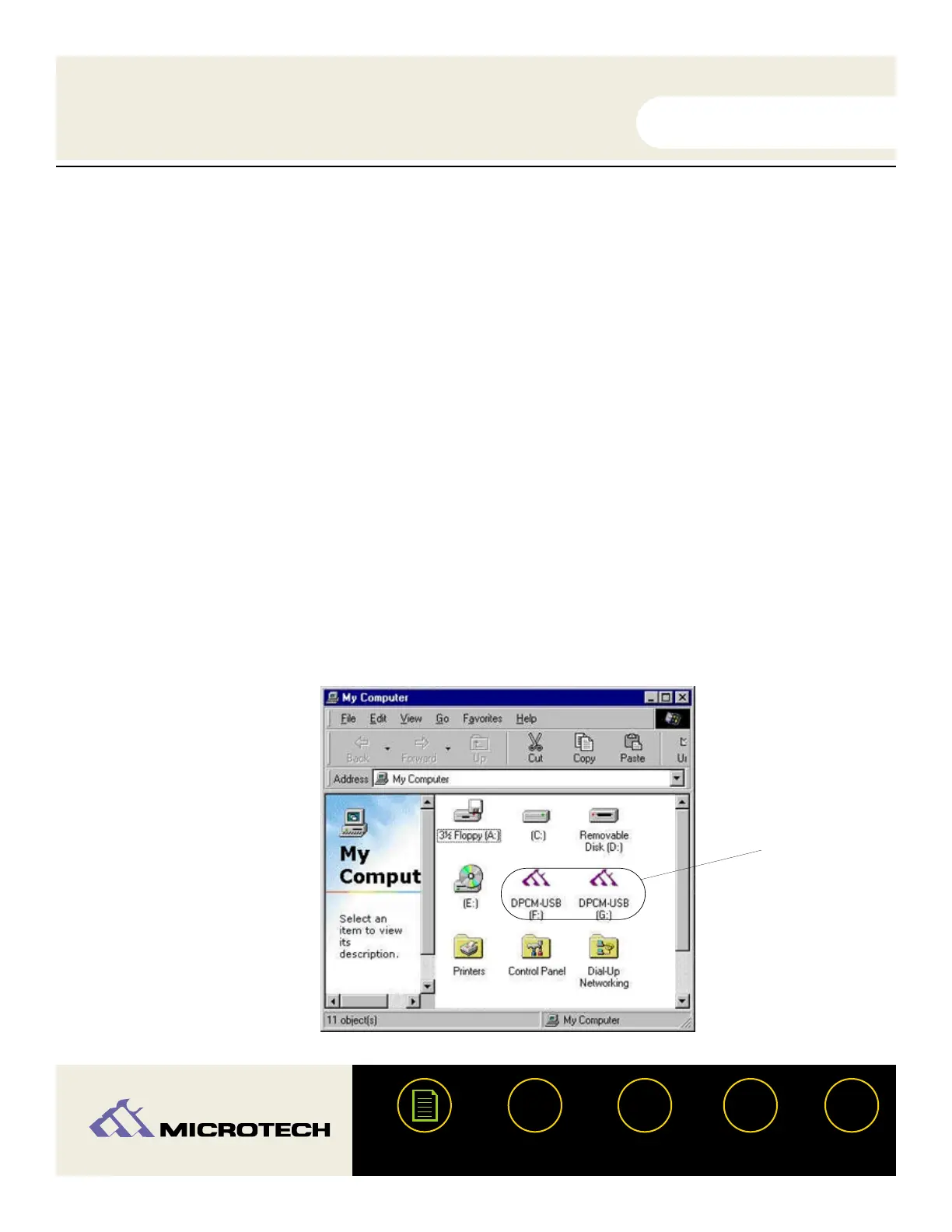
Double click "My Computer." You will see two DPCM-USB (CameraMate) icons, these are
removable drives.
If you are using a CompactFlash or a Microdrive, you should right click on the first DPCM
icon (F: in the picture provided), or the second DPCM icon (G: in the picture) if you are
using SmartMedia. A pop-up menu will appear. Select "Format."
USER'S
MANUAL
USER'S
MANUAL
USB CameraMate
?
HELP
CONTACT
NEXTBACK
CONTENTS
30
1.
2.
USB
CameraMate


 To Next Page