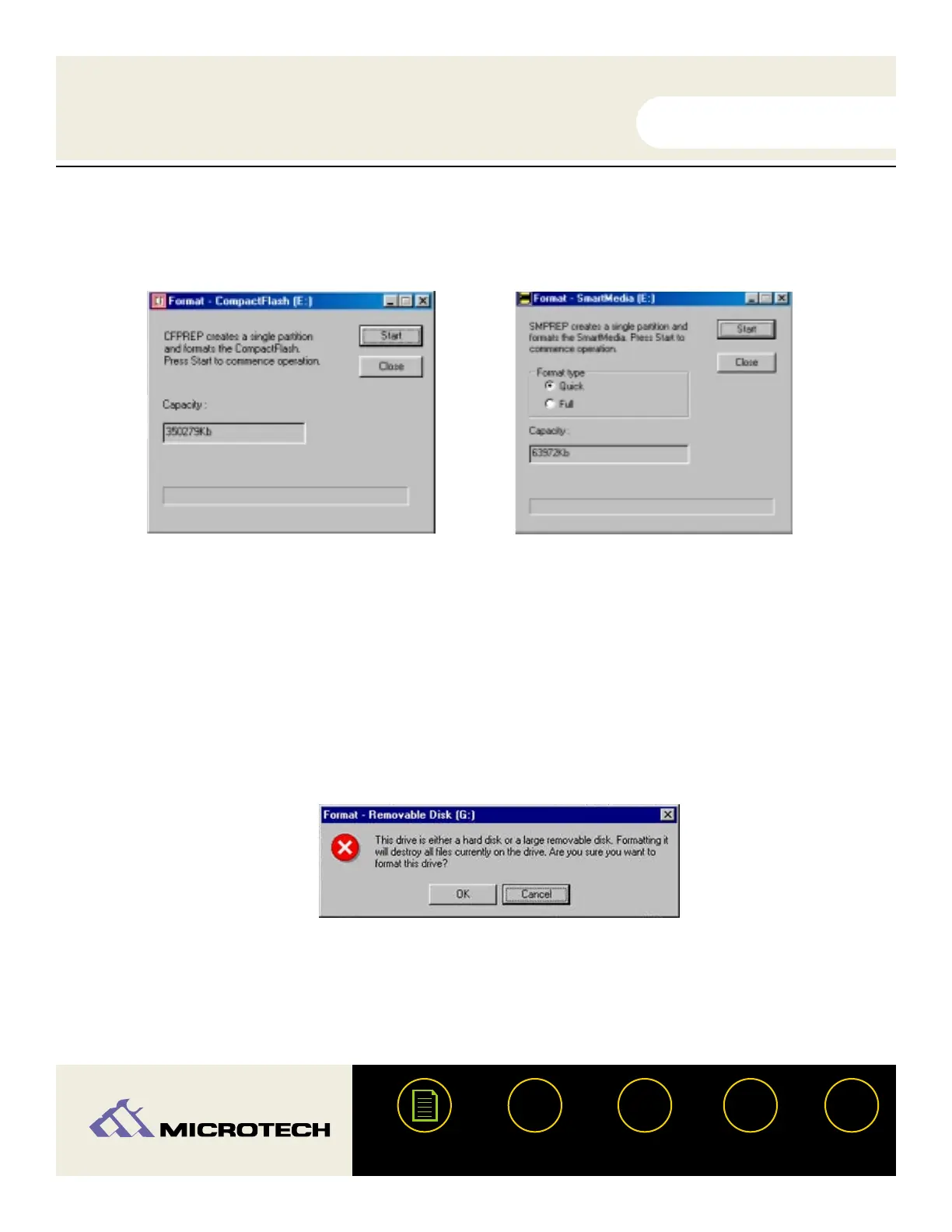
Select the format type. Depending on the type of card inserted, you will see a message
similar to one of the examples shown below.
Click "Start." A dialog will appear warning that you are about to erase everything on the
media.
Click "OK" to proceed. It will format the media and then bring up a format status screen.
USER'S
MANUAL
USER'S
MANUAL
USB CameraMate
?
HELP
CONTACT
NEXTBACK
CONTENTS
31
3.
4.
5.
CompactFlash format screen:
The CFPrep Utility will create a single formatted
partition on your CompactFlash card - no other for-
matting options are available.
SmartMedia format screen:
The SMPrep Utility provides two format options for
your SmartMedia card. The Quick format option is
selected by default, and recommended for general
use to erase data on your SmartMedia card. If you
experience problems with your SmartMedia, you
may wish to select the Full format option to com-
pletely erase and scan your SmartMedia card for
any bad data blocks.


 To Next Page