Connect to a Video Source
The SHOWWX+™ can connect to a variety of devices with TV-out such as an iPod, iPhone,
iPad, a laptop, cell phone, camera, and more. The following describes the connectivity
options available with the SHOWWX+.
How to Connect to an iPod, iPhone, or iPad
To see compatible devices with the SHOWWX: http://www.MicroVision.com/showwx/compatibility.html
Cable
SHOWWX+ Cable for iPod,
iPhone, and iPad
SHOWWX+ Composite Video
Adapter (NTSC/PAL)
SHOWWX+ VGA Dock
Connect SHOWWX+ to...
iPod, iPhone, or iPad with
Component TV-out
Any device with a male
RCA Video out connection
Laptop and PC devices
Included
Yes
Yes
No
Sold Separately
Yes
Yes
Yes
Note:
» While connected to an iPod, iPhone, or iPad
the Audio Jack on the iPod can also be used.
» To see compatible devices with the SHOWWX+
visit http://www.MicroVision.com/showwx/
12
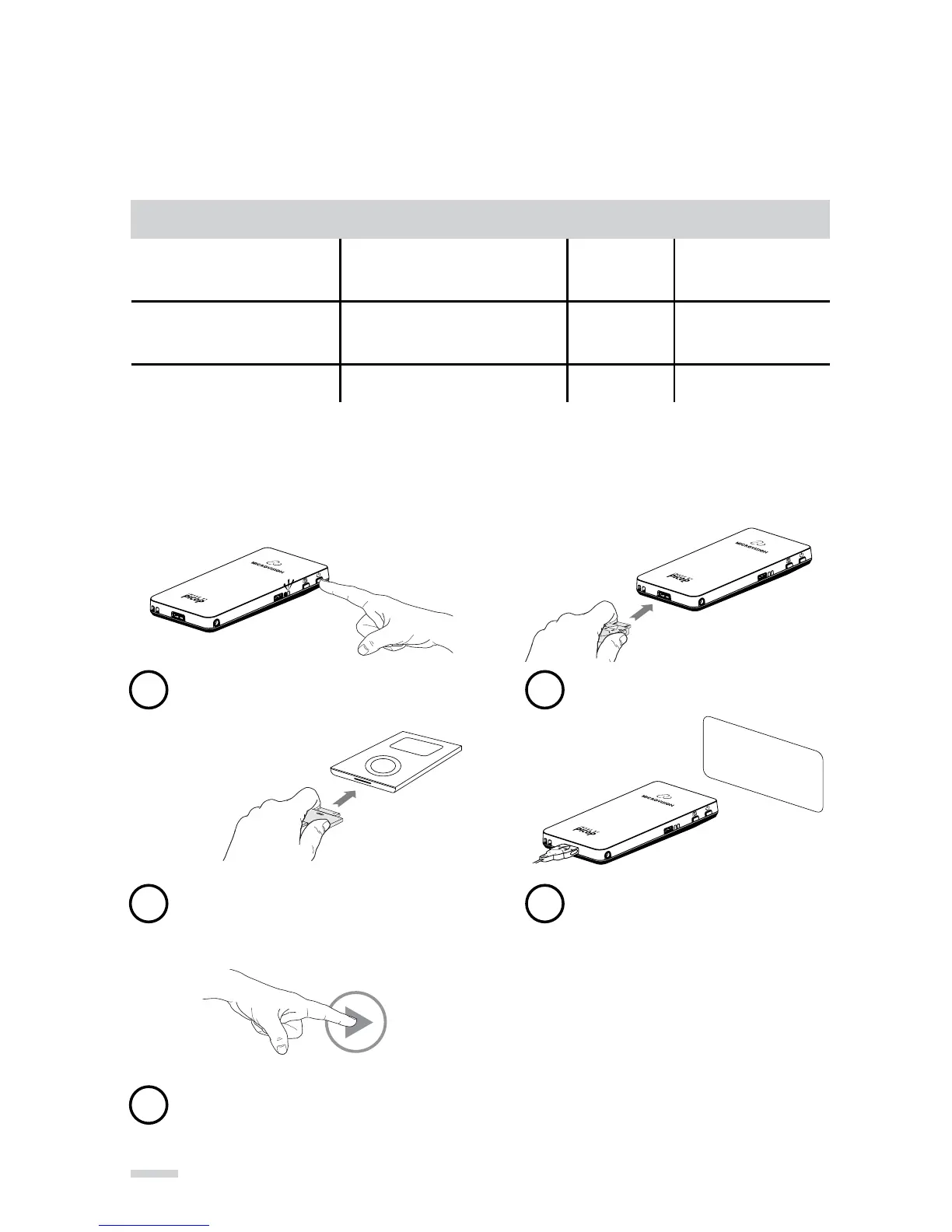
Power on the projector
1
Connect the cable to the projector
2
Connect the cable to the iPod, iPhone,
or iPad (already on)
3
Wait to see “Ready To Use” alert
4
Select Picture or Video content
and Press play on iPod, iPhone,
or iPad
5



 To Next Page