Manual Number 9019161 Revision C, August 18, 2023 22
4.4.1.1 BRIGHTNESS
The display brightness can be controlled with either an external voltage or automatically
using the integrated photocell. See Section 4.4 for further details. The Brightness feature in
the Options Menu allows the user to manually adjust or offset the display brightness up or
down regardless of the current level set by the External or Internal (automatic) brightness
control method.
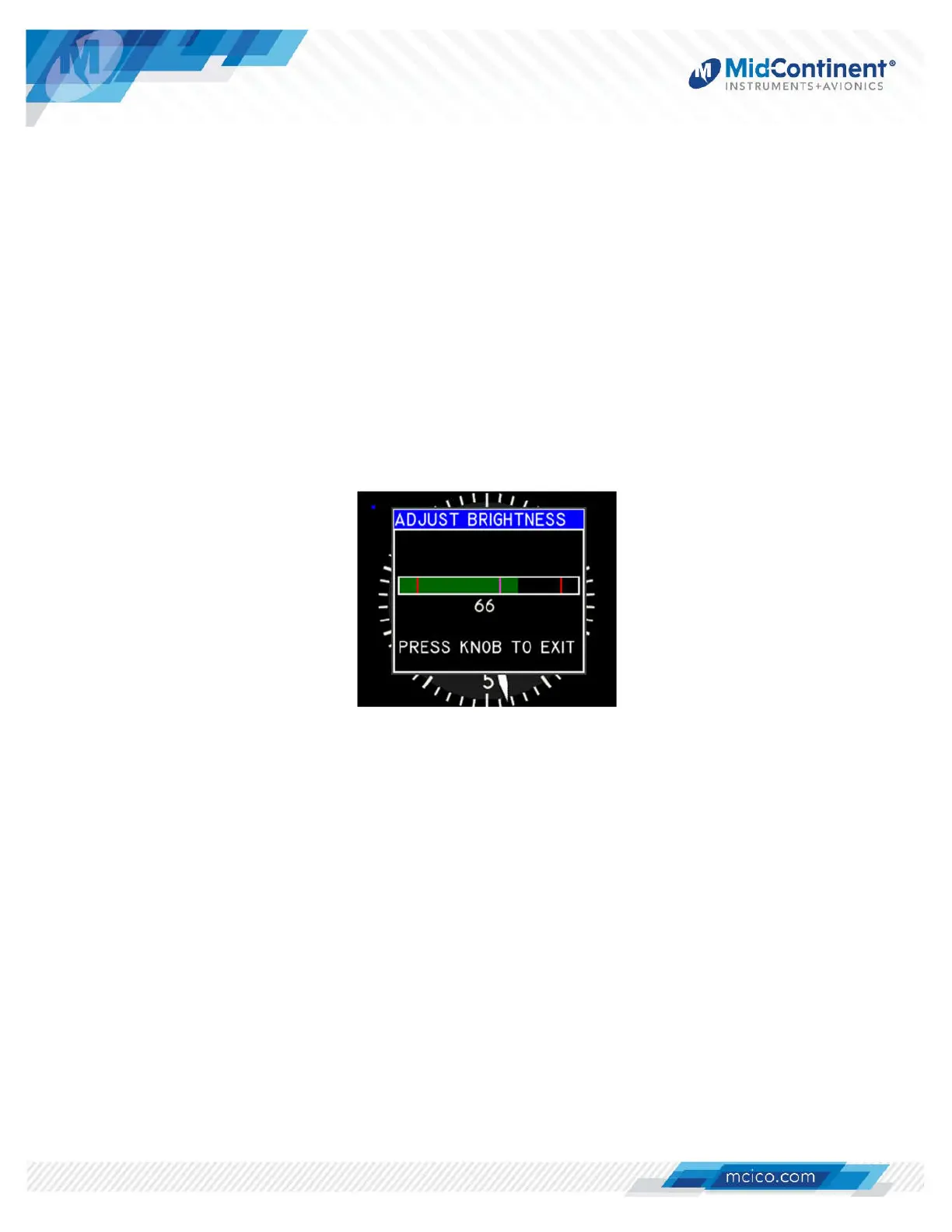
The Brightness adjust bar has the following elements: (Figure 4.4)
Full Box: 0-100% brightness range
Left Marker: Minimum brightness*
Center Marker: Current unadjusted brightness level;
per the external input or photocell response, as configured
Right Marker: Maximum brightness*
Green bar: Current brightness per manual adjustment/offset
* as determined by the Dimming Curve in Configuration Mode
Figure 4.4 Manual Brightness Adjustment
After selecting the Brightness menu option, the Brightness adjust bar will appear. Turning
the Control Knob will adjust/offset the display brightness (green bar) above or below the
current brightness level (center marker). Once set, the brightness will continue to be
controlled up or down with the preset control method, but with the adjusted offset applied. At
no time can the brightness exceed the minimum or maximum values programmed into the
Dimming Curve within Configuration Mode, regardless of the manual adjustment. The
manual brightness adjustment will be saved into memory, even after a power cycle.
Pressing the Control Knob will revert to the active display. Inactivity for approximately five
(5) seconds will also revert to the active display.
4.4.1.2 USER OPTIONS
The User Options menu is only available if the specific design of the loaded CID includes it.
This menu will include user selectable options that can be changed by the pilot or crew
during Flight Mode. See the applicable User Guide of the loaded CID for specific details.


 To Next Page