27
III. OTHER ADJUSTMENTS (MANAGER MODE)
A. PLC SYSTEM CONTROL AND OPERATION
When the PS638 Oven, Display, and PLC
are powered up by the ON-OFF Rotary
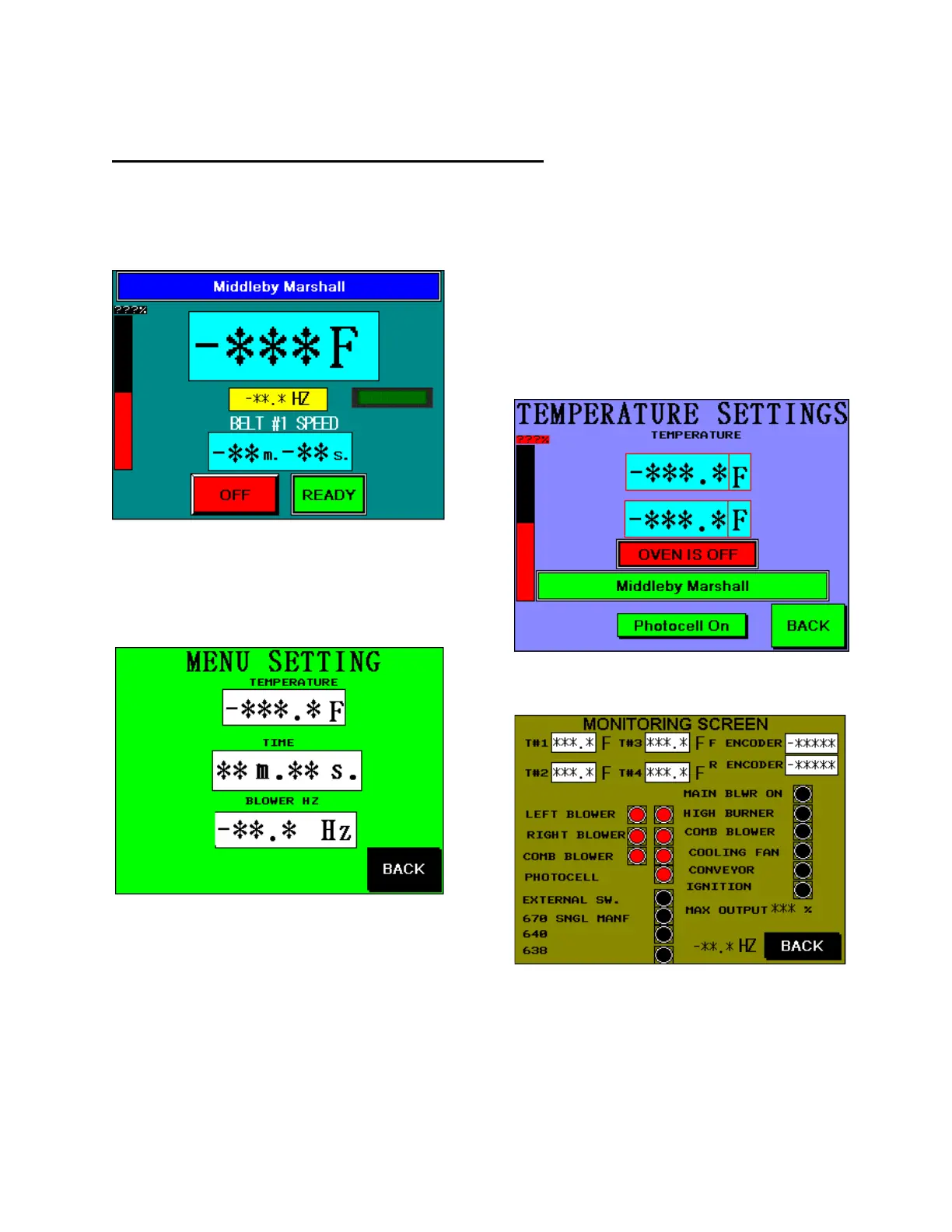
Switch, the following screen will appear:
Setting Temperature, Baking
Hertz, and Belt Speed
Press the yellow HZ box on the main
screen to pop the following MENU SETTING:
To change any set point, press on its box,
which will bring up a keypad screen.
Press the TEMPERATURE block, to
change temperature, then press “ENT”
button. Temperature set point is
adjustable with the oven on or off.
Press the [Bake] TIME block to enter a
new bake time.
Press the BLOWER HZ block to
change the BAKING Hertz setting.
When finished making bake adjustments,
press the BACK button. WAIT for the
main screen to display READY. Now the
oven is at the proper belt speed and
temperature for baking.
Pressing on the Temp Display – brings
up the set-point and actual temperature
displays. There is also a button to
enable/disable the optional photocell.
The MONITORING SCREEN Button
activates the next menu:
This is a monitoring screen, which not
only shows you temperatures and
encoder readings, but also PLC input and
relay status. It also shows what type of
oven the PLC is programmed for.



 To Next Page