6
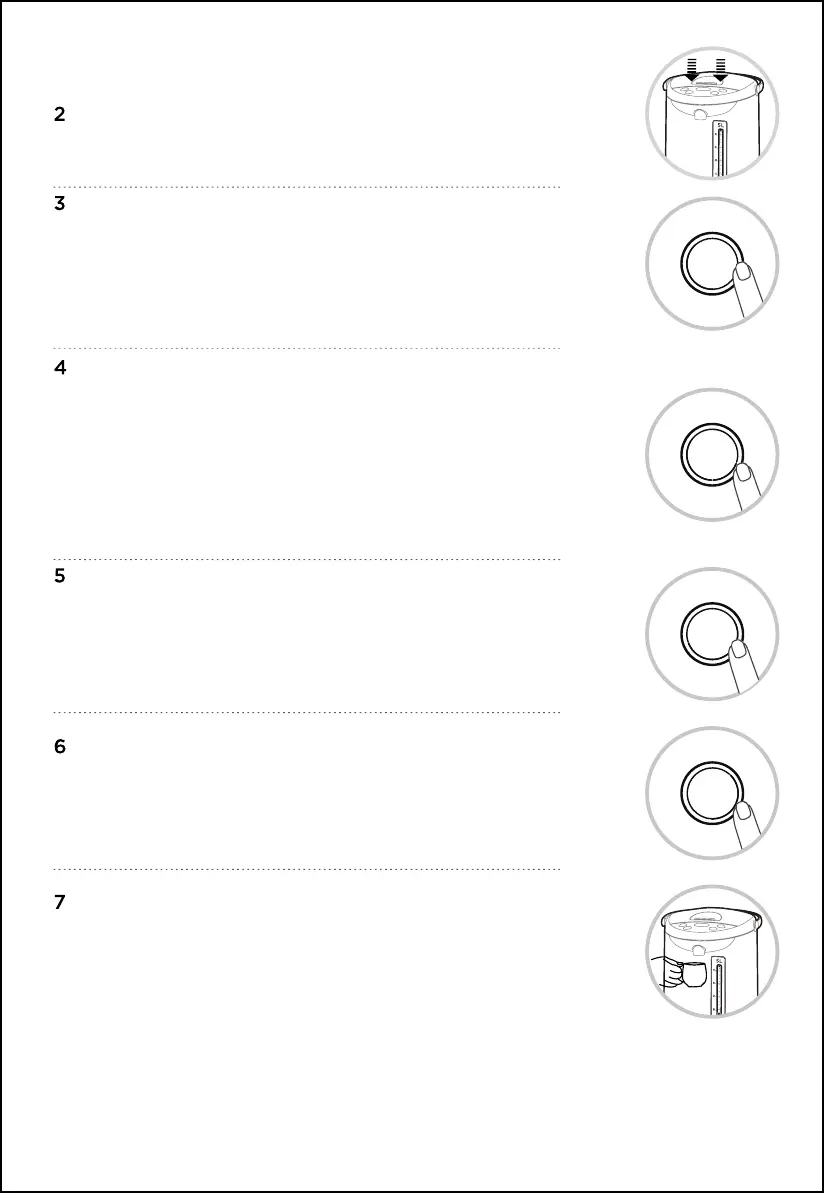
Close the top cover.
Turn on the power supply, all indicators light up, the buzzer sounds
a long time. After 1 second, all the button indicator light off, except
the “On/Off” button indicator flashes, and the kettle enters the
standby state. (If there is no operation for 30 seconds, the kettle
enters the “Shut Down” state, press the “On/Off” button to enter the
standby state.)
Click the “Boiling” button, select the “Tap Water” function (the “Keep
Warm” function is on by default). The “On/Off” button indicator light is
on constantly. The “Tap Water” function indicator light and the “Keep
Warm” indicator will flash for 5 seconds, after 5 seconds, the “Tap
Water” function indicator will light up constantly, the “Keep Warm”
indicator will keep on flashing,
and the kettle starts to work at the same time. After starting work,
click the “Boiling” button to switch between “Tap Water” and “Purified
Water” functions;
Click “Keep Warm” to select the “Keep Warm” temperature, cycle
through 45°C-55°C-65°C-85°C for selection; the corresponding
temperature point indicator flashes, after boiling, the temperature
drops until the pre-set “Keep Warm” temperature, and the
indicator lights up constantly.
Press the “Unlock” button and the unlock indicator lights up
constantly.
Place the water container under the water outlet and press the
“Pour out water” button to collect water, release the button to
stop water.
On/Off
Boiling
Keep
Warm
Unlock


 To Next Page