OPERATING MODES
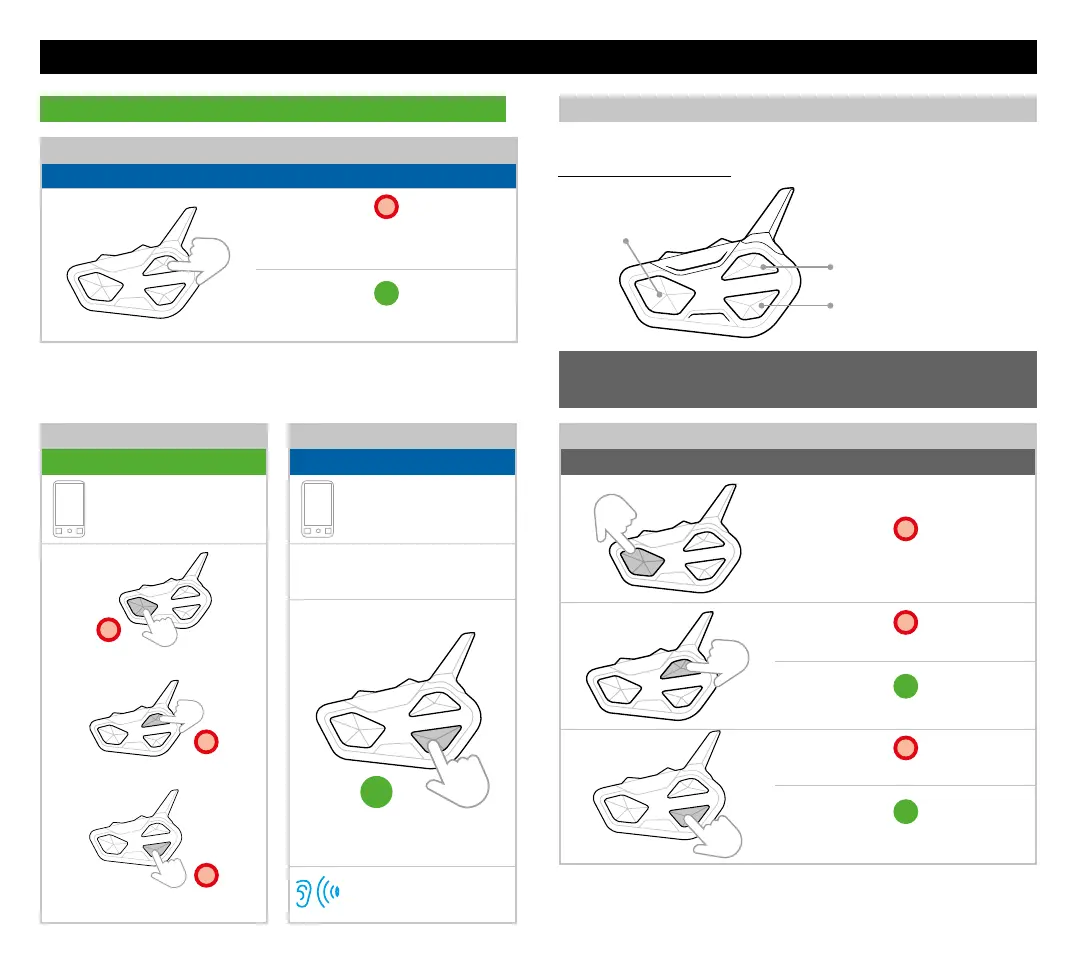
PHONE MODE
Seek radio station backward
TO ANSWER/END/REJECT A CALL
Status: all modes
x1
Press once any key
to answer/end a call
3”
Press for 3 sec, to reject a call
RADIO MODE
FUNCTION DESCRIPTION
MUSIC
Status: phone mode
Select Music App
x1
Press once Play/Pause
x1
Press once Next track
x1
Press once Previous track
FM Radio
On/Mute
Seek radio station forward
FM RADIO
Status: radio mode
x1
Press once On/Mute
x1
Press once station forward
3”
Press for 3 sec. memory forward
x1
Press once station backward
3”
Press for 3 sec. memory backward
Note: if your phone is paired with Vol-, press the Down button.
SHORTCUT: in Radio mode press twice the buttons for the
Intercom functionalities.
MUSIC SHARE
Status: all modes
Select Music App
Open Midland intercom
(manually or by VOX)
3”
Press for 3 sec.
Voice announcement
Press once the buttons:
Note: with FM radio mute, press once the Up or Down buttons to activate
the voice call.



 To Previous Page