EasyManua.ls Logo

Midland BTR1 ADVANCED - Phone Mode; Descrizione Funzioni

Midland BTR1 ADVANCED
8 pages
Print Icon
To Next Page IconTo Next Page
To Previous Page IconTo Previous Page
Loading...
OPERATING MODES
INTERCOM MODE
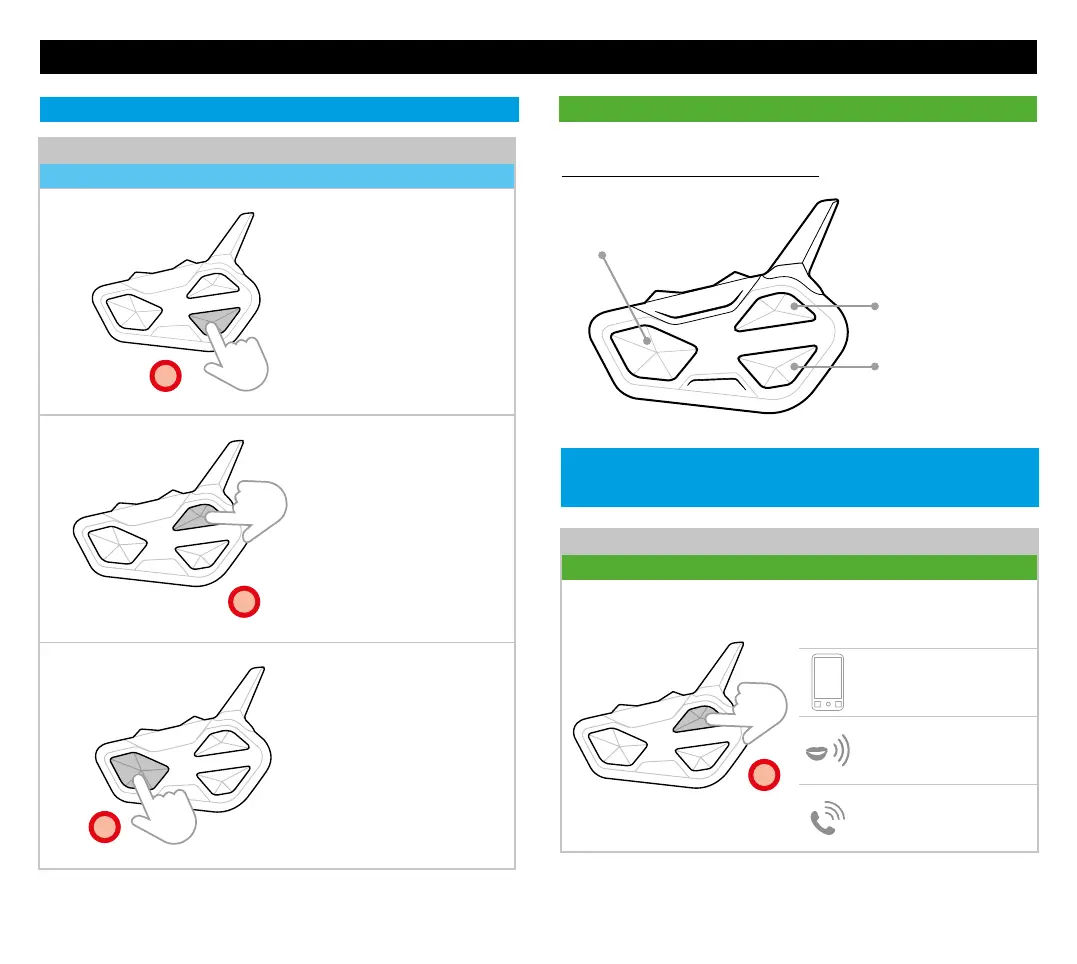
TO MAKE A CALL
Status: Phone mode (no audio active)
x1
Press once
Voice Assistant Response
(Google assistant, Siri)
Give instructions
Call
PHONE MODE
DESCRIZIONE FUNZIONI
Play/Pause
(Phone on Vol+)
Call
Answer
End
Next song
Note: if your phone is paired with Vol-, press the Down button.
(Phone on Vol-)
Call
Answer
End
Previous track
OPEN/CLOSE CONFERENCE
Status: Conference
x1
Press once opens/closes
Conference with the unit
paired to Down button
x1
Press once opens/closes
Conference with the unit
paired to Up button
x1
Press once opens
automatically Conference
to all paired units
Press once the buttons to activate:
SHORTCUT: in Phone mode press twice for the Intercom
functionalities.

Related product manuals