@~IDLAND
Model
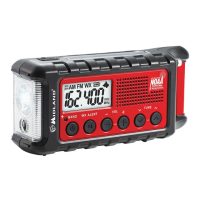
ER310
,
Using the Weather Radio Continued ...
Weather
Alert Function
•
To enable
the NOAA
Weather
Alert
function, press the
WX
ALERT
button.
•
When enabled, the
"WX"
icon
on
the LCD screen will flash.
•
When a weather
alert is received, the ER31
0 will
sound an
audible siren and the flashlight will flash on and off
along with the
LCD
backlight
for 1 minute.
·
• Within the first minute
of
an
alert being received, press any
button on the ER31
0
to
stop the siren and
flashlight.
The radio
will
switch to your selected weather
channel.
Weather Alert Memory Function
•
After the first minute
of
receiving a weather alert,
if
no
button is pressed, the
ER31
0 will
go into weather
alert
memory mode.
•
The WEATHER
MEMORY INDICATOR will flash
every 5
seconds indicating an alert
has been received within the last
hour.
•
When the
WX
ALERT
button is pressed, the radio
will
switch to your selected weather channel and clear the weather
alert
memory.
• Any other button pressed
will
have
normal
function and
will clear
the weather
alert memory.
Page
10
midlandusa.com









 To Next Page