Need help?
Do you have a question about the Midland ER10 and is the answer not in the manual?
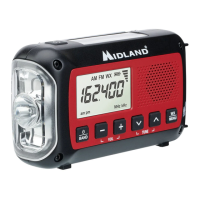
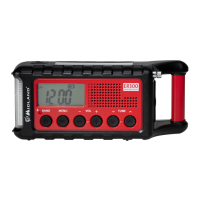
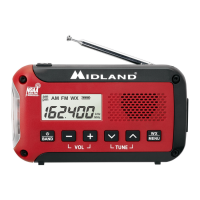
The Midland ER10 is an emergency alert weather radio designed to provide essential weather information and alerts, as well as general AM/FM radio reception. This portable device is built to be user-friendly and reliable in various situations, making it a valuable tool for staying informed during emergencies or for everyday listening.
The primary function of the Midland ER10 is to receive emergency weather alerts from NOAA (National Oceanic and Atmospheric Administration) and NWS (National Weather Service). It operates as an all-hazard alert broadcast receiver, covering most of the United States. When a weather alert is issued, the radio will sound an audible siren and its built-in flashlight will flash, ensuring users are promptly notified of potential dangers. This alert function can be enabled or disabled as needed, and the WX icon on the LCD screen will flash when alerts are active, or disappear when disabled in AM/FM mode.
Beyond weather alerts, the ER10 also functions as a standard AM/FM radio, allowing users to tune into their favorite stations for news, music, or other broadcasts. This dual functionality makes it a versatile device for both emergency preparedness and daily entertainment.
The ER10 is designed for straightforward operation with a clear LCD display and intuitive controls.
Power On/Off and Band Selection: To power on the radio, users press and hold the "BAND" button for three seconds. The same action powers off the radio. Once on, pressing the "BAND" button cycles through the available bands: AM, FM, and WX (weather). This allows for quick switching between different listening modes.
Volume Adjustment: Volume control is simple, with dedicated "+" and "-" buttons to increase or decrease the audio level. The volume bar indicator on the LCD provides a visual representation of the current volume setting.
Tuning Radio Stations: For AM and FM bands, users can tune to desired stations using the up and down arrow buttons. To enhance reception, especially for FM and WX bands, the telescopic antenna should be fully extended and rotated until the signal is clear. The radio also features an automatic scan function: pressing and holding the up or down arrow buttons will cause the radio to automatically scan to the next active station.
Weather Alert Activation: The weather alert function is activated by pressing the "WX MENU" button. When enabled, the WX icon on the LCD will flash. Upon receiving an alert, an audible siren will sound, and the flashlight will flash. Any button press will cancel an active alert. The alert function can be disabled by pressing the "WX MENU" button again, which will stop the WX icon from flashing (or make it disappear in AM/FM mode).
Menu Navigation: The radio includes a menu system for adjusting various settings. To access the menu, users press and hold the "WX MENU" button for three seconds. The up and down arrow buttons are used to toggle through menu settings, and the "WX MENU" button is pressed to go to the next menu option. If no buttons are pressed for 10 seconds, the menu will timeout, and settings will be saved.
Clock Setting: The clock can be set through the menu. Users press and hold "WX MENU" to enter the menu, then select either 24-hour or 12-hour clock mode. The up and down arrow buttons are used to adjust hours and minutes, with the "WX MENU" button used to confirm selections and move between hour and minute adjustments.
Weather Channel Display Options: The ER10 offers two display options for weather channels: channel number or frequency. This can be adjusted in the menu by navigating to the "ch" and "Fr" option using the "WX MENU" button and then using the up and down arrow buttons to make a selection.
Selecting Weather Channels: The radio has 7 NOAA/NWS weather channels. After selecting the WX band, users can use the up and down arrow buttons to select a specific weather channel for their area. Pressing and holding these buttons will scan to the next active channel, which is useful for finding the strongest signal.
Built-in LED Flashlight: A practical feature for emergencies, the ER10 includes a built-in LED flashlight. Pressing the dedicated flashlight button activates it in low power mode. Subsequent presses cycle through high power mode, an SOS strobe, and finally turns the flashlight off.
Battery Power: The ER10 is powered by 3 AA alkaline batteries. The LCD display includes a battery level indicator, showing 3 bars for full battery, 2 bars for 2/3 battery, 1 bar for 1/3 battery, and a flashing "no bar" icon when the battery is low. This allows users to monitor battery life and replace batteries before they run out.
Headphone Jack: A 3.5mm headphone jack is included, allowing for private listening without disturbing others. This is particularly useful in quiet environments or during emergencies when discretion is needed.
Antenna for Reception: For optimal reception, especially for FM and WX bands, the telescopic antenna should be fully extended and rotated. This simple adjustment helps improve signal clarity and ensures reliable access to broadcasts.
Durability and Warranty: The device comes with a one-year limited warranty covering defects in material or workmanship, excluding damage from water, battery leaks, abuse, or unauthorized accessories/service. This indicates a level of expected durability and manufacturer support.
The Midland ER10 is a comprehensive and user-friendly emergency weather radio that combines essential alert functions with everyday radio listening capabilities, making it a reliable companion for various situations.
 General
| Frequency Range | 162.400 - 162.550 MHz |
|---|---|
| Bands | NOAA Weather Band |
| NOAA Weather Scan + Alert | Yes |
| NOAA Channels | 7 |
| Display | LCD |
| Headphone Jack | Yes |
| Flashlight | Yes |
| USB Charging | Yes |
| Type | Emergency Weather Radio |
| Power Source | Hand Crank |

 To Next Page