EasyManua.ls Logo

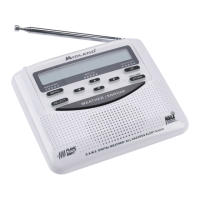
Midland WR120 - User Manual

Midland WR120
13 pages
Print Icon
To Next Page IconTo Next Page
Loading...
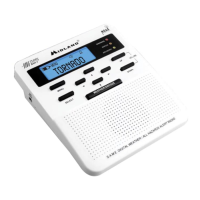
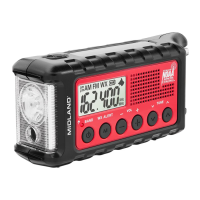
All Hazards Alert Weather Radio with S.A.M.E
:::0,'/$1'5$',2&20
WR120
Midland Radio Corporation
5900 Parretta Drive
Kansas City, MO 64120
Tel. (816) 241-8500
Owner’s Manual
Guide du propriétaire
Manual de instrucciones

Questions and Answers

  • K
    Kelly YoungJul 30, 2025
    What to do if Midland WR120 is not responding to weather alert broadcasts?
    • D
      David YoungJul 31, 2025
      If your Midland Weather Radio isn't picking up weather alerts, first ensure you've programmed the correct S.A.M.E. code(s). Also, verify that the broadcast tower nearest to you is currently active and transmitting alerts.
  • R
    reynoldsomarAug 8, 2025
    Why is there no sound coming from my Midland Weather Radio?
    • M
      Melanie ZimmermanAug 8, 2025
      If you're not getting any sound from your Midland Weather Radio, the first thing to check is the volume control. Make sure it's turned up to a level you can hear.
  • V
    Vanessa LeeAug 14, 2025
    How to fix no weather broadcast on Midland WR120?
    • J
      john87Aug 14, 2025
      If your Midland Weather Radio isn't playing weather broadcasts when you press the WEATHER/SNOOZE button, try these steps: 1. Extend the telescoping antenna fully. 2. If using an external antenna, check its connection. 3. Ensure the radio is set to the weather channel used in your area. 4. Contact the broadcasting station to confirm they are broadcasting. 5. If you're in a metal structure, move closer to a window. 6. If the signal is weak, consider using an external antenna.
  • D
    Dr. Victoria JonesAug 21, 2025
    How to troubleshoot a Midland WR120 Weather Radio with no power?
    • K
      katieheathAug 21, 2025
      If your Midland Weather Radio has no power, ensure the power adapter is securely plugged into the back of the radio and the wall outlet. Also, make sure batteries are installed to provide backup power in case of a power failure.

Summary

Setting Up Your Weather Radio

Set Time

Instructions on how to set the current time on the radio.

Set Alarm

Steps to configure the alarm function of the weather radio.

Locating Your S.A.M.E. Codes

S.A.M.E. (Specific Area Message Encoding) Codes

Explains the S.A.M.E. encoding system used for targeted alerts.

Set Location

User Notifications

Troubleshooting

No Power

Solutions for issues related to the radio not receiving power.

No Sound

Troubleshooting steps for when the radio produces no audio output.

No Weather Broadcast

Steps to diagnose why no weather broadcasts are received.

Alert Broadcast Responsiveness

How to resolve issues with alert reception or radio responsiveness.

Reception and Test Signals

Warranty and Service Information

Midland WR120 Specifications

General IconGeneral
TypeWeather Radio
SAME TechnologyYes
Public Alert CertifiedYes
AM/FM RadioNo
DisplayLCD
Weight1 lb
Channels7 NOAA Channels
AlarmYes
ClockYes
Power SourceAC Adapter, Battery

Related product manuals