EasyManua.ls Logo

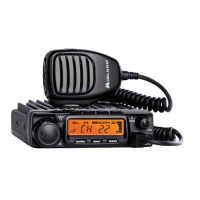
Midland MicroMobile MXT575 - User Manual

Midland MicroMobile MXT575
34 pages
Print Icon
To Next Page IconTo Next Page
Loading...
MXT575

Questions and Answers

  • K
    Karen RobinsonAug 6, 2025
    What to do if my Midland MicroMobile MXT575 Two-Way Radio cannot receive messages?
    • L
      Laura OnealAug 6, 2025
      To ensure proper communication, verify that both Midland Two-Way radios are set to the same channel and Privacy Code settings. Also, confirm that you are within the operational range of the other radio. Keep in mind that buildings and other structures can affect communication range.
  • J
    Jesus MillerAug 16, 2025
    How to fix Midland Two-Way Radio when it has no power?
    • D
      dennisgibsonAug 16, 2025
      If your Midland Two-Way Radio is not powering on, check the vehicle's power source (battery) and replace it if necessary. Also, check the input power connection and wiring to the vehicle's power source to ensure everything is properly connected.
  • L
    Louis JenkinsAug 26, 2025
    What to do if the keypad on my Midland Two-Way Radio is not responding?
    • L
      Lance JohnsAug 26, 2025
      If the keypad on your Midland Two-Way Radio is not responding, first ensure that the keypad 'lock' is not enabled. If it's not locked, try resetting the radio by turning it off and then back on.

Summary

Welcome and Key Features

Product Features Overview

Lists key features of the MXT575 GMRS 2-way radio, including power, channels, and special functions.

FCC Notice and Compliance

FCC Licensing and Operation Rules

Details FCC licensing requirements, rules, and compliance statements for the MXT575 radio.

Radio Frequency Exposure Guidelines

Explains safe practices and standards for human exposure to radio frequency energy emitted by the radio.

Installing Your Radio

Installation Preparation and Vehicle Compatibility

Outlines essential steps before installation, including checking vehicle polarity and gathering tools.

Mounting Bracket and Antenna Installation

Step-by-step instructions for attaching the radio's mounting bracket and installing the antenna.

Connecting Power, Microphone, and Speaker

Details connecting the radio to power, microphone, external speaker, and intercom for operation.

Controls and Indicators Overview

Microphone Controls and Features

Details the function of each button and control on the microphone.

Front Panel Connections

Explains the connection points located on the front of the MXT575 radio unit.

Rear Panel Connections

Details the connection jacks found on the rear of the MXT575 radio.

LCD Display Icons and Indicators

Explains the meaning of various icons and symbols displayed on the radio's LCD screen.

Operating Your Radio

Understanding Radio Range and Conditions

Discusses optimal conditions and tips for maximizing the operating range of the MXT575 radio.

Powering On;Off and Volume Adjustment

Guides on powering the radio on/off and adjusting the speaker volume.

Selecting Active Channels

Steps for choosing and switching between available GMRS channels for communication.

Transmitting and Receiving Calls

Explains the process of sending and receiving transmissions, including PTT button usage.

Utility Functions

Keypad Lock and Monitor Mode

How to lock the keypad and use monitor mode to check channel activity.

Scanning for Active Channels

Explains how to use the auto-scan feature to find active GMRS channels.

NOAA Weather Radio and Scan

Entering and Exiting Weather Scan

Guides on activating and deactivating the NOAA weather scan mode for receiving alerts.

Enabling and Disabling Weather Alerts

Procedures for setting up and turning off weather alert notifications from NOAA.

Menu Functions and Configuration

Selecting Privacy Codes (CTCSS;DCS)

Details how to select CTCSS or DCS privacy codes for clearer communication.

Transmit Power Level Settings

How to adjust the radio's transmit power between high and low settings.

Squelch Sensitivity and Roger Beep

How to adjust squelch sensitivity and enable/disable the roger beep function.

Call Alert Tones, Silent Operation, and Repeaters

Configuration options for call tones, silent mode, and enabling repeater channels.

Display Color and Channel Bandwidth

Customization options for LCD display color and selecting channel bandwidth.

Speaker Selection and Restoring Defaults

How to choose audio output speakers and restore factory default settings.

Care and Maintenance

Cleaning and Radio Care Instructions

Guidelines for cleaning and maintaining the MXT575 radio to ensure its longevity.

Troubleshooting Common Issues

Common Problems and Solutions

Lists common operational problems and their corresponding solutions for the MXT575 radio.

Specifications and Reference Charts

Technical Specifications Overview

Provides technical specifications of the MXT575 radio, including channels and frequencies.

Frequency and Privacy Code Charts

Lists of GMRS, repeater, WX band frequencies, and CTCSS/DCS privacy codes.

FCC Warnings and Statements

Important Warnings on Modifications and Operation

Important warnings regarding modifications, operation, and compliance with FCC regulations.

Limited Warranty Information

Warranty Terms and Claims Process

Details the warranty terms, exclusions, and claims process for the MXT575 radio.

Midland MicroMobile MXT575 Specifications

General IconGeneral
Package typeBox
Package depth76.2 mm
Package width254 mm
Package height340.36 mm
Package weight2267.96 g
Rated power50 W
Product typeSpeaker/microphone
CompatibilityMidland FRS/GMRS radios
Product colorBlack
Brand compatibilityMidland
Protection featuresWaterproof
Quantity1
Warranty period1 year(s)
Weight and Dimensions IconWeight and Dimensions
Depth177.8 mm
Width45.72 mm
Height139.7 mm
Weight1360.77 g

Related product manuals