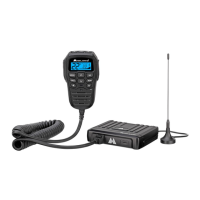
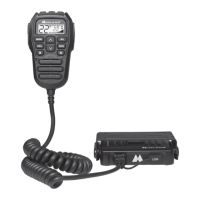
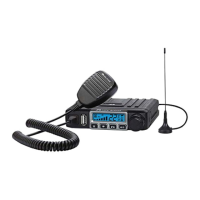
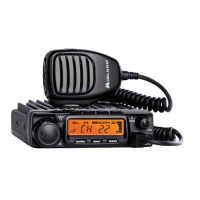
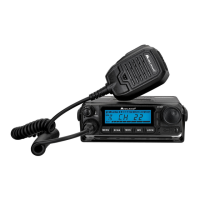
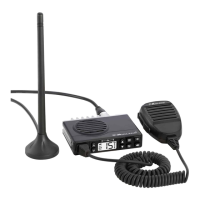
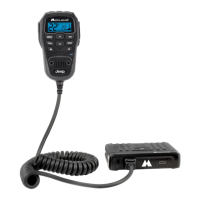
The Midland MXT275 MicroMobile is a GMRS (General Mobile Radio Service) 2-way radio designed for reliable and trouble-free performance. This compact unit offers state-of-the-art high-tech engineering, making it a quality piece of electronic equipment constructed with fine components and solid-state circuitry mounted on a rugged printed circuit board.
Function Description:
The MXT275 serves as a GMRS 2-way radio, allowing users to communicate over designated GMRS frequencies. It features 15 GMRS channels, 10 NOAA Weather Channels, and 8 Repeater Channels, expanding its communication capabilities. The radio supports 142 Privacy Codes (38 CTCSS and 104 DCS) to enable multiple users to share the same channel without interference. A Monitor Function allows users to check for activity on the current active channel and adjust volume when no signal is being received. The device also includes a Keypad Lock to prevent accidental setting changes and offers both High and Low transmit power settings for optimal range management. For connectivity, it features an external speaker jack and a USB-C port.
Usage Features:
The radio is designed for easy installation in any 12-volt, negative ground system vehicle. It comes with a "magnetic mount" antenna for flexible placement on a vehicle's roof, trunk, or similar location, with guidelines provided for optimal antenna performance and cable routing. The power cord includes a cigarette lighter adapter for simple plug-and-play installation, or it can be hard-wired into the vehicle's electrical system. An RJ45 connector is used for the microphone, which also has a mounting bracket for convenient placement.
Operating the MXT275 is straightforward. To power on/off, users press and hold the Power Button on the microphone. Channels are selected using the Channel Up and Down buttons. Volume is adjusted with dedicated Volume Up and Down buttons. Transmitting a call involves pressing and holding the PTT (Push-to-Talk) button and speaking into the microphone, while releasing it allows for receiving calls. The LCD display provides clear indicators for the active channel, transmit/receive status (TX/RX icons), repeater channel status (RP icon), privacy code type (CTCSS/DCS icons), transmit power level (H/L icons), scan function (Scanning icon), keypad lock status (Key Lock icon), NOAA Weather Band mode (NOAA Weather Band icon), monitor mode (Monitor icon), and signal strength.
The MXT275 includes several utility functions accessible via the MENU button. Users can lock the keypad by pressing and holding the Lock button for three seconds, preventing accidental changes to radio settings while keeping PTT, Volume, and Call buttons active. The Monitor Mode allows checking for channel activity and adjusting volume. The "auto-scan" mode continuously scans all 15 available channels for activity, pausing on active ones.
The NOAA Weather Radio function enables reception of weather reports from designated NOAA stations, and a NOAA Weather Scan function scans all 10 weather channels to find the strongest signal in the area. Users can manually set a weather channel or enable a Weather Alert, which sounds a siren when an alert is broadcast, automatically switching the radio to the assigned weather channel.
Menu mode functions offer further customization. Users can select Privacy Codes (CTCSS or DCS) for each channel to ensure private communication. Transmit (TX) Power Level can be set to High or Low, with channels 1-7 restricted to Low power due to regulations. Squelch Sensitivity is adjustable from 01 (most sensitive) to 09 (least sensitive) to control when the squelch opens. The Roger Beep feature, when activated, emits a tone when the PTT button is released, signaling the end of transmission. A Call Alert Tone can be selected from 5 options. Silent Operation mode disables all audible "beeps" and "tones." Repeater Channels can be activated to extend range, and the LCD Display Background Color can be chosen from 7 different options. The output speaker can also be selected, allowing users to choose between the handheld speaker, radio base speaker, or both.
Maintenance Features:
For care and maintenance, the MXT275 should be cleaned with a soft cloth moistened with water. Alcohol or cleaning solutions should not be used, and the radio should not be immersed in water. If the radio gets wet, it should be dried with a lint-free cloth. A troubleshooting guide is provided to help resolve common operational problems, such as no power, inability to receive messages, unresponsive keypad, or dim display backlight. The radio's default settings can be restored by simultaneously pressing and holding the PTT and Weather buttons while turning the radio on, which clears all user settings.


 To Next Page
 General