EasyManua.ls Logo

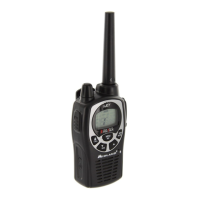
Midland X-TRA TALK GXT Series - User Manual

Midland X-TRA TALK GXT Series
64 pages
Print Icon
To Next Page IconTo Next Page
Loading...
-IDLAND
Je.TRA
TALK GXT1000/1030/1040/1050/1191
SERIES
GXT
SERIES midlandusa.com

Questions and Answers

  • D
    Donna JohnsonAug 5, 2025
    What to do if my Midland X-TRA TALK GXT has no power?
    • P
      Perry RiveraAug 5, 2025
      If your Midland Radio has no power, first check the vehicle power source (battery) and replace it if needed. Also, check the input power connection and/or wires to the vehicle power source to ensure they are properly connected.
  • C
    christinejohnsonAug 15, 2025
    Why can't I receive messages on my Midland X-TRA TALK GXT Radio?
    • M
      Meredith SmithAug 15, 2025
      If you cannot receive messages on your Midland Radio, verify that both radios have the same channel selection and Privacy Code settings. Also, make sure you are within range of the other radio. Buildings and other structures can affect communication range.
  • S
    Stephanie JordanAug 25, 2025
    What to do if the Midland X-TRA TALK GXT keypad is not responding?
    • B
      Barbara BurnettAug 25, 2025
      If the keypad on your Midland Radio is not responding, ensure that the keypad 'lock' is not activated. If it is not, reset the radio by turning it off and then back on.

Midland X-TRA TALK GXT Series Specifications

General IconGeneral
Power OutputUp to 5 watts (GMRS channels)
NOAA Weather ScanYes
Channel ScanYes
Keypad LockYes
Hi/Lo Power SettingsYes
Monitor FunctionYes
Auto SquelchYes
Call AlertYes
Whisper ModeYes
Direct CallYes
Backlit DisplayYes
Number of Channels22 channels
RangeUp to 36 miles (in optimal conditions)
Weather AlertsYes
Power SourceRechargeable battery pack
SOS SirenYes
Weather ChannelsNOAA channels
Vibrate AlertYes
VOXYes

Related product manuals