CHARGING AND USE OF THE LI-PO BATTERY
1. Check that the battery is in perfect condition before charging. If the battery appears damaged
you do not charge it to avoid damage or injuries.
2. Always use the original charger to recharge the battery. Using a non-matching charger could
cause irreversible damage to the battery and cause an accident.
3. When charging, if the charge connector is overheating, this means an excessive load and this
can cause permanent damage to the battery. Please stop charging immediately if this happens.
4. Do not leave the battery unattended while charging and do not leave load near flammable
material or in a vehicle.
5. When the drone has just finished flight, the battery temperature is higher, it is preferable to wait
for 30 minutes, and charge the lithium battery when cooled, otherwise it may damage the battery.
6. Do not short-circuit the battery polarity when connecting the charger.
7. Do not expose the battery to excessive heat, never throw it into the fire to avoid any risk of
explosion.
8. Do not dispose of the battery in domestic waste but bring it to a collection point for recycling,
please check with your local authorities about it.
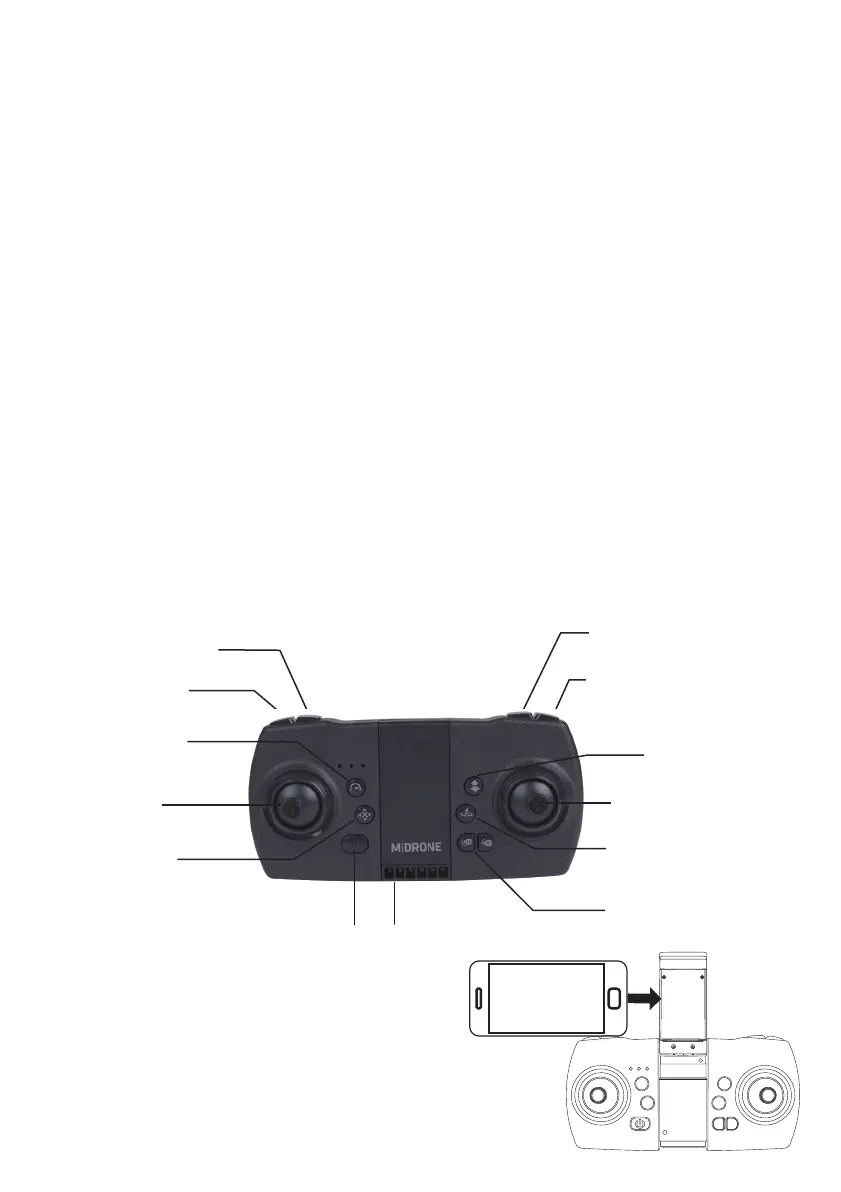
DESCRIPTION OF THE REMOTE CONTROL
The supplied remote lets you control the drone to a distance of about 50 meters. We recommend
that you familiarize yourself with the buttons of the remote before you start using the drone.
Extend the support located in the middle of the
remote control to insert the phone. The support
closes automatically.
Mounting the phone on the remote control
- Do not fly your aircraft over public areas in built-up areas.
- Do not fly your aircraft near airfields.
- Do not fly over sensitive or protected sites: nuclear power plants, military land, natural reserves...
- Respect the privacy of others, by not broadcasting the shots without the agreement of the persons
concerned, and by not making any commercial use of them.
- Check under which conditions you are insured for this activity.
In case of doubt, contact the Direction Générale de l'Aviation Civile (DGAC).
Photo
Video
Auto take-off
Auto landing
ON/OFF
Speed selection
Micro adjustments
Left joystick
(elevation and rotation)
Left joystick
(flight forward, backward, left,
right)
360° Flip
Make sure the drone is at a minimum
height of 3 meters before activating
this function
Headless mode
Automatic return
Camera angle
adjustment



 To Next Page